
1. Introduction
Thank you for choosing the Sencor SES 9350CH Automatic Espresso/Cappuccino Machine. This manual provides essential information for the safe and efficient use, maintenance, and troubleshooting of your new appliance. Please read these instructions carefully before first use and keep them for future reference.
2. Safety Instructions
Always observe basic safety precautions when using electrical appliances to reduce the risk of fire, electric shock, and injury.
- Ensure the voltage indicated on the appliance corresponds to your local mains voltage before connecting.
- Do not immerse the appliance, power cord, or plug in water or any other liquid.
- Keep the appliance out of reach of children.
- Do not operate the appliance if the power cord or plug is damaged, or if the appliance malfunctions or has been damaged in any way.
- Always place the appliance on a stable, flat, heat-resistant surface, away from hot surfaces or open flames.
- Exercise caution when handling hot components and steam.
- Unplug the appliance from the mains socket before cleaning and when not in use.
- Only use accessories recommended by the manufacturer.
3. Product Overview
Familiarize yourself with the main components of your Sencor SES 9350CH machine.

Figure 3.1: Front view of the Sencor SES 9350CH Automatic Espresso/Cappuccino Machine, showing the color LCD display, coffee spout, and integrated milk system.
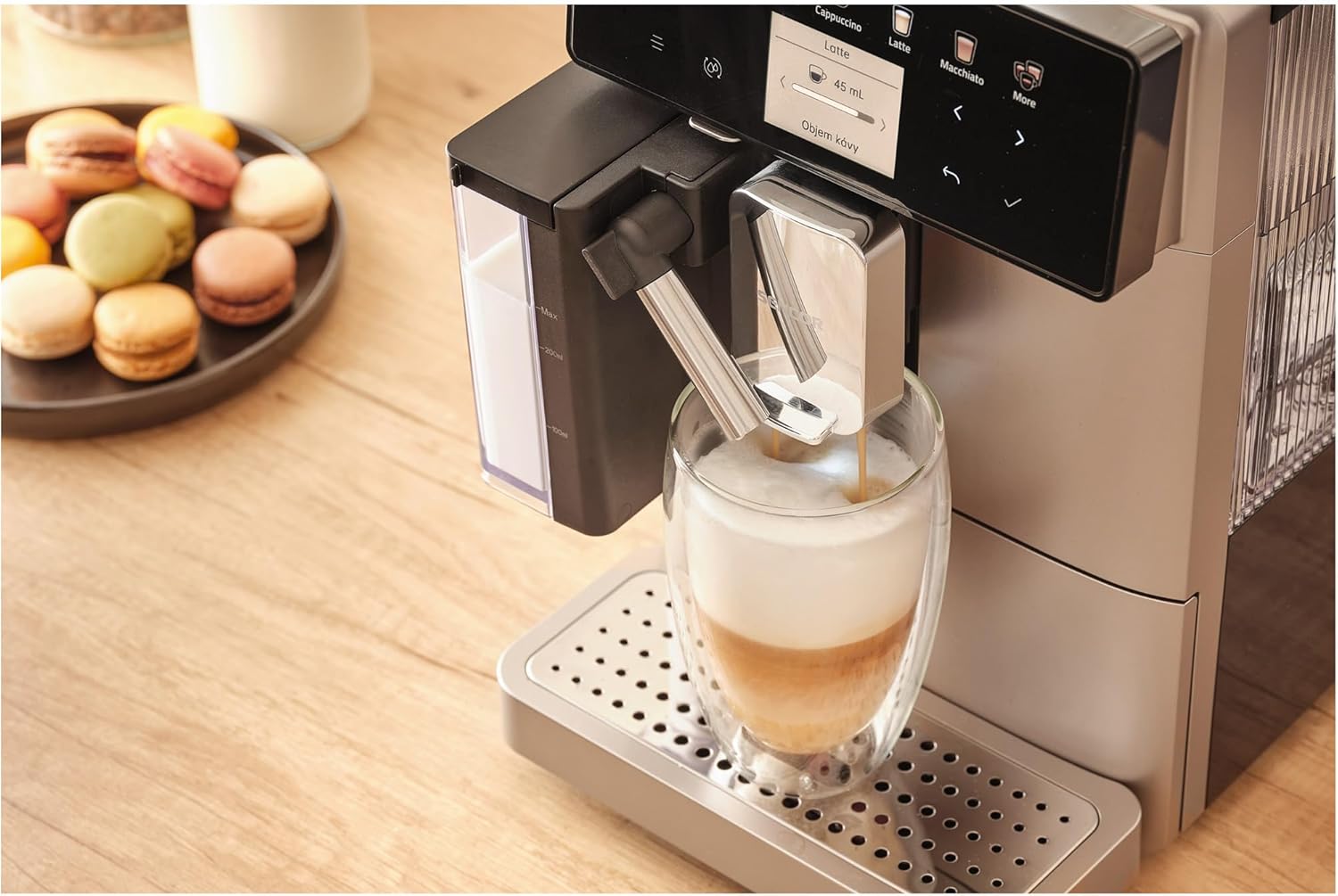
Figure 3.2: Close-up view of the EasyLatte milk system and adjustable coffee spout, demonstrating milk frothing directly into a glass.
Key Components:
- Color LCD Display: Intuitive interface for beverage selection and machine status.
- Coffee Bean Hopper: Located at the top, for whole coffee beans (200g capacity).
- Water Tank: Removable, 1.3-liter capacity, typically located at the side or back.
- EasyLatte Milk System: Integrated milk container (300ml) for automatic milk frothing.
- Coffee Spout: Adjustable height to accommodate various cup sizes.
- Ground Coffee Chute: For using pre-ground coffee.
- Drip Tray: Collects excess liquid, removable for cleaning.
- Coffee Grounds Container: Collects used coffee pucks, removable for emptying.
4. Setup
4.1 First Use Preparation
- Unpacking: Carefully remove the machine from its packaging. Remove all protective films and packaging materials.
- Placement: Place the machine on a stable, level surface. Ensure adequate ventilation around the appliance.
- Clean Components: Wash the water tank, milk container, and drip tray with warm water and a mild detergent. Rinse thoroughly and dry.
- Fill Water Tank: Fill the removable 1.3-liter water tank with fresh, cold tap water up to the MAX level. Reinsert it securely.
- Fill Bean Hopper: Open the lid of the coffee bean hopper and fill it with fresh whole coffee beans (up to 200g). Close the lid.
- Connect Power: Plug the power cord into a grounded wall socket.
4.2 Initial Rinse Cycle
Upon first power-on, the machine will guide you through an initial rinse cycle to prime the system and clean internal components. Follow the instructions on the color LCD display.
5. Operating Instructions
The Sencor SES 9350CH offers a wide range of 15 beverages and intuitive controls via its color LCD display.
5.1 Making Espresso or Coffee
- Ensure the water tank is filled and the bean hopper contains coffee beans.
- Place a cup under the coffee spout. Adjust the spout height if necessary.
- On the LCD display, select your desired beverage (e.g., "Espresso" or "Coffee").
- You can adjust coffee strength and volume using the on-screen options. The machine also features a coffee cup size memory function.
- Press the "Start" button (often indicated by a play icon or a specific beverage button) to begin brewing.
- The machine will grind the beans, pre-brew (for fuller flavor), and dispense the coffee.
5.2 Preparing Milk-Based Beverages (e.g., Cappuccino, Latte)
- Fill the 300ml EasyLatte milk container with fresh, cold milk. Attach it securely to the machine.
- Place a suitable cup or glass under the coffee and milk spouts.
- Select your desired milk-based beverage (e.g., "Cappuccino," "Latte," "Macchiato") from the LCD display.
- The machine will automatically froth the milk and dispense it, followed by the coffee, creating a layered drink.
- After preparing milk-based drinks, the machine may prompt for a quick milk system rinse. Follow the on-screen instructions.
5.3 Using Ground Coffee
If you prefer to use pre-ground coffee, follow these steps:
- Ensure the machine is on and ready.
- Open the lid of the ground coffee chute (usually located near the bean hopper).
- Add one scoop of pre-ground coffee (do not overfill).
- Select the "Ground Coffee" option on the display, then choose your desired beverage.
- Press "Start" to brew.
5.4 Hot Water Function
For tea or Americano, select the "Hot Water" function on the display. Place a cup under the hot water spout and press "Start."
6. Maintenance
Regular cleaning and maintenance ensure optimal performance and longevity of your Sencor SES 9350CH.
6.1 Daily Cleaning
- Drip Tray and Coffee Grounds Container: Empty and rinse daily. The machine will signal when the grounds container needs emptying.
- Milk System: After each milk-based beverage, perform the quick rinse cycle. For thorough cleaning, disassemble the milk container and rinse all parts with warm water.
- Exterior: Wipe the machine's exterior with a soft, damp cloth.
6.2 Weekly/Bi-Weekly Cleaning
- Brewing Unit: The integrated professional brewing unit is typically self-cleaning or easily removable for rinsing under tap water. Refer to the on-screen instructions for specific guidance.
- Water Tank: Rinse the water tank thoroughly.
6.3 Descaling
The machine features an indicator and a dedicated descaling program. When prompted by the "Descaling Indicator," follow the on-screen instructions to perform the descaling process using a suitable descaling solution (not included). Regular descaling is crucial for preventing mineral buildup and maintaining machine performance.

Figure 6.1: Side view of the Sencor SES 9350CH, illustrating its compact design and access points for maintenance.
7. Troubleshooting
This section addresses common issues you might encounter with your Sencor SES 9350CH machine.
| Problem | Possible Cause | Solution |
|---|---|---|
| No coffee dispensed. | Water tank empty; machine not primed; brewing unit blocked. | Fill water tank; perform initial rinse cycle; clean brewing unit. |
| Coffee is too weak/strong. | Incorrect grind setting; insufficient coffee dosage; wrong beverage selection. | Adjust grind setting (9 levels available); increase coffee dosage via display; select appropriate beverage. |
| Milk not frothing correctly. | Milk system dirty; milk type/temperature incorrect; milk container not properly attached. | Clean milk system thoroughly; use fresh, cold, full-fat milk; ensure milk container is securely attached. |
| "Descaling" message appears. | Machine requires descaling. | Perform the descaling program as instructed on the display. |
| Machine displays an error code. | Specific internal issue. | Refer to the full instruction manual for a list of error codes and their solutions. If the problem persists, contact customer support. |
8. Specifications
| Brand | SENCOR |
| Model Number | SES 9350CH |
| Color | Black |
| Product Dimensions (W x D x H) | 21.5 x 34 x 45.5 cm |
| Water Tank Capacity | 1.3 Liters |
| Coffee Bean Hopper Capacity | 200g |
| Power | 1400 Watts |
| Voltage | 240 Volts |
| Pump Pressure | 19 Bar |
| Item Weight | 9.5 Kilograms |
| Special Feature | Compact design, Portable |
| Components Included | Instruction manual |
9. Warranty and Support
For detailed warranty information and customer support, please refer to the warranty card included with your product or contact Sencor customer service. Keep your proof of purchase for any warranty claims.


