
1. Introduction
The Life Fitness T5 Treadmill with Go Console is designed to provide an effective and comfortable workout experience. It features a FlexDeck Select Shock Absorption system, heart rate monitoring, and a user-friendly Go Console with various pre-programmed workouts. This manual provides essential information for the safe and efficient operation, setup, and maintenance of your treadmill.
2. Important Safety Information
Before operating the treadmill, please read and understand all safety instructions. Failure to do so may result in injury or damage to the equipment.
- Always consult with a physician before starting any new exercise program.
- Keep children and pets away from the treadmill during operation.
- Place the treadmill on a solid, level surface with adequate clearance around it.
- Wear appropriate athletic footwear and clothing.
- Do not operate the treadmill if it is damaged or malfunctioning.
- Use the safety stop key at all times. Attach the clip to your clothing before starting your workout.
- Do not step on or off the treadmill while the belt is moving.
- Hold the handrails for support, especially when starting or stopping the treadmill, or adjusting speed/incline.
- Unplug the treadmill from the power source when not in use or before cleaning/maintenance.
3. Setup and Assembly
The Life Fitness T5 Treadmill with Go Console is designed for minimal assembly. Please ensure you have adequate space and the correct power source before beginning.
3.1 Unpacking and Placement
Carefully remove all components from the packaging. This treadmill does not require assembly. Place the treadmill on a firm, level surface. Ensure there is at least 2 meters (6.5 feet) of clear space behind the treadmill and 0.5 meters (1.6 feet) on each side for safe operation and access.
3.2 Power Connection
Connect the treadmill to a grounded electrical outlet using the provided power cord. The treadmill operates on a standard corded electric power source. Ensure the power switch is in the OFF position before plugging in.
3.3 Included Components Overview
Your treadmill package includes the following main components:
- Treadmill Base
- Go Console with Blue LCD Screen
- Control Panel
- Ergobar
- Integrated Accessory Tray
- 2 Removable Dishwasher-Safe Cup Holders
- Hand Sensors for Heart Rate Monitoring
- Smartphone/Tablet Holder (also serves as a reading rack)
- User Manuals and Warranty Documentation
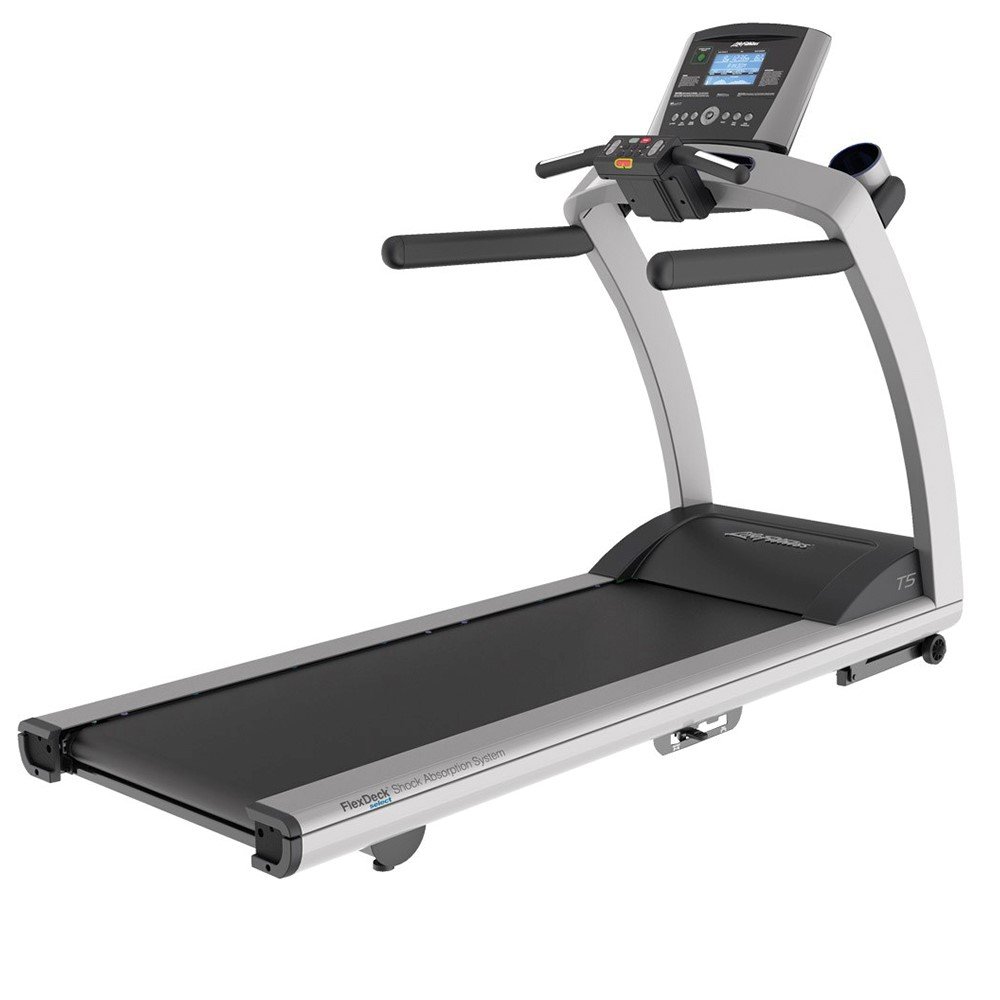
Image 1: Life Fitness T5 Treadmill with Go Console. This image shows the complete treadmill unit, including the base, running deck, and the Go Console with its display and controls.
4. Operating Instructions
Familiarize yourself with the Go Console and its functions before beginning your workout.
4.1 Go Console Overview
The Go Console features an intuitive design with an energy-saving capability and a blue, custom-etched LCD screen. It displays key workout metrics and allows access to various programs.
- Display Metrics: The LCD screen shows Resistance Levels, Time, Speed, Distance, Heart Rate, and Calories Burned.
- Workout Programs: The console includes 12 pre-programmed workouts, 2 custom workouts, and supports 2 user profiles.
- Quick Start Button: This button remembers your preferred walk, jog, or run speed for quick access to your favorite settings.
4.2 Starting a Workout
- Ensure the treadmill is plugged in and the power switch is ON.
- Attach the safety stop key clip to your clothing.
- Step onto the treadmill, placing your feet on the side rails.
- Press the Quick Start button to begin a manual workout at your saved speed, or select a pre-programmed workout from the console.
- The belt will start moving at a low speed. Begin walking and gradually increase speed as desired.
4.3 Adjusting Speed and Incline
- Speed: Use the speed control buttons on the console to increase or decrease the belt speed. The minimum speed is 0.5 mph, and the maximum speed is 12 mph.
- Incline: Use the incline control buttons to adjust the running surface angle. The treadmill offers 3 different incline positions, with an increment of 0.5 percent.
4.4 Heart Rate Monitoring
The treadmill is equipped with hand sensors and a wireless telemetry system for heart rate monitoring. To use the hand sensors, grip them firmly with both hands during your workout. Your heart rate will be displayed on the Go Console screen.
4.5 FlexDeck Select Shock Absorption System
The FlexDeck Select system allows you to choose from 3 kinds of running surface firmness to customize your workout comfort and impact reduction.
4.6 Ending a Workout
To end your workout, press the STOP button on the console. The treadmill belt will gradually slow down and stop. Alternatively, pull the safety stop key to immediately stop the treadmill in an emergency.
5. Maintenance
Regular maintenance ensures the longevity and optimal performance of your Life Fitness T5 Treadmill.
5.1 Cleaning
- Always unplug the treadmill before cleaning.
- Wipe down the console and exterior surfaces with a damp cloth and mild soap. Avoid abrasive cleaners or solvents.
- Regularly clean the running deck and belt to prevent dust and debris buildup.
- The cup holders are removable and dishwasher-safe for easy cleaning.
5.2 Inspection
- Periodically inspect the power cord for any damage.
- Check the running belt for signs of wear or fraying.
- Ensure all visible bolts and screws are tight.
5.3 Lubrication
Refer to the separate lubrication guide or contact customer support for specific instructions on running belt lubrication, if required. Over-lubrication can damage the treadmill.
6. Troubleshooting
This section addresses common issues you might encounter with your treadmill. For problems not listed here, please contact customer support.
6.1 Treadmill Does Not Power On
- Ensure the power cord is securely plugged into a grounded outlet and the treadmill.
- Check that the power switch on the treadmill is in the ON position.
- Verify the circuit breaker in your home has not tripped.
6.2 Running Belt Stops or Hesitates
- Ensure the safety stop key is fully engaged.
- Check if the maximum user weight (400 lbs) is exceeded.
- The running belt may require lubrication or adjustment. Refer to the maintenance section or contact support.
6.3 Inaccurate Heart Rate Reading
- Ensure your hands are firmly gripping the hand sensors.
- Moisture or dry skin can affect readings; ensure hands are clean and slightly moist.
- Interference from other electronic devices may occur.
7. Specifications
| Feature | Specification |
|---|---|
| Product Dimensions (Base Unit) | 79.5 in L x 32 in W x 61 in H (201.93 cm L x 81.28 cm W x 154.94 cm H) |
| Control Panel Dimensions | 23 in x 20 in x 6 in |
| Assembled Weight | 349.5 lbs |
| Running Surface | 60 in x 22 in |
| Motor System | 3.0 HP (6.0 HP Peak) DC Motor with MagnaDrive Controller |
| Minimum Speed | 0.5 mph |
| Maximum Speed | 12 mph |
| Incline Increment | 0.5% |
| Maximum User Weight | 400 lbs |
| Power Source | Corded Electric |
| Display Type | Blue LCD |
| Frame Material | Alloy Steel |
| Number of Programs | 12 Pre-programmed, 2 Custom |
| Special Features | Heart Rate Monitor, FlexDeck Select System, Quick Start Button, Smartphone/Tablet Holder |
8. Warranty and Support
Life Fitness provides comprehensive warranty coverage for the T5 Treadmill with Go Console:
- Frame: Lifetime Warranty
- Drive Motor: 10 Years Warranty
- Parts: 7 Years Warranty
- Console: 3 Years Warranty
- Labor: 1 Year Warranty
For technical support, service, or warranty claims, please contact Life Fitness customer service. Refer to the warranty documentation included with your product for detailed terms and conditions.


