
Amazon Basics BSK30BK
Amazon Basics Portable Wireless, 2.1 Bluetooth Speaker (Model BSK30BK)
Instruction Manual
Introduction
Thank you for purchasing the Amazon Basics Portable Wireless, 2.1 Bluetooth Speaker. This manual provides important information regarding the setup, operation, maintenance, and troubleshooting of your new speaker. Please read it thoroughly before use and retain it for future reference.
Product Overview
The Amazon Basics Portable Wireless, 2.1 Bluetooth Speaker offers high-quality sound with a portable design. It features Bluetooth connectivity for wireless audio streaming, a 3.5mm aux-in jack for wired connections, and a built-in microphone for hands-free calling.
Package Contents
- Amazon Basics Portable Wireless, 2.1 Bluetooth Speaker
- USB Charging Cable
- Instruction Manual
Speaker Components
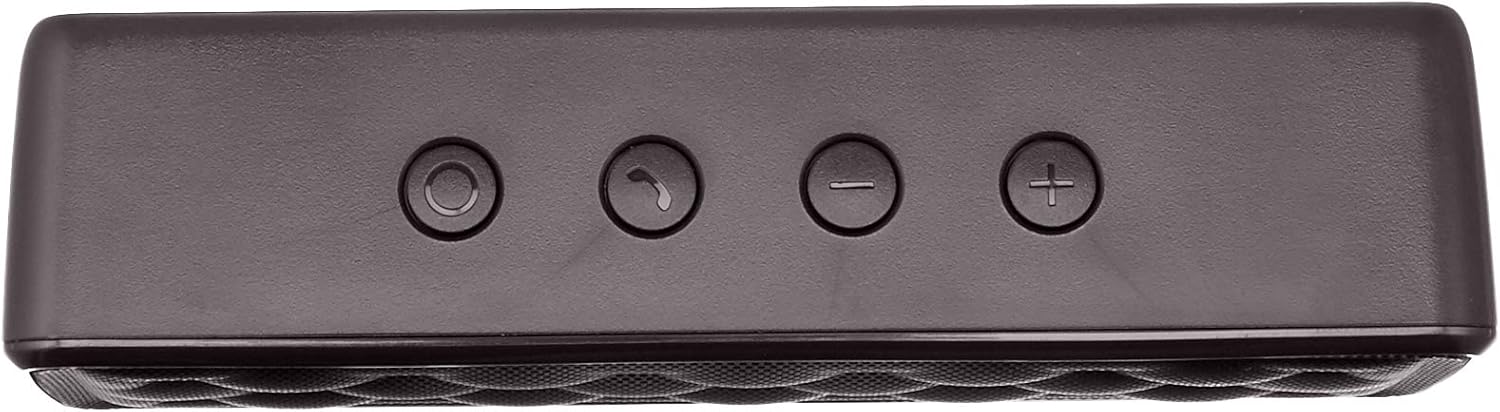


Setup
1. Charging the Speaker
Before first use, fully charge the speaker. Connect the supplied USB charging cable to the Micro USB port on the speaker and the other end to a USB power source (e.g., computer USB port, USB wall adapter). The charging indicator light will illuminate during charging and turn off when fully charged. A full charge takes approximately 3 hours.
2. Powering On/Off
To power on the speaker, slide the ON/OFF switch located on the rear panel to the "ON" position. To power off, slide the switch to the "OFF" position.
Operating Instructions
Bluetooth Pairing
- Ensure the speaker is powered on and within 33 feet (10 meters) of your Bluetooth-enabled device.
- The speaker will automatically enter pairing mode, indicated by a flashing blue LED light.
- On your device, go to Bluetooth settings and search for available devices.
- Select "Amazon Basics Speaker" from the list.
- Once paired, the blue LED light will stop flashing and remain solid. You can now stream audio wirelessly.
Note: If pairing fails, turn off the speaker and your device's Bluetooth, then repeat the steps. The speaker will attempt to reconnect to the last paired device automatically when powered on.
Audio Playback
- Volume Control: Use the '+' and '-' buttons on the top panel of the speaker to adjust the volume. You can also control the volume from your connected device.
- Play/Pause: Use the controls on your connected device to play or pause audio.
Hands-Free Calling
When connected via Bluetooth, the speaker's built-in microphone allows for hands-free calling.
- Answer/End Call: Press the Call/Bluetooth button once to answer an incoming call or end an ongoing call.
- Reject Call: Press and hold the Call/Bluetooth button for 2 seconds to reject an incoming call.
- Redial: Double-press the Call/Bluetooth button to redial the last number.
AUX Input Mode
To connect non-Bluetooth audio devices, use the 3.5mm AUX input jack on the rear panel. Connect one end of a 3.5mm audio cable (not included) to the speaker's AUX port and the other end to your audio device's headphone jack. The speaker will automatically switch to AUX mode when a cable is inserted.

Maintenance
- Clean the speaker with a soft, dry cloth. Do not use abrasive cleaners or solvents.
- Avoid exposing the speaker to extreme temperatures, humidity, or direct sunlight.
- Do not immerse the speaker in water. It is not waterproof.
- Store the speaker in a cool, dry place when not in use for extended periods.
Troubleshooting
| Problem | Possible Cause | Solution |
|---|---|---|
| Speaker does not power on. | Battery is depleted. | Charge the speaker using the supplied USB cable. |
| Cannot pair via Bluetooth. | Bluetooth is off on your device; speaker is out of range; speaker is already paired to another device. | Ensure Bluetooth is enabled on your device. Move the speaker closer to your device (within 33 feet). Disconnect from other devices or restart the speaker to enter pairing mode. |
| No sound or low volume. | Volume is too low on speaker or device; incorrect input mode. | Increase volume on both the speaker and your connected device. Ensure the correct input mode (Bluetooth or AUX) is active. |
| Sound distortion. | Volume is too high; speaker is too far from the device. | Reduce the volume on the speaker and/or your device. Move the speaker closer to your device. |
Specifications
| Model Name | BSK30BK |
| Connectivity Technology | Bluetooth, Auxiliary |
| Wireless Range | Up to 33 feet (10 meters) |
| Speaker Output Power | 2 x 2.5 Watts (5 Watts total) |
| Battery Life | Up to 8 hours (on a full charge) |
| Charging Time | Approximately 3 hours |
| Dimensions (L x W x H) | 6.3" x 1.5" x 2.6" (16 cm x 3.8 cm x 6.6 cm) |
| Weight | 8.1 ounces (0.23 kg) |
| Built-in Microphone | Yes |
| Waterproof | No |
Warranty Information
This product is covered by a Limited Warranty. For detailed information regarding warranty terms and conditions, please refer to the documentation included with your purchase or visit the Amazon Basics official website.
Customer Support
For further assistance, troubleshooting, or product information, please visit the Amazon Basics support page or contact customer service through your Amazon account.
Important Safety Information
- Do not disassemble, repair, or modify the product.
- Keep the product away from water and high humidity.
- Avoid prolonged exposure to direct sunlight or extreme heat.
- Do not drop or subject the product to strong impacts.
- Dispose of the product and its battery responsibly according to local regulations.
Product Videos
No official instructional videos from the seller are available for this product at this time.
Related documentsBSK30BK


Ask a question about this manual
Ask about setup, troubleshooting, compatibility, parts, safety, or missing instructions. Manuals+ will review the question and use this page’s manual context to help answer it.