1. Introduction
This manual provides detailed instructions for the installation, operation, and maintenance of the SANWA JLF-H Joystick Wiring Harness. This harness is designed to facilitate the connection of SANWA JLF series joysticks to compatible gaming devices, ensuring proper signal transmission for directional and button inputs. Please read this manual thoroughly before installation to ensure correct setup and optimal performance.
2. Product Overview
The SANWA JLF-H Wiring Harness is a crucial component for integrating SANWA JLF series joysticks into custom arcade setups or fight sticks. It features a Molex connector designed to interface directly with the joystick's PCB and individual wires for connecting to a control board or encoder. The harness simplifies the wiring process, providing a reliable and organized connection for joystick inputs.
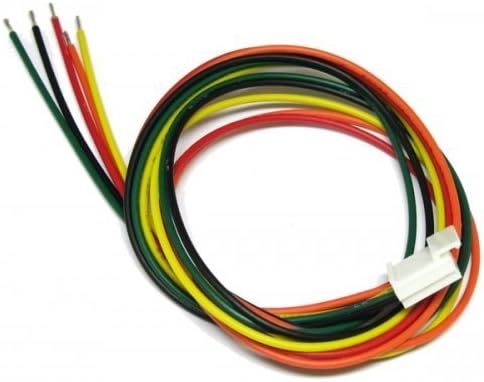
Figure 1: SANWA JLF-H Joystick Wiring Harness. This image shows the coiled wiring harness with a white Molex connector on one end and individual colored wires on the other, ready for connection.
3. Setup and Installation
Proper installation of the JLF-H wiring harness is essential for correct joystick functionality. Follow these steps carefully:
- Identify Components: Ensure you have your SANWA JLF series joystick, the JLF-H wiring harness, and your control board/encoder.
- Connect to Joystick: Locate the 5-pin connector port on the SANWA JLF joystick's PCB. Carefully align the white Molex connector of the JLF-H harness with this port and push it firmly until it clicks into place. Ensure the connector is oriented correctly to avoid bending pins.
- Wire to Control Board/Encoder: The individual wires from the harness need to be connected to your control board or encoder. Refer to the wiring guide below for standard color assignments. Each wire corresponds to a specific direction (Up, Down, Left, Right) and ground.
- Secure Connections: Once all wires are connected, ensure they are secure and free from strain. Avoid sharp bends or kinks in the wiring.
- Test Functionality: Before final assembly, test the joystick's functionality to confirm all directions and inputs are registered correctly.

Figure 2: Joystick Wiring Guide for Sanwa and Seimitsu Joysticks. This diagram illustrates various wiring configurations for Sanwa and Seimitsu joysticks, showing the internal pin layout and corresponding wire colors for Up, Down, Left, Right, and Ground connections. It also indicates how the wire harness connects to the joystick's PCB.
Wiring Color Code (Standard for SANWA JLF-H)
Refer to Figure 2 for visual confirmation. The standard color assignments are:
- Red: Up
- Orange: Down
- Yellow: Left
- Green: Right
- Black: Ground (GND)
Caution: Always verify the pinout of your specific control board or encoder before making connections. Incorrect wiring can damage components.
4. Operating Instructions
Once the SANWA JLF-H Wiring Harness is correctly installed and connected to your joystick and control board, the joystick will function as intended. The harness itself is a passive component and does not require any specific operational steps beyond proper installation. Its purpose is to transmit the electrical signals from the joystick's microswitches to your gaming system's input interface.
5. Maintenance
The SANWA JLF-H Wiring Harness requires minimal maintenance. To ensure longevity and reliable performance:
- Regular Inspection: Periodically inspect the harness for any signs of wear, fraying, or damage to the insulation.
- Cleanliness: Keep the harness and its connectors free from dust and debris. Use a soft, dry cloth for cleaning if necessary.
- Avoid Strain: Ensure the wires are not under excessive tension or bent at sharp angles, which can lead to internal wire breakage.
- Environmental Conditions: Store and use the harness in a dry environment, away from extreme temperatures and direct sunlight.
6. Troubleshooting
If you encounter issues after installing the JLF-H wiring harness, consider the following troubleshooting steps:
| Problem | Possible Cause | Solution |
|---|---|---|
| Joystick not responding or incorrect inputs |
|
|
| Intermittent inputs |
|
|
7. Specifications
| Feature | Detail |
|---|---|
| Brand | SANWA |
| Model Name | JLF-H |
| Connector Type | Molex (5-pin) |
| Cable Type | Multi-conductor wiring harness |
| Compatible Devices | Gaming devices with SANWA JLF series joysticks |
| Recommended Uses | Gaming device wiring, arcade stick modification |
| Color | Black (harness connector), various (individual wires) |
| Connector Gender | Male-to-Female (Molex to individual wires) |
| Number of Pins | 5 (on Molex connector) |
| Item Weight | Approximately 0.32 ounces (0.02 Pounds) |
| Product Dimensions | Approximately 1 x 1 x 1 inches (packaged) |
| Outer Material | Plastic |
| UPC | 855742001149, 608408247364 |
8. Warranty and Support
For warranty information and technical support regarding your SANWA JLF-H Joystick Wiring Harness, please contact the retailer or the manufacturer directly. Keep your proof of purchase for any warranty claims.
Manufacturer: Sanwa