
Introduction
This manual provides essential information for the safe and efficient operation, installation, and maintenance of your Jackson Conserver XL2 Commercial Dishwasher. The Conserver XL2 is a door-type, low-temperature chemical sanitizing dishwasher designed for straight-thru operation, capable of washing approximately 74 racks per hour. It features a durable stainless steel finish, three built-in dispenser pumps, and a built-in scrap accumulator, all while being ENERGY STAR certified for energy efficiency.
Setup and Installation
The Jackson Conserver XL2 is designed for built-in installation. Due to its substantial weight of approximately 560 pounds and dimensions of 25 x 48.5 x 68.5 inches, professional installation is highly recommended to ensure proper placement, electrical connection, and plumbing.
- Location: Choose a stable, level surface capable of supporting the unit's weight. Ensure adequate space for straight-thru operation and maintenance access.
- Electrical Connection: The unit requires a 115 Volts electrical supply. All electrical connections must be performed by a qualified electrician in accordance with local codes.
- Plumbing: Connect water supply and drain lines according to local plumbing codes. Ensure proper water pressure and drainage for optimal performance.
- Chemical Dispensers: Connect the three built-in dispenser pumps to the appropriate chemical containers (detergent, rinse aid, sanitizer) as per manufacturer instructions.
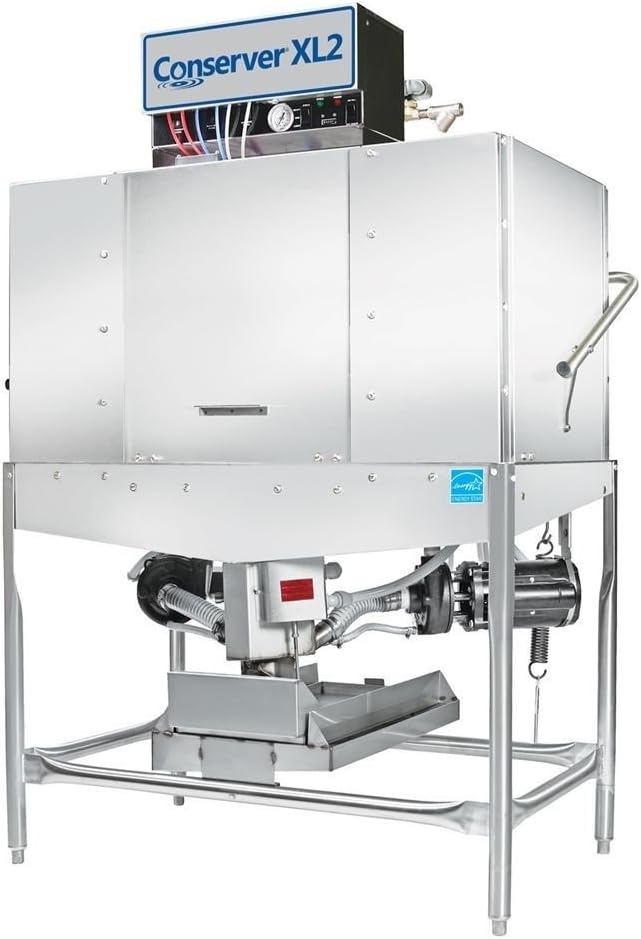
Figure 1: A full view of the Jackson Conserver XL2 commercial dishwasher, showcasing its stainless steel construction, straight-thru design, and the control panel on top. This image illustrates the overall appearance and size of the unit.
Operating Instructions
The Conserver XL2 is designed for user-friendly operation with its push-button control console. Follow these steps for efficient dishwashing:
- Pre-Scraping: Before loading, ensure all large food particles are scraped off dishes. The built-in scrap accumulator will collect smaller debris.
- Loading Racks: Load dishes into appropriate racks, ensuring they are not overcrowded to allow for proper water circulation. The unit is designed for straight-thru operation, allowing for continuous loading and unloading.
- Close Door: Securely close the dishwasher door.
- Select Cycle: Use the push-button control console to select the desired wash cycle. The low-temperature chemical sanitizing process will begin automatically.
- Monitor Progress: The dishwasher operates at approximately 74 racks per hour. The sound reduction system ensures quiet operation at 55 dB.
- Unloading: Once the cycle is complete, carefully open the door and unload the sanitized dishes.
The dishwasher comes with a cutlery basket for washing utensils. Ensure proper placement of cutlery to achieve optimal cleaning and sanitization.
Maintenance
Regular maintenance is crucial for the longevity and optimal performance of your Conserver XL2 dishwasher.
- Daily Cleaning:
- Clean the interior and exterior stainless steel surfaces with a mild, non-abrasive cleaner.
- Empty and clean the built-in scrap accumulator to prevent clogs and maintain hygiene.
- Chemical Dispensers: Regularly check the levels of detergent, rinse aid, and sanitizer in their respective containers. Refill as needed. Ensure dispenser lines are clear and free of blockages.
- Spray Arms and Nozzles: Periodically inspect spray arms and nozzles for blockages from food debris or mineral deposits. Clean them thoroughly to ensure even water distribution.
- Filters: Clean all internal filters as recommended by the manufacturer to prevent debris from recirculating.
- Gaskets and Seals: Inspect door gaskets and seals for wear or damage. Replace if necessary to prevent leaks.
For detailed maintenance schedules and procedures, refer to the comprehensive maintenance guide provided by Jackson.
Troubleshooting
This section provides solutions to common issues you might encounter with your Conserver XL2 dishwasher. For problems not listed here, or if solutions do not resolve the issue, contact qualified service personnel.
| Problem | Possible Cause | Solution |
|---|---|---|
| Dishes not clean | Improper loading, clogged spray arms, low water temperature, insufficient chemicals. | Ensure proper loading, clean spray arms and nozzles, verify water heater settings, check chemical levels and dispenser function. |
| Water leaks | Damaged door gasket, loose plumbing connections, clogged drain. | Inspect and replace door gasket if damaged, tighten plumbing connections, clear drain. |
| Dishwasher not starting | No power, door not closed properly, control panel issue. | Check power supply and circuit breaker, ensure door is fully latched, consult service manual for control panel diagnostics. |
| Excessive noise | Foreign object in pump, worn motor bearings, improper installation. | Inspect pump for obstructions, contact service technician for motor issues, verify unit is level and stable. |
Specifications
| Feature | Detail |
|---|---|
| Brand | Jackson |
| Model | CONSERVER XL2 |
| Type | Door Type, Low Temperature Chemical Sanitizing |
| Operation | Straight-Thru |
| Capacity | Approximately 74 racks/hour |
| Material | Stainless Steel |
| Item Weight | 560 pounds |
| Product Dimensions (L x W x H) | 25 x 48.5 x 68.5 inches |
| Noise Level | 55 dB |
| Installation Type | Built-in |
| Control Console | Push Button |
| Voltage | 115 Volts |
| Special Features | Sound Reduction System, 3 Built-in Dispenser Pumps, Built-in Scrap Accumulator, ENERGY STAR Certified |
| Included Components | Dishwasher, Cutlery Basket |
Warranty and Support
For specific warranty terms and conditions, please refer to the warranty documentation provided with your purchase or contact Jackson directly. Warranty coverage typically includes defects in materials and workmanship for a specified period.
Should you require technical assistance, parts, or service, please contact Jackson customer support or your authorized dealer. Have your model number (CONSERVER XL2) and serial number ready when contacting support.
Jackson Contact Information: Please visit the official Jackson website or refer to your purchase documentation for the most current contact details.


