
Introduction
The SUNWAYFOTO ET-01 is a carbon fiber tripod extension tube designed to increase the height of your tripod. Constructed from CNC machined solid metal and carbon fiber, it offers strength, impact resistance, and a lightweight design. Its seamless leg sections and friction tube mechanism ensure stability and prevent dust and sand ingress, maintaining smooth operation over time. The ET-01 is compatible with most tripods and cameras, featuring both 1/4" and 3/8" mounting threads.
Safety Information
- Ensure all connections are securely tightened before mounting any equipment.
- Do not exceed the maximum load capacity of 10 kg (22.05 lbs) to prevent damage to the extension tube or attached equipment.
- Avoid exposing the extension tube to extreme temperatures or corrosive substances.
- Keep out of reach of children.
- Handle with care to prevent drops or impacts that could compromise structural integrity.
Package Contents
Please verify that all items are present in your package:
- SUNWAYFOTO ET-01 Carbon Fiber Tripod Extension Tube
- 1/4" and 3/8" mounting screws/adapters (as applicable for top and bottom connections)

Image: The SUNWAYFOTO ET-01 extension tube shown with its interchangeable mounting screws.
Product Features
- Material: High-strength carbon fiber and CNC machined solid metal components.
- Construction: Seamless connection of leg sections for enhanced airtightness, preventing dust and sand intrusion.
- Adjustability: Two leg sections with a friction tube mechanism for smooth height adjustment.
- Mounting: Features 1/4" standard stud for camera mounting and 3/8" screw for tripod attachment.
- Load Capacity: Supports up to 10 kg (22.05 lbs).
- Lightweight Design: Weighs approximately 159g (0.35 lbs).
- Corrosion Resistance: Designed for durability even in challenging conditions.
- Shock Absorption: Carbon fiber construction provides better shock absorption compared to aluminum.

Image: The compact design of the ET-01, showing the dust-proof twist locks for secure adjustment.
Setup
- Identify Mounting Threads: The ET-01 features a 3/8" screw at its base for attachment to a tripod and a reversible 1/4" / 3/8" stud at the top for mounting a camera or tripod head.
- Attach to Tripod: Screw the 3/8" threaded base of the ET-01 onto the 3/8" mounting screw of your tripod. Ensure it is tightened securely by hand.
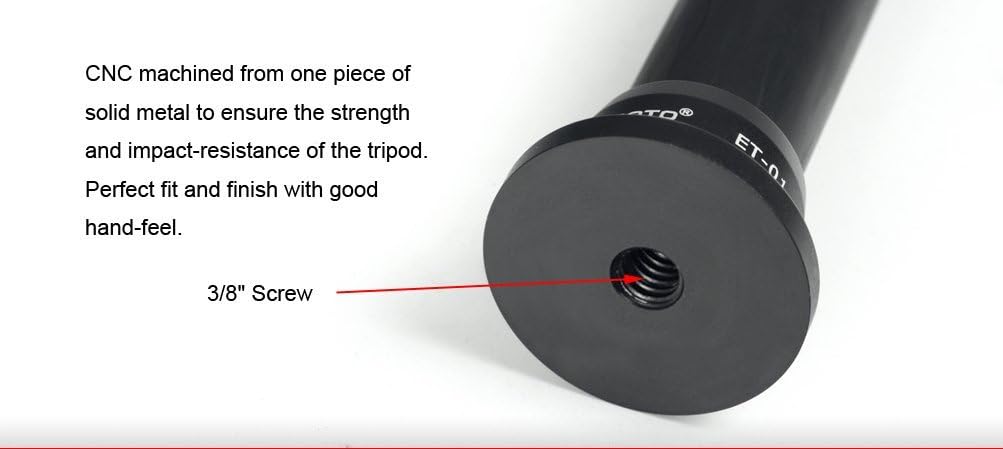
Image: The 3/8" screw thread located at the bottom of the extension tube for tripod attachment.
- Mount Camera or Tripod Head:
- If your camera or tripod head has a 1/4" thread, ensure the 1/4" stud is exposed at the top of the ET-01. Some designs may require depressing a spring-loaded 3/8" screw to reveal the 1/4" thread.
- Carefully screw your camera or tripod head onto the exposed stud. Tighten firmly to prevent rotation.

Image: The 1/4" standard stud at the top of the extension tube, ready for camera mounting.
- Verify Stability: Before use, gently test the stability of the entire setup to ensure all components are securely fastened and can support the weight of your equipment.

Image: The ET-01 extension tube integrated into a tripod setup, illustrating its compatibility.
Operating the Extension Tube
- Adjusting Height: The ET-01 features two leg sections. To extend the tube, twist the locking collar counter-clockwise to loosen, pull the inner section to the desired height, and then twist clockwise to tighten and secure.

Image: The ET-01 demonstrating its adjustable height from 190mm to 306mm.
- Multiple Extension Tubes: For additional height, multiple ET-01 extension tubes can be connected in conjunction with each other. Ensure each connection is secure and the overall load capacity is not exceeded.
- Load Capacity: Always ensure the total weight of your camera, lens, and any accessories does not exceed the 10 kg (22.05 lbs) load capacity of the extension tube.
Maintenance
- Cleaning: Wipe the carbon fiber and metal surfaces with a soft, dry cloth. For stubborn dirt, a slightly damp cloth can be used, followed by immediate drying.
- Dust and Sand: The seamless design helps prevent dust and sand, but if exposed, carefully clean the locking mechanisms and leg sections to maintain smooth operation.
- Storage: Store the extension tube in a dry, cool place away from direct sunlight and extreme temperatures.
- Inspection: Periodically inspect all threads and connections for wear or damage. Do not use if any components appear compromised.
Troubleshooting
| Problem | Possible Cause | Solution |
|---|---|---|
| Extension tube does not tighten securely. | Locking collar not fully tightened; internal mechanism dirty or worn. | Ensure the locking collar is twisted clockwise until firm. Clean the internal friction tube if necessary. If wear is suspected, contact support. |
| Camera/tripod head wobbles on the extension tube. | Mounting screw not fully tightened; incorrect thread used; damaged threads. | Verify the camera/head is screwed onto the correct 1/4" or 3/8" stud and tightened securely. Inspect threads for damage. |
| Difficulty extending or retracting sections. | Dust or debris in the friction tube; locking collar overtightened. | Loosen the locking collar. Clean the leg sections thoroughly. Avoid overtightening the collar. |
| Top 1/4" stud is not visible. | The 3/8" screw is in the default position, covering the 1/4" thread. | Firmly depress the spring-loaded 3/8" screw to reveal the 1/4" thread underneath. |
Specifications
| Feature | Detail |
|---|---|
| Model Number | ET-01 |
| Material | Carbon Fiber, Metal (Aluminum Alloy, Steel) |
| Number of Leg Sections | 2 |
| Leg Diameter | 24mm, 20mm (0.94", 0.79") |
| Minimum Height (Folded) | 190mm (7.48 inches) |
| Maximum Height (Extended) | 306mm (12.05 inches) |
| Load Capacity | 10 kg (22.05 lbs) |
| Mounting Screws | Top: 1/4" thread (reversible with 3/8"); Bottom: 3/8" thread |
| Item Weight | 159 g (0.35 lbs) |
| Dimensions (Extended) | Approx. 306mm (Length) x 24mm (Max Diameter) |
| Color | Black |
| Compatible Devices | Camera |
Warranty Information
SUNWAYFOTO products typically come with a limited warranty covering manufacturing defects. Please refer to the official SUNWAYFOTO website or your purchase documentation for specific warranty terms and conditions, including duration and coverage details. Keep your proof of purchase for warranty claims.
Customer Support
For technical assistance, troubleshooting not covered in this manual, or warranty inquiries, please contact SUNWAYFOTO customer support through their official website. You may find contact information, FAQs, and additional resources at www.sunwayfoto.com (Note: This is a placeholder URL, please verify the actual support website.)