
Claber 91006
CLABER 91006 Ring-Socket Replacement User Manual
For Aquauno and Aquadue Programmers
Brand: Claber
Model: 91006
1. Product Overview
The CLABER 91006 ring-socket is a genuine replacement part designed for various Claber Aquauno and Aquadue inline irrigation programmers. This essential component ensures the proper functioning of your watering system by providing a secure connection and integrated filtration.
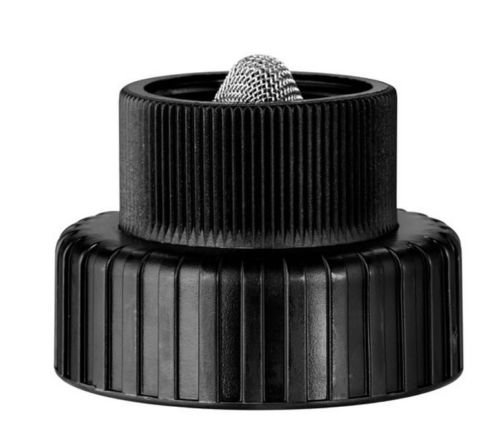
Image: The CLABER 91006 ring-socket replacement part, featuring a threaded female connector and an integrated mesh filter.
2. Components
The CLABER 91006 ring-socket replacement part consists of the following:
- 3/4" Female Tap Connector: Designed for secure attachment to a standard 3/4-inch tap or water source.
- Washable Filter: An integrated filter to prevent debris from entering and damaging your irrigation system.
- Adjustment Nut: For securing the unit to the programmer.
3. Compatible Models
This replacement ring-socket is suitable for the following Claber Aquauno and Aquadue inline programmers:
- Aquauno Models: 8444, 8446, 8454, 8456, 8493, 8411, 8412, 8413, 8414
- Aquauno PLUS Model: 8415
- Aquadue DUPLO Model: 8410
4. Installation Instructions
Follow these steps to replace the ring-socket on your Claber irrigation programmer:
- Turn Off Water Supply: Before beginning, ensure the main water supply to your irrigation system is completely turned off to prevent leaks.
- Disconnect Old Part: Carefully unscrew and remove the existing ring-socket from your Claber programmer. Be mindful of any remaining water.
- Inspect and Clean: Inspect the connection point on the programmer for any debris or residue. Clean if necessary to ensure a proper seal with the new part.
- Install New Ring-Socket: Screw the new CLABER 91006 ring-socket onto the programmer by hand. Ensure it is aligned correctly to avoid cross-threading.
- Tighten Securely: Once hand-tight, use appropriate tools if necessary to gently tighten the ring-socket, ensuring a snug and leak-free connection. Do not overtighten.
- Restore Water Supply: Slowly turn the main water supply back on.
- Check for Leaks: Observe the connection point for any signs of water leakage. If leaks occur, turn off the water, re-tighten the connection, and re-check.
5. Operation
The CLABER 91006 ring-socket is a passive component that facilitates the connection of your irrigation programmer to the water supply and filters incoming water. Once installed, it operates continuously as part of your irrigation system, requiring no direct user interaction for its primary function.
6. Maintenance
The integrated filter within the ring-socket is washable and designed for easy maintenance. Regular cleaning of the filter is recommended to ensure optimal water flow and prevent blockages in your irrigation system. To clean:
- Turn off the water supply.
- Unscrew the ring-socket from the tap or programmer.
- Remove the mesh filter.
- Rinse the filter under running water to remove any accumulated debris.
- Reinsert the clean filter and reattach the ring-socket, following the installation instructions.
7. Troubleshooting
If you experience issues with your irrigation programmer, consider the following in relation to the ring-socket:
- Leaks at Connection: Ensure the ring-socket is properly tightened and that the rubber washer (if applicable) is correctly seated and not damaged. Overtightening can also cause damage.
- Reduced Water Flow: A clogged filter is a common cause of reduced water flow. Refer to the Maintenance section for cleaning instructions.
- Cracked or Damaged Housing: If the old ring-socket was cracked due to frost or impact, replacing it with the CLABER 91006 will resolve leaks and restore system integrity.
8. Specifications
| Attribute | Value |
|---|---|
| Model Number | 91006 |
| Brand | CLABER |
| Connection Size | 3/4 inch Female |
| Package Dimensions | 12 x 6.8 x 3.2 cm |
| Item Weight | 80 grams |
| Manufacturer | CLABER |
9. Warranty and Support
Information regarding specific warranty terms for the CLABER 91006 ring-socket replacement part was not available in the provided product data. For warranty claims or technical support, please contact Claber directly through their official website or customer service channels.
Ask a question about this manual
Ask about setup, troubleshooting, compatibility, parts, safety, or missing instructions. Manuals+ will review the question and use this page’s manual context to help answer it.