KODAK 32GB Class 10 UHS-I U1 MicroSDHC Card with Adapter User Manual
Model: EKMSDM32GHC10K
Introduction
This manual provides detailed instructions for the proper use, setup, and maintenance of your KODAK 32GB Class 10 UHS-I U1 MicroSDHC Card with Adapter. Please read this manual thoroughly to ensure optimal performance and longevity of your memory card.
Product Overview
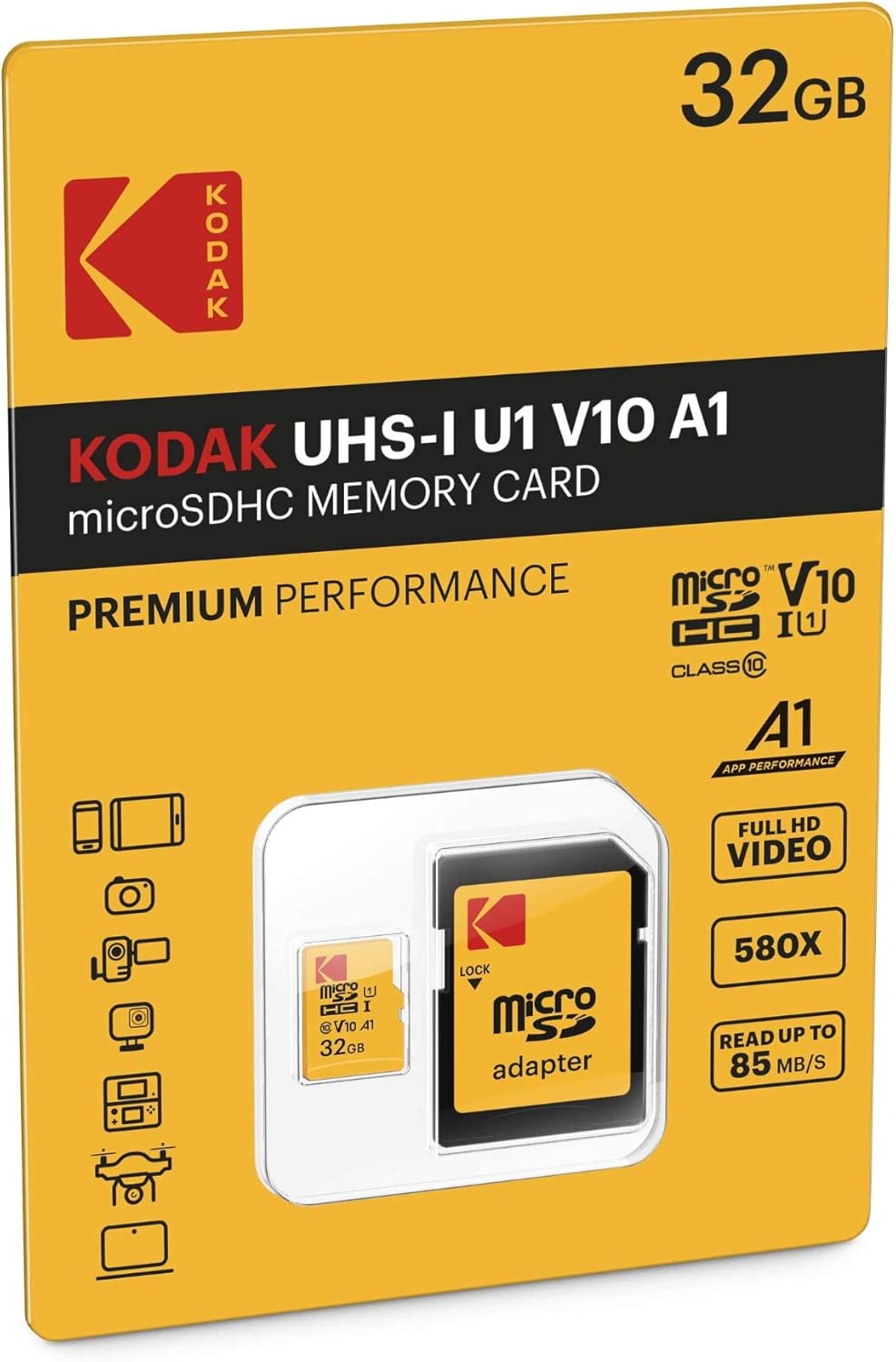
The KODAK 32GB MicroSDHC card is designed for reliable storage in a variety of compatible devices, including smartphones and tablets. It features UHS-I U1 and Class 10 speed ratings, ensuring efficient data transfer and Full HD video recording. The included SD adapter allows for broader compatibility with devices that accept standard SD cards.
Image 1: Front view of the KODAK 32GB MicroSDHC card, displaying its capacity and speed ratings.
Image 2: The KODAK MicroSDHC card and its accompanying SD adapter, shown within its retail packaging.
Setup
1. Inserting the MicroSD Card
Identify the MicroSD Slot: Locate the microSD card slot on your compatible device (e.g., smartphone, tablet, camera). Refer to your device's manual for exact location.
Insert the Card: Gently insert the KODAK MicroSDHC card into the slot with the gold contacts facing down (or as indicated by your device). Push until it clicks into place. Do not force the card.
2. Using the SD Adapter
The included SD adapter allows you to use your microSD card with devices that have a standard SD card slot, such as laptops, desktop computers, and some cameras.
Image 3: The KODAK MicroSDHC card positioned next to its SD adapter, illustrating how they connect.
Insert MicroSD into Adapter: Slide the KODAK MicroSDHC card into the designated slot on the side of the SD adapter until it is fully seated.
Insert Adapter into Device: Insert the SD adapter (with the microSD card inside) into the SD card slot of your device.
Lock Switch: Ensure the lock switch on the side of the SD adapter is in the "unlocked" (upward) position to allow writing to the card. If it is in the "locked" (downward) position, the card will be read-only.
3. Formatting the Memory Card
It is recommended to format the memory card before its first use and periodically thereafter, especially if you experience performance issues or use it with multiple devices. Formatting erases all data on the card, so back up any important files first.
In-Device Formatting: Most devices (smartphones, cameras) offer an option to format the memory card through their settings menu. This is generally the preferred method as it formats the card in a way that is optimized for that specific device.
Computer Formatting: You can also format the card using a computer.
Insert the microSD card (via adapter) into your computer's card reader.
Open "This PC" (Windows) or "Finder" (Mac).
Right-click (Windows) or Control-click (Mac) on the drive letter/name corresponding to your memory card.
Select "Format..."
Choose the appropriate file system (e.g., FAT32 for broader compatibility, exFAT for larger files/capacities if supported by your device). Ensure "Quick Format" is checked for faster formatting.
Click "Start" to begin the formatting process.
Operating Instructions
1. Saving Data
Once inserted and recognized, your KODAK MicroSDHC card will function as additional storage for your device. You can typically set your device to save photos, videos, and other files directly to the card. For Android devices, you may also be able to move compatible applications to the card to free up internal storage.
2. Data Transfer
Device to Card: Use your device's file manager or settings to move or copy files between internal storage and the microSD card.
Card to Computer: Insert the microSD card (using the SD adapter) into a computer's card reader. The card will appear as a removable drive, allowing you to drag and drop files.
3. Optimizing for App Performance (A1 Rating)
This card features an A1 App Performance rating, meaning it is optimized for faster app launch and performance on Android devices (6.0 OS and higher). To utilize this, ensure your device settings allow apps to be stored or moved to the external storage.
4. Full HD Video Recording
The UHS Speed Class 1 (U1) and Class 10 ratings ensure the card can handle the data demands of Full HD (1080P) video recording. When recording, ensure your device is set to save videos to the microSD card.
Maintenance and Care
Handle with Care: Avoid bending, dropping, or applying excessive force to the memory card.
Protect Contacts: Keep the gold contacts clean and free from dust, dirt, or moisture. Avoid touching them directly.
Temperature and Environment: Store the card in a cool, dry place. Avoid exposure to extreme temperatures, direct sunlight, or strong magnetic fields. The card is designed to be temperature proof, but extreme conditions can still affect performance or data integrity over time.
Safe Removal: Always safely eject the memory card from your device or computer before physically removing it to prevent data corruption. For most operating systems, this involves an "Eject" or "Safely Remove Hardware" option.
Regular Backups: Periodically back up important data from your memory card to another storage device (e.g., computer hard drive, cloud storage) to prevent data loss.
Troubleshooting
Card Not Recognized:
Ensure the card is fully and correctly inserted into the slot.
If using the SD adapter, check that the microSD card is fully seated within the adapter and the adapter's lock switch is in the "unlocked" position.
Restart your device or computer.
Try the card in another compatible device to determine if the issue is with the card or the device.
If the card is new, it might need to be formatted (refer to "Formatting the Memory Card" in the Setup section).
Slow Performance or Data Transfer:
Ensure your device supports UHS-I speeds. Older devices may operate at slower speeds.
Check if the card is nearly full. Performance can degrade when storage is almost exhausted.
Format the card (after backing up data) to restore optimal performance.
Avoid running multiple demanding applications while transferring data.
Data Corruption or Errors:
Always safely eject the card before removal.
Avoid removing the card during read/write operations.
If errors persist, back up any recoverable data and then format the card. If errors continue after formatting, the card may be faulty.
Specifications
Brand
KODAK
Model Name
PREMIUM UHS-I U1 V10 (EKMSDM32GHC10K)
Flash Memory Type
Micro SDHC
Memory Storage Capacity
32 GB
Secure Digital Association Speed Class
Class 10, UHS-I U1, A1, V10
Read Speed
Up to 85 MB/s
Write Speed
Up to 25 MB/s (10x)
Compatible Devices
Smartphone, Tablet, and other devices with MicroSDHC or SD (via adapter) slots
Special Features
Drop Proof, Lightweight, Temperature Proof
Dimensions (Card)
Approx. 15mm x 11mm x 1mm
Weight
Approx. 0.141 ounces (4 grams)
Warranty and Support
Warranty Information
This KODAK MicroSDHC card comes with a 2-YEARS LIMITED warranty from the date of purchase. This warranty covers manufacturing defects and failures under normal use. It does not cover damage caused by misuse, accidents, unauthorized modifications, or natural disasters.
Please retain your proof of purchase for warranty claims.
Customer Support
For technical assistance, warranty claims, or further inquiries, please contact KODAK customer support through their official website or the retailer from whom you purchased the product. Refer to the KODAK official website for the most current contact information.