
1. Introduction
The Ambient Weather WS-12 Wireless Weather Station provides comprehensive weather monitoring with a color-changing display. This manual details the setup, operation, and maintenance of your weather station to ensure optimal performance and longevity.
The system includes a main display console and distributed wireless sensors for outdoor temperature, humidity, wind speed, wind direction, and rainfall. The console features a customizable backlight that changes color based on temperature or can be set manually. It displays current weather conditions, historical data, moon phase, and allows for setting various alarms.
2. Package Contents
- Display Console
- Wireless Thermo-Hygrometer Sensor
- Rain Gauge Sensor
- Anemometer (Wind Speed and Direction Sensor) with Solar Panel
- Mounting Hardware for Sensors
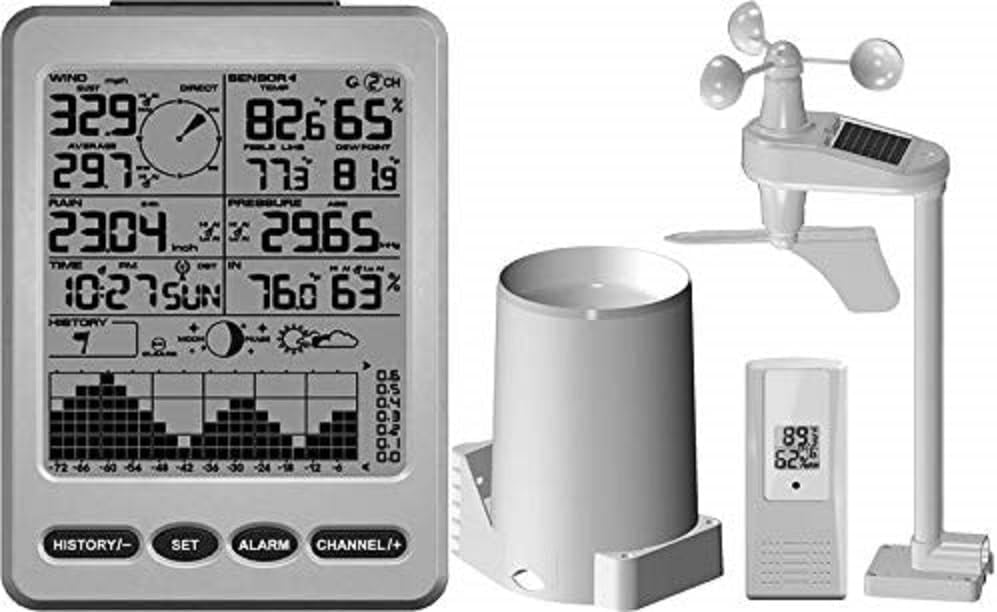
Figure 2.1: Main components of the WS-12 Weather Station. Shown are the display console, the wireless thermo-hygrometer, the rain gauge, and the anemometer with its integrated solar panel.
3. Setup Guide
3.1 Battery Installation
Batteries are not included and must be purchased separately. Ensure correct polarity during installation.
- Display Console: Requires 4 x AA batteries.
- Wireless Thermo-Hygrometer: Requires 2 x AAA batteries.
- Rain Gauge Sensor: Requires 4 x AAA batteries.
- Anemometer: Requires 4 x AAA batteries. The anemometer also features a solar panel for extended battery life.
Note: Install batteries in the outdoor sensors first, then in the display console to ensure proper synchronization.
3.2 Sensor Placement
Optimal sensor placement is crucial for accurate readings.
- Thermo-Hygrometer: Place in a shaded area, away from direct sunlight and heat sources, to measure ambient air temperature and humidity accurately. Ensure it is protected from direct rain.
- Rain Gauge: Install on a level surface, away from obstructions like trees or buildings that could block rainfall. Ensure easy access for periodic cleaning.
- Anemometer: Mount in an open area, as high as possible, to minimize interference from buildings or trees. The solar panel should face south for maximum sun exposure.
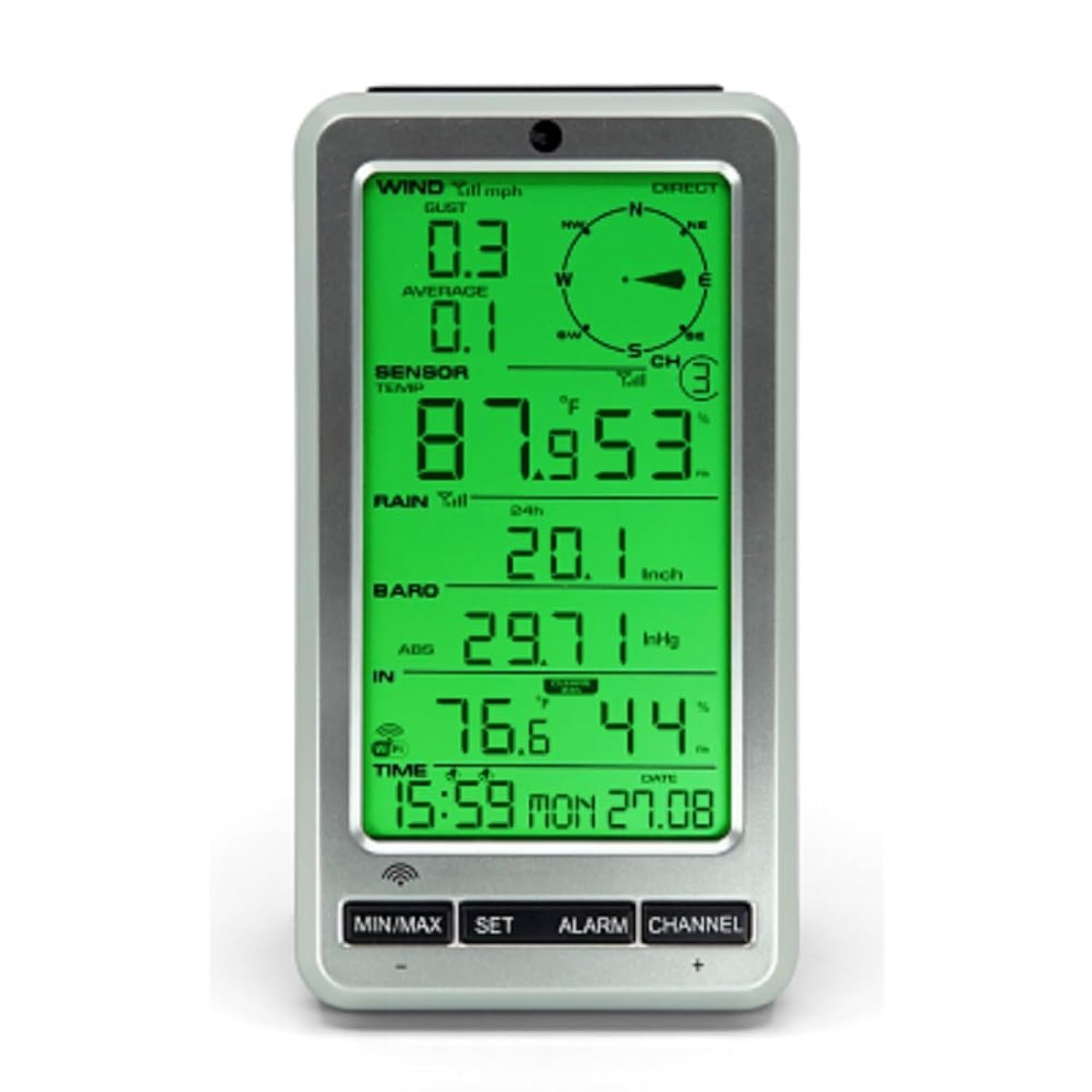
Figure 3.1: The WS-12 display console, illustrating the clear presentation of wind speed, direction, temperature, humidity, rainfall, barometric pressure, and time.
3.3 Initial Synchronization
- After installing batteries in all sensors and the console, power on the display console.
- The console will automatically begin searching for the wireless sensors. This process may take several minutes.
- Once connected, the outdoor temperature, humidity, wind, and rain data will appear on the display. If data does not appear, refer to the Troubleshooting section.
4. Operation
4.1 Display Console Overview
The display console presents various weather parameters and settings. Key areas include:
- Time and Date: Displays current time and calendar date.
- Indoor/Outdoor Temperature & Humidity: Shows current readings.
- Wind Speed & Direction: Provides current wind data.
- Rainfall: Accumulates rainfall data.
- Barometric Pressure: Displays current atmospheric pressure.
- Dew Point & Feels Like Temperature: Calculated values for comfort indication.
- Moon Phase: Indicates the current lunar phase.
4.2 Button Functions
The console typically features buttons for navigation and settings:
- MIN/MAX: View minimum and maximum recorded values for various parameters.
- SET: Enter setup mode for time, date, units, and other settings.
- ALARM: Set time alarms or weather condition alarms (e.g., high/low temperature alerts).
- CHANNEL (+): Switch between different sensor channels if additional sensors are connected, or adjust values during setup.
4.3 Customizing the Display
- Backlight Color: The backlight color can change automatically based on outdoor temperature or be manually adjusted through the settings menu. Refer to the console's specific settings for detailed instructions.
- Units: Temperature (Celsius/Fahrenheit), wind speed (mph, km/h, m/s), and rainfall (inches/mm) units can be configured in the setup menu.
- Calibration: The console allows for calibration of certain parameters to match local conditions or other reference instruments. This feature is accessed via the SET menu.
5. Maintenance
- Battery Replacement: Replace batteries in all sensors and the display console annually, or when low battery indicators appear. Use high-quality alkaline batteries.
- Sensor Cleaning:
- Rain Gauge: Periodically check and clean the rain gauge funnel and tipping bucket mechanism to prevent debris (leaves, insects) from obstructing accurate rainfall measurement.
- Anemometer: Ensure the wind cups and wind vane rotate freely. Remove any obstructions. The solar panel should be kept clean for efficient charging.
- Thermo-Hygrometer: Keep the sensor housing free of dust and spiderwebs.
- Firmware Updates: Check the Ambient Weather website for any available firmware updates for your model.
6. Troubleshooting
| Problem | Possible Cause | Solution |
|---|---|---|
| No outdoor data displayed (dashes). |
|
|
| Inaccurate temperature/humidity readings. |
|
|
| Rainfall readings are incorrect or zero. |
|
|
| Wind speed/direction inaccurate or not registering. |
|
|
7. Specifications
| Feature | Detail |
|---|---|
| Model Number | WS-12 |
| Display Type | LCD with Color Changing Backlight |
| Connectivity Technology | Wireless (433 MHz) |
| Power Source (Console) | 4 x AA Batteries (not included) |
| Power Source (Thermo-Hygrometer) | 2 x AAA Batteries (not included) |
| Power Source (Rain Gauge) | 4 x AAA Batteries (not included) |
| Power Source (Anemometer) | 4 x AAA Batteries (not included), Solar Powered |
| Temperature Accuracy | ±1 °C |
| Upper Temperature Rating | 140 °F (60 °C) |
| Product Dimensions (Console) | 4.5 x 1.5 x 7.5 inches (approx.) |
| Item Weight | 1.79 pounds (total package approx.) |
| Material | Plastic |
| Assembly Required | Yes |
8. Warranty and Support
For warranty information and technical support, please refer to the official Ambient Weather website or contact their customer service directly. Keep your purchase receipt for warranty claims.
Online Resources: www.ambientweather.com


