
Samsung BN59-01247A
Samsung BN59-01247A TV Remote Control User Manual
Introduction
This manual provides instructions for the setup, operation, and maintenance of your Samsung BN59-01247A TV Remote Control. Please read this manual carefully to ensure proper use and to maximize the lifespan of your device.
Setup
1. Battery Installation
Your Samsung BN59-01247A remote control requires two AAA batteries (not included).
- Locate the battery compartment on the back of the remote control.
- Slide the battery cover downwards or in the direction indicated by an arrow to open it.
- Insert two AAA batteries, ensuring the positive (+) and negative (-) terminals align correctly with the markings inside the compartment.
- Close the battery cover by sliding it back into place until it clicks securely.
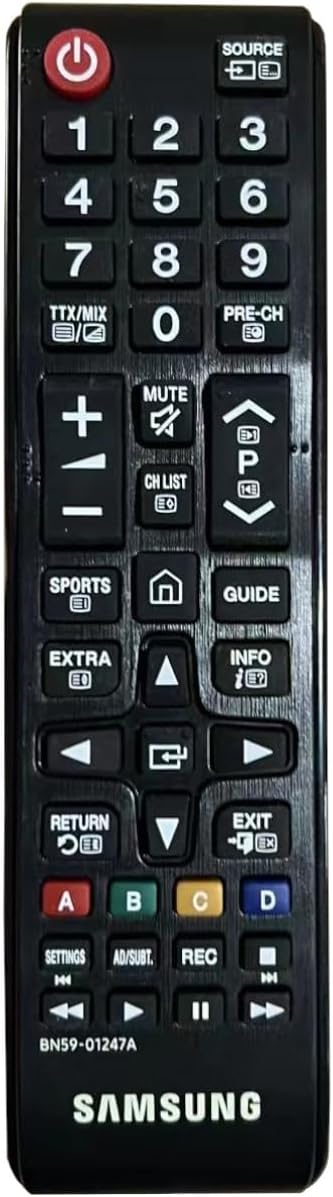
Image: Front view of the Samsung BN59-01247A remote control. The battery compartment is located on the back of the device, not visible in this image.
2. Initial Use
The Samsung BN59-01247A remote control uses infrared technology and typically does not require pairing with compatible Samsung televisions. Once batteries are installed, point the remote control directly at your television and press a button (e.g., Power) to confirm functionality.
Operating Instructions
The Samsung BN59-01247A remote control features 20 buttons designed for intuitive control of your Samsung television.
Image: Front view of the Samsung BN59-01247A remote control, showing the layout of all buttons.
Button Functions Overview
- Power Button: Turns the television on or off.
- Source Button: Selects input sources (e.g., HDMI, AV, TV).
- Number Buttons (0-9): Directly enters channel numbers.
- Volume Up/Down (+/-): Adjusts the television's volume level.
- Mute Button: Mutes or unmutes the television's audio.
- Channel Up/Down (CH List, P^/Pv): Changes television channels sequentially or accesses the channel list.
- Directional Pad (Up, Down, Left, Right) and Enter Button: Navigates menus and confirms selections.
- Return Button: Returns to the previous menu or screen.
- Exit Button: Exits the current menu or application.
- Home Button (House icon): Accesses the Smart Hub or main menu.
- Guide Button: Displays the electronic program guide.
- Info Button: Shows information about the current program or input.
- Color Buttons (A, B, C, D): Used for specific functions within certain applications or menus, as indicated on screen.
- Play, Pause, Stop, Fast Forward, Rewind Buttons: Controls media playback.
Maintenance
Cleaning
To clean your remote control, gently wipe its surface with a soft, dry cloth. For stubborn dirt, slightly dampen the cloth with water. Avoid using harsh chemicals, abrasive cleaners, or excessive moisture, as these can damage the remote.
Battery Replacement
Replace batteries when the remote control's response becomes inconsistent or stops working. Always replace both AAA batteries simultaneously with new ones. Do not mix old and new batteries, or different types of batteries. Dispose of used batteries according to local regulations.
Troubleshooting
Remote Control Not Responding
- Check Batteries: Ensure batteries are inserted correctly with the correct polarity (+/-). Replace old batteries with new AAA batteries.
- Line of Sight: Make sure there are no obstructions between the remote control and the television's infrared receiver. Point the remote directly at the TV.
- Remote Control Sensor: Ensure the infrared sensor on the remote control (usually at the top) is clean and unobstructed.
- TV Power: Confirm that the television is powered on and not in standby mode.
Limited Functionality
- Compatibility: Verify that your television model is compatible with the Samsung BN59-01247A remote control. This remote is designed for various Samsung TV models.
- Specific App/Menu Issues: Some buttons may have different functions or be inactive depending on the current application or menu on your TV. Refer to your television's user manual for specific on-screen functions.
Specifications
| Feature | Detail |
|---|---|
| Model Number | BN59-01247A |
| Brand | Samsung |
| Compatible Devices | Television |
| Connectivity Technology | Infrared |
| Number of Buttons | 20 |
| Controller Type | Button Control |
| Maximum Range | 10 Meters |
| Power Source | 2 x AAA Batteries (not included) |
| Battery Type | Alkaline recommended |
| Weight | 65 Grams |
| Color | Black |
| Special Feature | Ergonomic design |
Warranty and Support
For warranty information and technical support, please refer to the documentation provided with your Samsung television or visit the official Samsung support website. This remote control is an original Samsung replacement part.