
Introduction
The Konftel EGO is a compact and portable personal speakerphone designed for crystal-clear audio conferencing. Featuring OmniSound audio technology, it is suitable for small meetings, individual use, and travel. This manual provides instructions for setting up, operating, and maintaining your Konftel EGO.
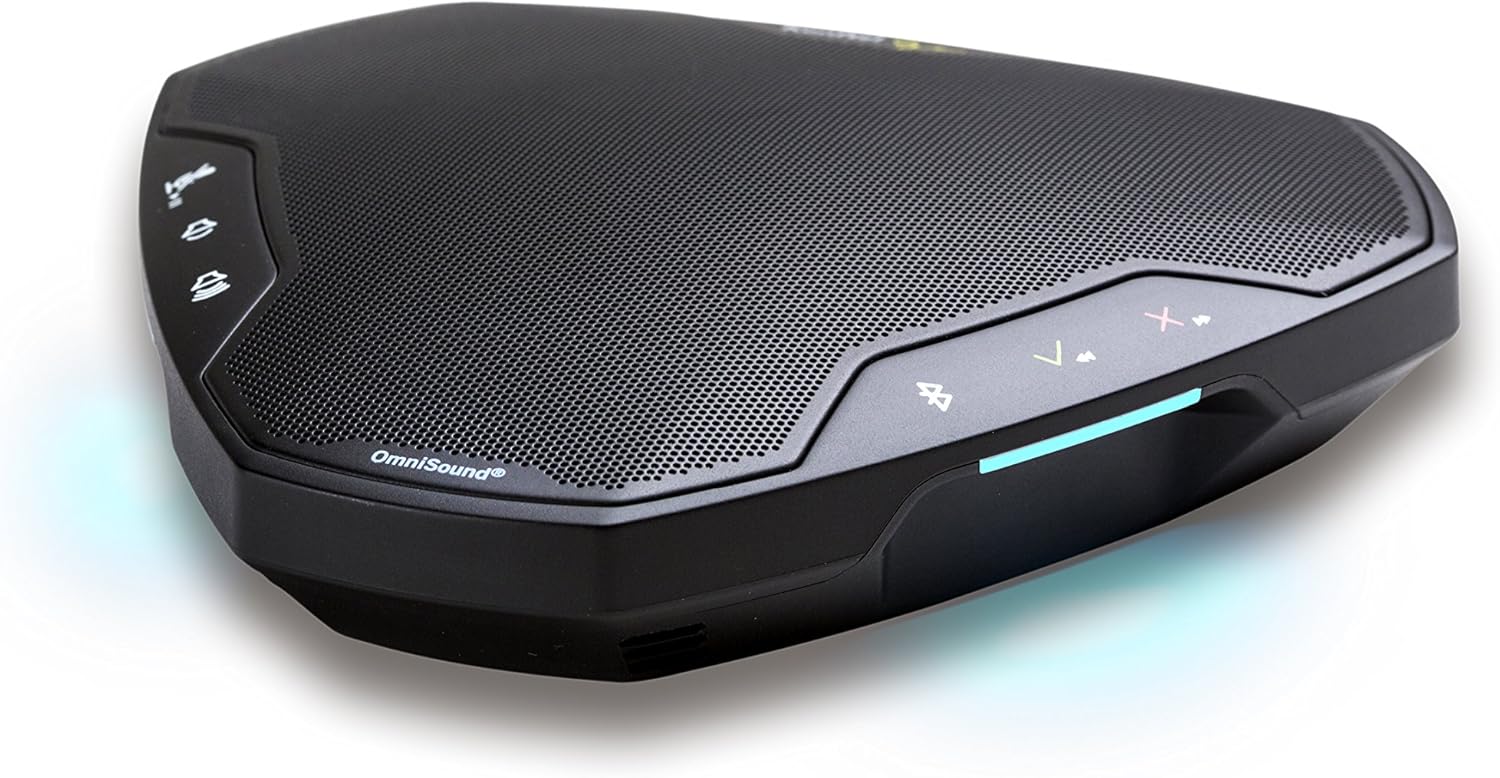
Image: The Konftel EGO in use during a small group meeting, demonstrating its portability and ease of integration into various environments.
What's in the Box
- Konftel EGO Conferencing Unit
- Carrying Case
- USB Cable
- User Manual (this document)
Product Overview
The Konftel EGO features intuitive controls and essential ports for connectivity. Familiarize yourself with the device's layout before use.

Image: Top view of the Konftel EGO, highlighting the touch-sensitive control panel and OmniSound branding.

Image: Rear view of the Konftel EGO, displaying the headset port, USB connection, and power button.
Key Components:
- Touch Controls: For call answer/end, volume up/down, mute, Bluetooth pairing.
- LCD Screen: Displays status information.
- USB Port: For connecting to a computer and charging.
- Headset Port: For connecting a personal headset (disables internal microphone).
- Power Button: To turn the device on/off.
- NFC Tag: For quick Bluetooth pairing with compatible devices.
Setup
1. Charging the Device
Before first use, fully charge your Konftel EGO. Connect the supplied USB cable to the USB port on the device and to a computer or a USB power adapter (not included). The LCD screen will indicate charging status. A full charge provides approximately 12 hours of talk time.
2. Connecting via USB
- Connect the Konftel EGO to your computer using the supplied USB cable.
- The device will be recognized as an audio device. Select "Konftel EGO" as your speaker and microphone in your computer's audio settings or conferencing application.
- The device will draw power from the USB connection during use.
3. Pairing via Bluetooth
The Konftel EGO supports Bluetooth pairing with mobile phones and other compatible devices.
Standard Bluetooth Pairing:
- Ensure the Konftel EGO is powered on.
- Press and hold the Bluetooth button on the device until the Bluetooth indicator flashes.
- On your mobile device, go to Bluetooth settings and select "Konftel EGO" from the list of available devices.
- Once paired, the Bluetooth indicator will glow steadily.
NFC Pairing (Near Field Communication):
- Ensure NFC is enabled on your mobile device.
- Tap your NFC-enabled mobile device against the NFC tag on the Konftel EGO (located near the "Konftel Ego" logo).
- Confirm the pairing request on your mobile device.
Operating the Konftel EGO
Call Management:
- Answer Call: Press the Answer button (green phone icon).
- End Call: Press the End Call button (red phone icon).
- Mute Microphone: Press the Mute button (microphone icon). Press again to unmute.
- Volume Adjustment: Use the Volume Up (+) and Volume Down (-) buttons.
Music Streaming:
When connected via Bluetooth, the Konftel EGO can stream music in HD quality from your mobile device. Use your mobile device's controls for playback (play, pause, skip tracks).
Using a Headset:
Connect a 3.5mm headset to the headset port on the Konftel EGO for private conversations. When a headset is connected, the internal microphone and speaker of the EGO are disabled.
Maintenance
Cleaning:
Wipe the device with a soft, dry cloth. Do not use liquid cleaners or abrasive materials, as these can damage the surface and internal components.
Battery Care:
- Avoid fully discharging the battery frequently.
- Store the device in a cool, dry place if not used for extended periods.
- Charge the device periodically if stored for a long time to maintain battery health.
Troubleshooting
| Problem | Possible Cause | Solution |
|---|---|---|
| No sound or low volume |
|
|
| Cannot connect via Bluetooth |
|
|
| Microphone not picking up sound |
|
|
Specifications
- Model Number: 910101081
- Product Dimensions: 5.71 x 5.31 x 1.26 inches
- Item Weight: 8.1 ounces
- Battery: 1 Lithium Ion battery (included)
- Connectivity: Bluetooth with NFC, USB
- Audio Technology: OmniSound with HD audio
- Manufacturer: Konftel
Warranty and Support
For warranty information and technical support, please refer to the official Konftel website or contact your local Konftel reseller. Keep your proof of purchase for warranty claims.
Official Konftel Website: www.konftel.com


