
1. Introduction
The Karaoke USA GP978 is a professional-grade karaoke player designed for versatile entertainment. It features DVD, CD+G, and MP3+G playback, a 7-inch color TFT display, Bluetooth connectivity, and recording capabilities. This unit is equipped with a telescopic handle and wheels for easy transport, making it suitable for various events and gatherings. This manual provides essential information for the safe and effective use of your GP978 karaoke system.
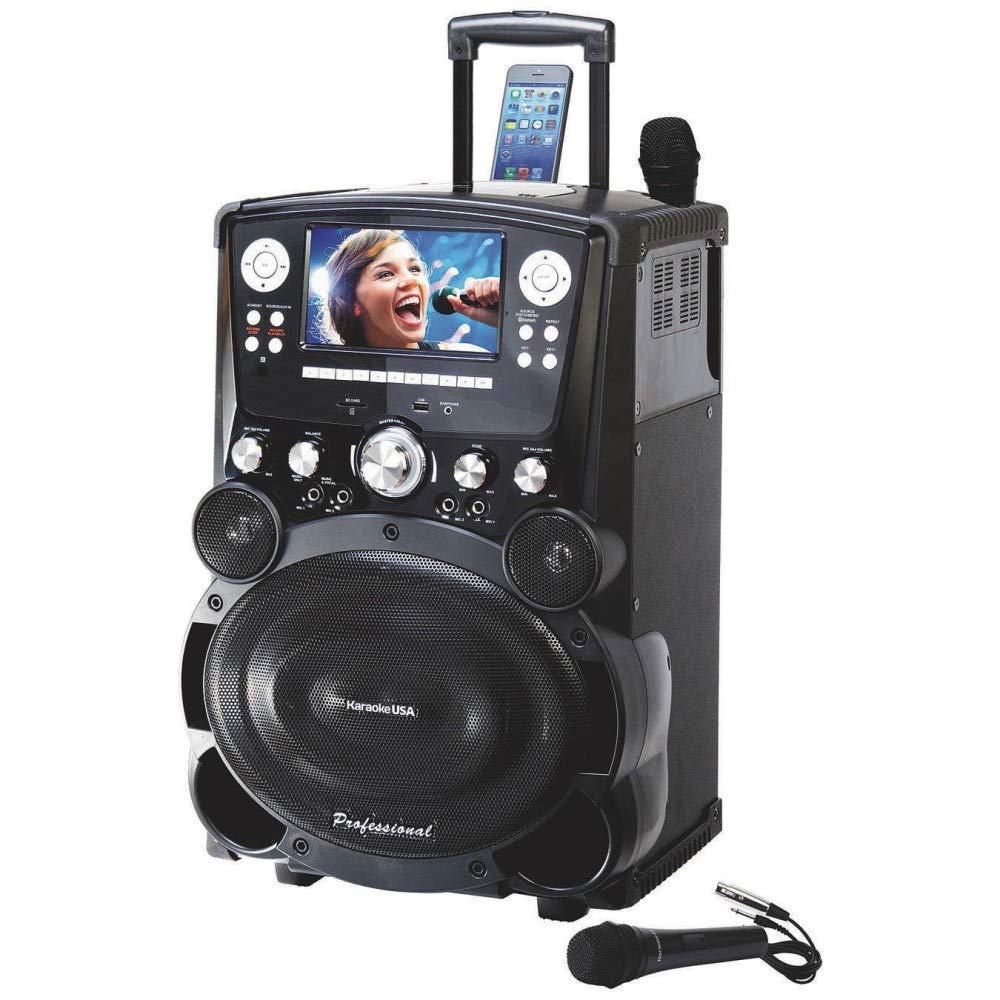
Figure 1: Front view of the Karaoke USA GP978 Professional Karaoke Player, showcasing its 7-inch color TFT display and integrated wheels for portability.
2. Setup
2.1 Unpacking
Carefully remove all components from the packaging. Verify that all items listed in the package contents are present:
- Karaoke USA GP978 Karaoke Player
- 2 Professional Microphones
- RCA Cable
- 3.5mm to 3.5mm AUX Cable
- 120V Power Cord
- Remote Control (2 x AAA Batteries not included)
- Instruction Manual
2.2 Power Connection
- Ensure the unit's power switch is in the OFF position.
- Connect the provided 120V power cord to the AC Line In port on the back of the unit.
- Plug the other end of the power cord into a standard electrical outlet (110V/50Hz~AC 240V/60Hz compatible).
2.3 Microphone Connection
The GP978 features four microphone inputs. Connect the professional microphones to any of the available MIC IN jacks on the unit.
2.4 Audio/Video Connections
To connect the GP978 to an external display or audio system:
- HDMI Output: For high-definition video and audio, connect an HDMI cable from the unit's HDMI OUT port to an HDMI input on your TV or monitor.
- RCA Audio/Video: Use the provided RCA cable to connect the VIDEO OUT and AUDIO OUT (L/R) ports on the unit to corresponding inputs on your TV or audio receiver.
- AUX Input: Connect external audio devices (e.g., smartphones, tablets) using the 3.5mm AUX cable to the AUX IN port.
2.5 Universal Device Cradle
The integrated universal cradle can securely hold most personal devices such as smartphones, tablets, or MP3 players. Place your device in the cradle for convenient viewing or charging via the USB charger port.
3. Operating Instructions
3.1 Basic Operation
- Press the POWER button to turn on the unit. The 7-inch TFT color screen will illuminate.
- Adjust the MASTER VOLUME knob to a comfortable listening level.
- Use the FUNCTION button to select the desired input source (DVD/CDG, MP3+G, Bluetooth, AUX, USB/SD).
3.2 Media Playback (DVD/CD+G/MP3+G)
- Open the disc tray and carefully place a DVD, CD+G, or MP3+G disc onto the spindle. Close the tray.
- The unit will automatically detect the disc and begin playback.
- Use the PLAY/PAUSE, STOP, NEXT, and PREVIOUS buttons on the unit or remote control to manage playback.
- For CD+G and MP3+G discs, lyrics will display on the 7-inch screen or connected external display.
3.3 USB/SD Card Playback and Recording
- Insert a USB flash drive into the USB port or an SD card into the SD card slot.
- Select USB or SD as the input source. The unit will display playable files.
- Use the navigation buttons to select a file and press PLAY.
- To record your voice and music mix, press the RECORD button during playback. The recording will be saved to the inserted USB drive or SD card. Press RECORD again to stop.
- To instantly play back a recording, press the INSTANT PLAYBACK button.
3.4 Bluetooth Connectivity
- Select Bluetooth as the input source. The unit will enter pairing mode.
- On your Bluetooth-enabled device (e.g., smartphone, tablet), search for available devices and select "Karaoke USA GP978".
- Once paired, you can stream audio wirelessly from your device to the GP978.
3.5 Microphone and Sound Controls
- Individual Microphone Volume Control: Adjust the volume for each connected microphone separately.
- Analog Echo Control: Add an echo effect to vocals for a richer sound.
- Balance Control: Adjust the balance between the vocal track and the music track on multiplex karaoke discs.
- Digital Key Control: Adjust the musical key of a song to match your vocal range without changing the tempo.

Figure 2: Close-up view of the control panel, showing various knobs and buttons for media playback, recording, and sound adjustments.
4. Maintenance
4.1 Cleaning
- Always unplug the unit from the power outlet before cleaning.
- Use a soft, dry cloth to wipe the exterior surfaces. For stubborn marks, a slightly damp cloth can be used, followed by a dry cloth.
- Do not use abrasive cleaners, waxes, or solvents as they may damage the finish.
- Gently clean the 7-inch TFT screen with a soft, lint-free cloth specifically designed for electronic displays.
4.2 Storage
When not in use, store the unit in a cool, dry place away from direct sunlight and extreme temperatures. Ensure all cables are neatly coiled to prevent damage.
5. Troubleshooting
If you encounter issues with your GP978, refer to the following common problems and solutions:
| Problem | Possible Cause | Solution |
|---|---|---|
| No power | Power cord not connected; Power outlet not active; Unit power switch off | Check power cord connection; Test outlet with another device; Ensure power switch is ON |
| No sound from speakers | Volume too low; Mute activated; Incorrect audio output selected on external device | Increase MASTER VOLUME; Check if unit or external device is muted; Verify correct audio input on external device |
| Microphone not working | Microphone not connected; Microphone volume low; Faulty microphone | Ensure microphone is securely plugged in; Increase individual MIC VOLUME; Test with another microphone |
| Bluetooth not pairing | Unit not in pairing mode; Device too far; Interference | Select Bluetooth input on GP978; Ensure device is within range (approx. 10m); Move away from other wireless devices |
| Disc not playing | Disc inserted incorrectly; Disc damaged/dirty; Incorrect function selected | Reinsert disc correctly; Clean disc with a soft cloth; Select DVD/CDG function |
6. Specifications
Key technical specifications for the Karaoke USA GP978 Professional Karaoke Player:
| Feature | Specification |
|---|---|
| Model Number | GP978 |
| Brand | Karaoke USA |
| Display | 7-inch TFT Color Screen |
| Power Output | 120 Watts Peak Power (100 Watts RMS) |
| Speakers | 2 x 8-inch Full Range (160 Watt Peak) + 3-inch Tweeter (20 Watt Peak) |
| Microphone Inputs | 4 |
| Connectivity | Bluetooth, HDMI, RCA, 3.5mm AUX, USB, SD |
| Media Type | DVD, CD+G, MP3+G, SD, USB |
| Recording Function | Record Voice and Music mix to USB/SD |
| Power Source | AC Line In: 110V/50Hz~AC 240V/60Hz |
| Item Weight | 21 Pounds |
| Included Components | Karaoke Player, 2 Microphones, RCA Cable, 3.5mm AUX Cable, Power Cord, Remote Control, Instruction Manual |
7. Warranty and Support
This product comes with a manufacturer's warranty. Please refer to the specific warranty information provided in the original packaging or contact Karaoke USA customer support for details regarding warranty coverage and service. For technical assistance or further inquiries, consult the contact information provided in your warranty documentation.


