
1. Introduction
The Motorola MOTOTRBO SL300 UHF 99 Channel Display Radio provides reliable push-to-talk communication in an ultra-slim and rugged profile. Designed for mobile and everyday users, this portable radio is suitable for various environments, from field operations to formal events. It incorporates an Active View display and Range Max technology for enhanced performance and user experience.
2. Package Contents
Verify that all items are present in your package:
- Motorola MOTOTRBO SL300 Radio
- Charger
- Lithium-Ion Battery
- Antenna
- Belt Clip

Image: Contents of the Motorola SL300 package, including the radio, charger, battery, antenna, and belt clip.
3. Product Features
- Ultra-Slim Design: Measuring less than an inch thick, the SL300 is highly portable and can be carried discreetly.
- Simple Operation: Features a separate power button, top channel toggle switch, side volume controls, and a prominent push-to-talk button for easy one-hand operation.
- Dual Capacity Direct Mode: Utilizes 2-slot TDMA DMR standard to double 12.5 kHz channel capacity without a repeater.
- IP54 Rated: Rugged construction ensures splashproof and dustproof operation in harsh environments.
- Range Max Receiver: Advanced radio design and patented antenna provide enhanced range while maintaining a slim profile and long battery life.
- Active View Display: A shatterproof display with hidden LED lighting clearly communicates channel, radio, and volume information in various lighting conditions.
- 99 Channels: Supports up to 99 channels for versatile communication needs.

Image: Overview of key features of the Motorola MOTOTRBO SL300, emphasizing its slim design, ease of use, and durability.
4. Setup
4.1. Install Battery
- Align the battery with the back of the radio.
- 4.2. Attach Antenna
- Screw the antenna clockwise into the connector on top of the radio until it is finger-tight.
4.3. Charge Battery
Before first use, fully charge the battery using the provided charger.
- Place the radio with the battery installed into the charging tray.
- Ensure the charging indicator light illuminates, indicating proper charging.
4.4. Attach Belt Clip

Image: Motorola SL300 radio shown with the belt clip attached, ready for wear.
- Align the belt clip with the grooves on the back of the radio.
- Slide the clip downwards until it locks into position.
5. Operating Instructions
5.1. Power On/Off
- Press and hold the Power/Info button located on the top of the radio until the display activates or deactivates.
5.2. Adjust Volume
- Use the Volume Up (+) and Volume Down (-) buttons on the side of the radio to adjust the audio level.
5.3. Change Channel

Image: Top controls of the Motorola SL300, including the Power/Info button and channel selection buttons.
- Use the CH+ and CH- buttons on the top of the radio to cycle through available channels. The Active View display will show the current channel.
5.4. Push-to-Talk (PTT)
- Press and hold the large PTT button on the side of the radio to transmit. Release to listen.
5.5. Info Button
- A short press of the Power/Info button can display additional radio status information on the Active View display.
Video: This video demonstrates the Motorola MOTOTRBO SL300 radio's features, including its slim design, intuitive controls, and Active View display. It highlights the radio's suitability for various professional environments and its robust audio capabilities.
6. Maintenance
- Cleaning: Use a soft, damp cloth to clean the radio's exterior. Do not use harsh chemicals or abrasive cleaners.
- Battery Care: For optimal battery life, charge the battery regularly and avoid extreme temperatures. Store the radio and battery in a cool, dry place.
- Antenna Inspection: Periodically check the antenna for any damage and ensure it is securely attached.
7. Troubleshooting
- Radio not powering on: Ensure the battery is fully charged and correctly installed.
- No audio/poor audio quality: Check the volume level. Verify that you are on the correct channel and within range of other radios.
- Cannot transmit: Ensure the PTT button is fully pressed. Check if the channel is busy.
For further assistance, refer to the full product documentation or contact Motorola support.
8. Specifications
Below are the general specifications for the Motorola MOTOTRBO SL300 radio:
| Feature | Detail |
|---|---|
| Item Weight | 5.8 ounces |
| Product Dimensions | 0.87 x 2.17 x 4.95 inches |
| Item Model Number | AAH88QCP9JA2AN |
| Batteries | 1 Lithium Ion battery required |
| Channel Capacity | 99 (Display models) |
| Frequency Band | UHF (403-470 MHz) |
| Power Output | 1W/2W/3W (with Range Max technology) |
| IP Rating | IP54 (Splashproof and Dustproof) |
| Battery Life (Li-Ion 2300mAh) | Digital: 14 hours, Analog: 11.8 hours |
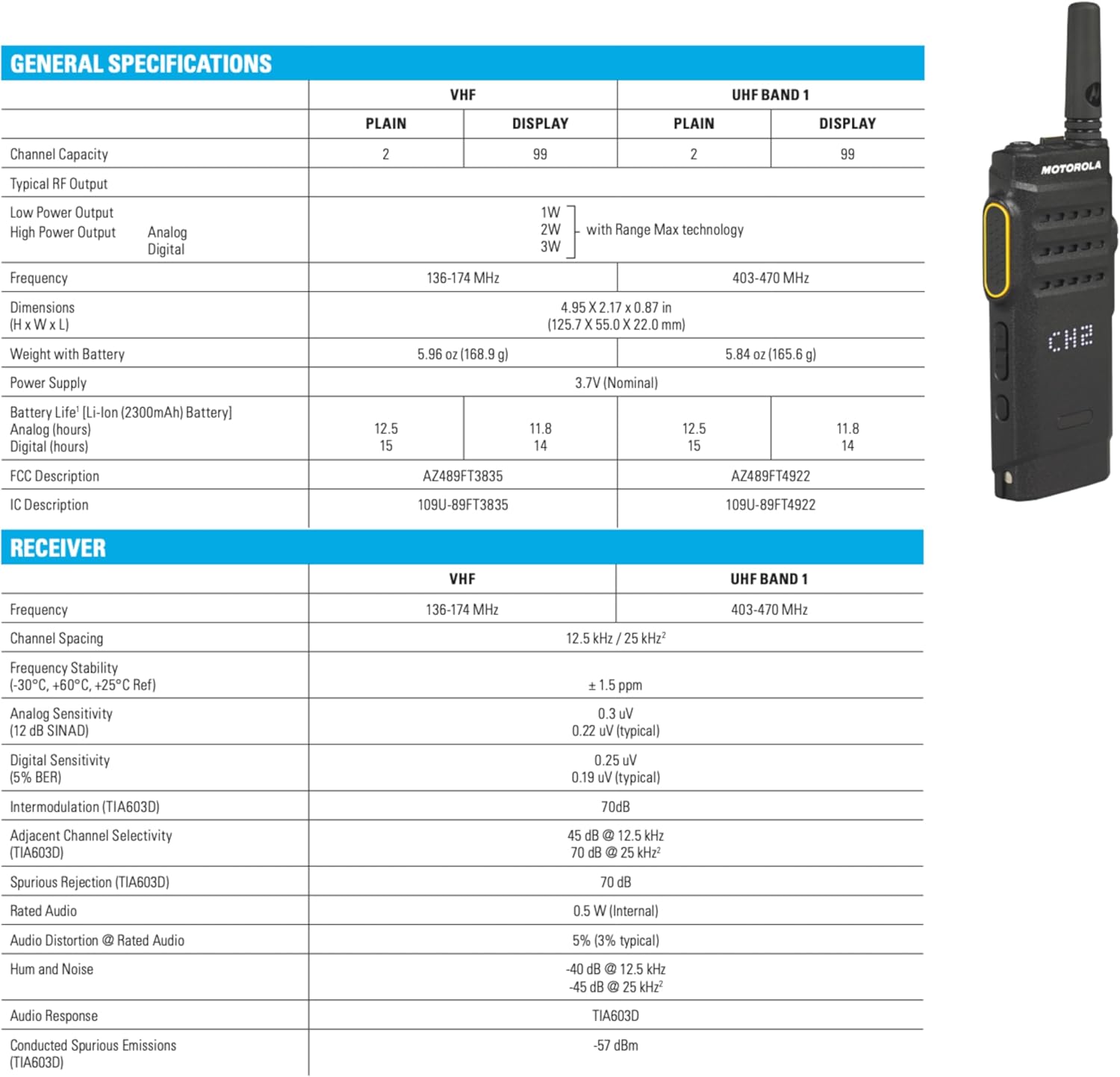
Image: General specifications table for the Motorola MOTOTRBO SL300.
9. Warranty and Support
The Motorola MOTOTRBO SL300 radio comes with a 2-Year Warranty. For warranty claims, technical support, or additional product information, please contact your authorized Motorola dealer or visit the official Motorola Solutions website.


