
1. Introduction
The Proster Handheld Digital Anemometer is a portable, professional measuring instrument designed for accurate wind speed, air volume, and temperature measurements. It features a large LCD display with backlight, multi-unit switching functions, and can be used for both handheld and fixed measurements. This device is ideal for various applications including outdoor activities, HVAC system checks, and environmental monitoring.
Key Features:
- Measures wind speed in m/s, ft/m, km/h, mile/h, and Knots.
- Measures air volume in CFM, CMM, and CMS.
- Large LCD display with backlight for clear readability in various lighting conditions.
- Data hold, maximum, and minimum value functions.
- Low battery indicator and auto power-off function.
- Compact and portable design.
2. Setup
2.1. Package Contents
Before using your anemometer, please ensure all items are present:
- Proster Handheld Digital Anemometer
- 9V6F22 Battery
- Carrying Case
- User Manual

Image: The Proster Handheld Digital Anemometer package contents, showing the device, a 9V battery, a black carrying case, and the user manual.
2.2. Battery Installation
- Locate the battery compartment on the back of the device.
- Use a small screwdriver to open the battery compartment cover.
- Insert the included 9V6F22 battery, ensuring correct polarity.
- Close the battery compartment cover and secure it with the screw.
The device is now ready for use. A low battery indicator will appear on the display when the battery needs replacement.
Video: A demonstration of the Proster Wind Speed Meter, including battery installation and basic operation.
2.3. Lanyard and Tripod Mounting
- Attach the included lanyard to the designated loop on the device for secure handheld use.
- The bottom of the anemometer features a tripod connector for fixed measurements, allowing for stable and continuous monitoring.
3. Operating Instructions
3.1. Device Overview
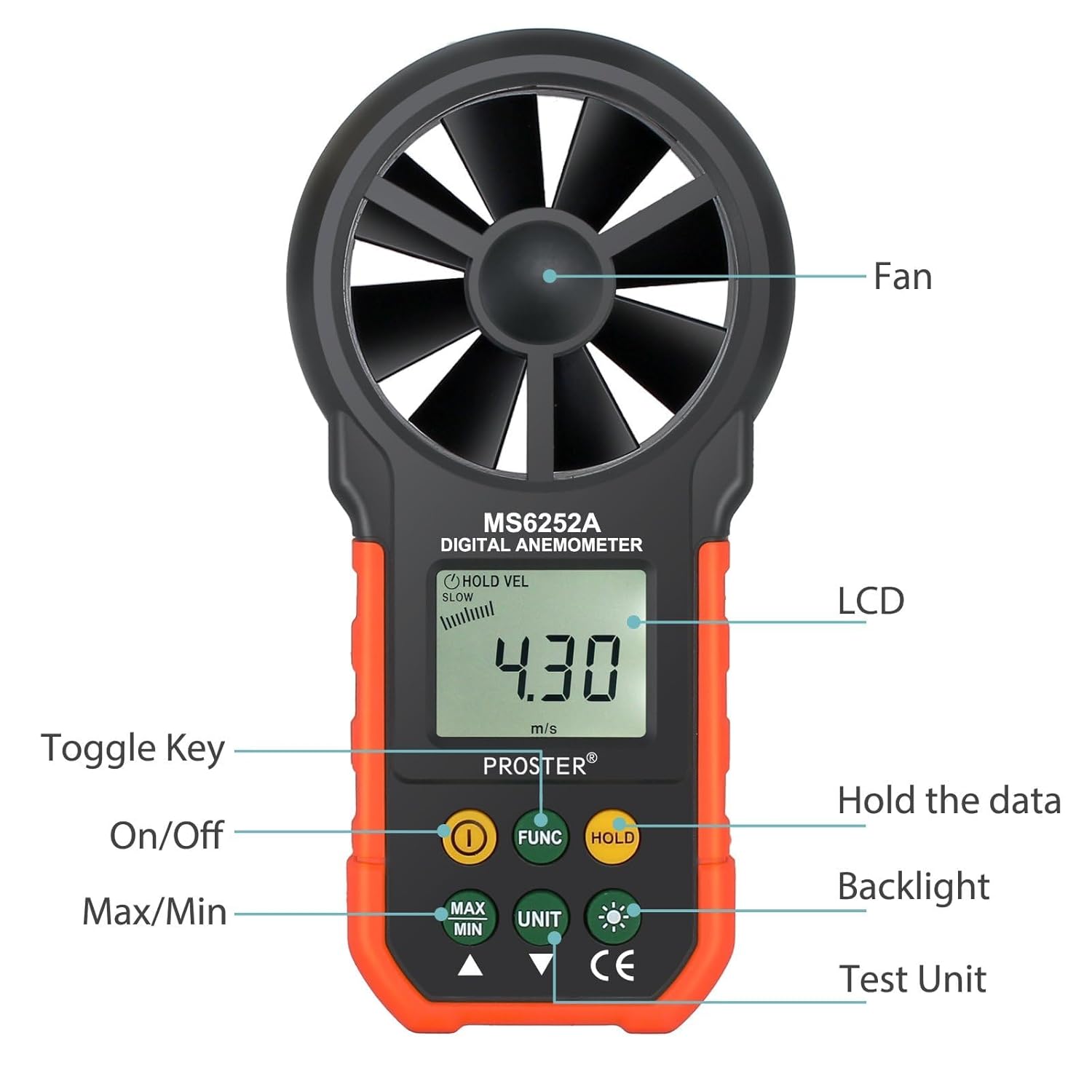
Image: A detailed diagram of the Proster Digital Anemometer, highlighting its key components and button functions.
3.2. Power On/Off
- Press the ON/OFF button (usually marked with a power symbol) to turn the device on.
- The device features an auto power-off function after 15 minutes of inactivity to conserve battery life.
3.3. Unit Selection
To switch between different wind speed units:
- Press the UNIT button repeatedly to cycle through the available units: m/s, ft/m, km/h, mile/h, and Knots.
To switch between temperature units:
- Press the °F/°C button to toggle between Fahrenheit and Celsius.
3.4. Measurement Modes (MAX/MIN/AVG/HOLD)
- Press the MAX/MIN button to view the maximum or minimum wind speed recorded during a measurement session.
- Press the HOLD button to freeze the current reading on the display. Press again to release.
- The device also supports an average (AVG) measurement mode for consistent readings over time.
3.5. Backlight Function

Image: A close-up view of the anemometer's LCD display with the backlight feature activated, showing clear digits.
- Press the Backlight button (usually marked with a light bulb symbol) to activate or deactivate the LCD backlight. This enhances readability in low-light conditions.
3.6. Air Volume Measurement
- Use the FUNC button to switch to air volume measurement modes (CFM, CMM, CMS).
- The device supports a wide range of air volume measurements for various applications.
Video: A seller-provided video demonstrating the Proster Anemometer's capabilities in measuring wind speed and air volume, highlighting its multi-functional design.

Image: The anemometer being used to measure airflow from an indoor air conditioning vent, demonstrating its utility for HVAC applications.
4. Maintenance
4.1. Battery Replacement
When the low battery indicator appears on the LCD, replace the 9V6F22 battery promptly to ensure accurate readings and continuous operation. Follow the battery installation steps in Section 2.2.
4.2. Cleaning and Storage
- Wipe the device with a soft, dry cloth. Do not use abrasive cleaners or solvents.
- Keep the fan blades free from dust and debris to maintain measurement accuracy.
- Store the anemometer in its carrying case in a cool, dry place when not in use.
5. Troubleshooting
Common Issues:
- No Display: Check if the battery is correctly installed and has sufficient charge. Replace if necessary.
- Inaccurate Readings: Ensure the fan blades are clean and spinning freely. Verify the device is held correctly in the direction of airflow.
- Display Not Changing: Check if the HOLD function is activated. Deactivate it to resume live readings.
6. Specifications
| Feature | Detail |
|---|---|
| Brand | Proster |
| Model | WIND |
| Power Source | 1x 9V6F22 Battery (Included) |
| Product Dimensions | 1.49"D x 3.35"W x 6.49"H |
| Item Weight | 11.3 Ounces |
| Wind Speed Range | m/s: 0.40-30; ft/m: 80-5900; km/h: 1.4-108; mile/h: 0.9-67.0; Knots: 0.8-58.0 |
| Air Volume Range | CFM: 0-99990 (0-9.999ft²); CMM: 0-99990 (0-9.999m²); CMS: 0-9999 (0-9.999m²) |
| Display Type | LCD with Backlight |
| Special Features | Portable, Data Hold, Max/Min/Avg Measurement, Auto Power Off |
| Material | Plastic |
7. Warranty and Support
Specific warranty information for the Proster Handheld Digital Anemometer (Model WIND) is not provided in this manual. Please refer to the product packaging or contact Proster customer support for detailed warranty terms and conditions.
For technical support or inquiries, please visit the official Proster website or contact their customer service department.