
1. Introduction
This manual provides comprehensive instructions for the installation, operation, and maintenance of your Kia 4UF60-AQ500 Key Start Model remote start system. This system allows you to start your parked vehicle remotely by pressing a button on the key fob, enabling pre-warming or pre-cooling of your vehicle. It is designed for seamless integration with your vehicle's anti-theft and remote keyless entry systems.
2. What's in the Box
The Kia 4UF60-AQ500 Key Start Model remote start system package includes the following components:
- Main Control Module
- Two Remote Key Fobs
- Wiring Harness
- Cable Ties (Zip Ties)

Figure 2.1: Components included in the Kia 4UF60-AQ500 remote start system kit.
3. Setup and Installation
Important: Installation of the Kia 4UF60-AQ500 remote start system requires technical expertise and should ideally be performed by a certified automotive technician. Improper installation can lead to vehicle damage or system malfunction.
3.1 Component Identification
The main control module is the central unit of the remote start system. It features various ports for connecting to your vehicle's electrical system.
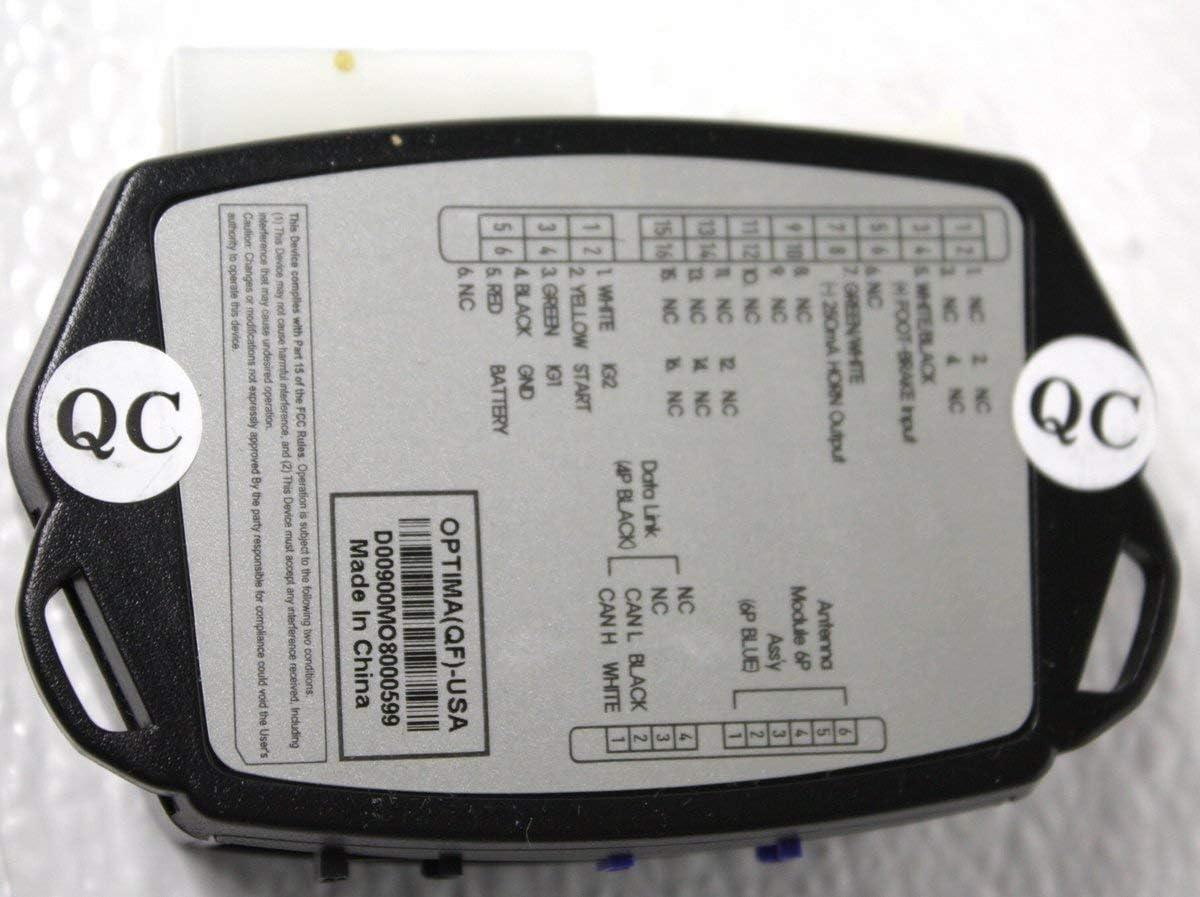
Figure 3.1: Rear view of the main control module with connection details.
The module includes connections for power, ground, data link, and signal wires for functions like horn output and brake input. Refer to the labels on the module for specific pin assignments.
3.2 Installation Steps (General Guidelines)
- Disconnect Battery: Always disconnect the vehicle's negative battery terminal before beginning any electrical work to prevent accidental shorts or damage.
- Mount Module: Identify a secure, dry, and accessible location within the vehicle's dashboard or under-dash area for mounting the main control module. Ensure it is away from excessive heat sources or moisture.
- Connect Wiring Harness: Connect the provided wiring harness to the main control module. Carefully identify and connect the harness wires to the appropriate vehicle circuits (e.g., ignition, constant power, ground, brake, door triggers, data lines). Vehicle-specific wiring diagrams are essential and are not included in this manual.
- Route and Secure Wiring: Route all wiring neatly and securely, away from moving parts, sharp edges, and heat sources. Use the provided cable ties to bundle and secure the wires.
- Reconnect Battery: Once all connections are made and secured, reconnect the vehicle's negative battery terminal.
- System Programming: Perform any necessary programming or pairing procedures for the remote key fobs and the remote start module as required by your specific vehicle model. This often involves a sequence of key turns, button presses, or diagnostic tool programming.
- Test System: Thoroughly test the remote start system according to the operating instructions to ensure all functions work correctly.
4. Operating Instructions
Once properly installed and programmed, your Kia 4UF60-AQ500 remote start system is ready for use.
4.1 Using the Remote Start Function

Figure 4.1: Remote key fobs for the Kia 4UF60-AQ500 system.
- Prepare Vehicle: Ensure your vehicle is in Park (P) and all doors, hood, and trunk are closed. The parking brake should be engaged for safety.
- Activate Remote Start: Press the 'ENGINE START STOP' button on your remote key fob (refer to Figure 4.1) twice within 3 seconds.
- Engine Start Confirmation: The vehicle's engine will start, and the parking lights may flash to confirm activation. The doors will remain locked. The climate control system will activate based on its last setting.
- Remote Shut-off: To turn off the engine remotely, press the 'ENGINE START STOP' button on the key fob once.
- Entering the Vehicle: To enter the vehicle after remote starting, unlock the doors using your standard key fob or vehicle's keyless entry system. Once inside, insert the key into the ignition and turn it to the 'ON' or 'RUN' position before pressing the brake pedal. This transfers control from the remote start system to the vehicle's ignition.
5. Maintenance
The Kia 4UF60-AQ500 remote start system is designed for minimal maintenance. Following these simple guidelines will help ensure its longevity and reliable operation:
- Key Fob Care: Keep the remote key fobs dry and protect them from extreme temperatures, direct sunlight, and physical impact.
- Battery Replacement: Replace the key fob battery when you notice a significant decrease in remote range or if any indicator light on the fob dims. Refer to the key fob's specific instructions (usually found in your vehicle's owner's manual) for the correct battery type and replacement procedure.
- Wiring Inspection: Periodically, or if you experience issues, have a qualified technician inspect the wiring connections to ensure they remain secure and free from corrosion or damage.
- Software Updates: In some cases, firmware updates for the remote start module may be available from Kia or your installer. Consult your dealer for more information.
6. Troubleshooting
This section addresses common issues you might encounter with your remote start system and provides potential solutions.
| Problem | Possible Cause / Solution |
|---|---|
| System does not respond to key fob commands. |
|
| Vehicle starts but immediately shuts off. |
|
| Reduced remote start range. |
|
| Remote start activates but vehicle does not start. |
|
If you continue to experience issues after attempting these solutions, please contact your installing dealer or an authorized Kia service center for further assistance.
7. Specifications
| Feature | Detail |
|---|---|
| Manufacturer | Kia |
| Brand | Kia |
| Item Weight | 1 pounds |
| Package Dimensions | 7 x 5 x 3 inches |
| Item Model Number | 4UF60-AQ500 |
| Manufacturer Part Number | 4UF60-AQ500 |
| ASIN | B01FTC0B3E |
| Date First Available | May 17, 2016 |
| Remote Control Included? | Yes |
8. Warranty and Support
This genuine Kia product is guaranteed against poor workmanship and material defects. For specific warranty terms and conditions, please refer to the documentation provided with your purchase or contact an authorized Kia dealership.
For technical support, installation assistance, or service, it is highly recommended to contact your installing dealer or an authorized Kia service center. They have the specialized tools and knowledge required to properly diagnose and service your remote start system.
You can find contact information for authorized Kia dealerships and service centers on the official Kia Motors website: www.kia.com


