
1. Introduction
This manual provides comprehensive instructions for the installation, operation, maintenance, and troubleshooting of the Mellanox MSN2700 Spectrum-Based 32-Port 100GbE Open Ethernet Platform. Please read this manual thoroughly before operating the device to ensure proper functionality and safety.
2. Safety Information
Observe the following safety precautions to prevent injury and damage to the equipment:
- Ensure proper grounding before connecting power.
- Do not operate the device in wet or humid conditions.
- Use only the specified power supplies.
- Do not block ventilation openings.
- Refer all servicing to qualified personnel.
Warning: This product may contain chemicals known to the State of California to cause cancer and birth defects or other reproductive harm. For more information, please visit www.P65Warnings.ca.gov.
3. Package Contents
The Mellanox MSN2700 package typically includes the following components. Please verify all items upon receipt:
- Mellanox MSN2700 Switch Unit
- Power Cords (quantity may vary based on region)
- Rack Mount Kit
- Documentation (Quick Start Guide, Safety Information)
Note: Specific included components may vary. Please refer to your product's packaging for an exact list.
4. Product Overview
The Mellanox MSN2700 is a high-performance 32-port 100GbE Open Ethernet switch designed for data center spine and top-of-rack (ToR) deployments. It offers flexible port speeds from 10Gb/s to 100Gb/s and is powered by the Spectrum ASIC, delivering 6.4Tb/s throughput in a compact 1RU form factor.
4.1 Front Panel Layout
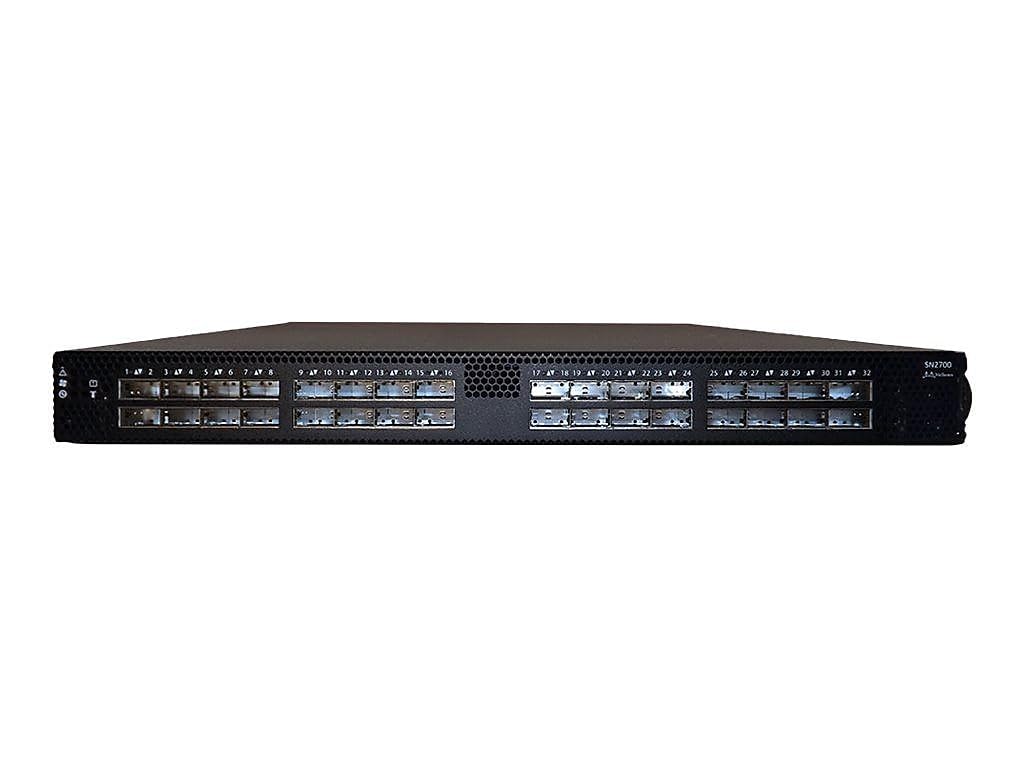
Figure 1: Front panel of the Mellanox MSN2700 switch. This image displays the front panel of the Mellanox MSN2700 switch, featuring 32 QSFP28 ports arranged in two rows. Each port is numbered from 1 to 32. The left side of the panel includes status indicators for power, system status, and fan. The right side shows the model name 'SN2700' and 'Mellanox' branding.
The front panel features 32 QSFP28 ports, providing high-density 100 Gigabit Ethernet connectivity. Status LEDs are located on the left side, indicating power, system health, and fan status. The ports are clearly numbered for easy identification and cabling.
4.2 Key Features
- 32 QSFP28 ports for 10/25/40/50/100GbE connectivity.
- 6.4Tb/s switching capacity with 4.76Bpps processing.
- Support for Software Defined Networking (SDN).
- Runs Onyx, Cumulus Linux, and other alternative operating systems via ONIE.
- Low power consumption.
- Zero Packet Loss capability.
5. Setup
5.1 Physical Installation
- Rack Mounting: Securely install the MSN2700 switch into a standard 19-inch equipment rack using the provided rack mount kit. Ensure adequate space for airflow around the unit.
- Power Connection: Connect the power supplies to a grounded AC power source. The device supports dual redundant power supplies for high availability.
- Grounding: Connect the chassis ground lug to a reliable earth ground.
5.2 Network Connections
- QSFP28 Ports: Insert QSFP28 transceivers or direct attach cables (DACs) into the 32 front-panel ports. Connect these to your servers or other network devices.
- Management Ports: Connect an Ethernet cable to the dedicated management port (typically RJ45) for out-of-band management. A console port (RJ45 or USB) may also be available for direct serial access.
6. Operating Instructions
6.1 Initial Configuration
The MSN2700 supports various network operating systems. The Open Network Install Environment (ONIE) allows for flexible OS installation.
- Accessing the Console: Connect a terminal emulator to the console port using the appropriate cable and settings (e.g., 115200 baud, 8 data bits, no parity, 1 stop bit).
- ONIE Boot: Upon power-on, the device will typically boot into ONIE. Follow the ONIE instructions to discover and install your preferred network operating system (e.g., Mellanox Onyx, Cumulus Linux).
- OS Configuration: Once the OS is installed, refer to the specific operating system documentation for initial network configuration, IP addressing, and management access setup.
6.2 LED Indicators
Monitor the front panel LEDs for system status:
- Power LED: Indicates power status (e.g., solid green for normal operation).
- System Status LED: Indicates overall system health (e.g., green for healthy, amber for warning, red for critical error).
- Fan LED: Indicates fan status (e.g., green for normal, amber for fan failure).
- Port LEDs: Each QSFP28 port has LEDs indicating link status and activity.
7. Maintenance
7.1 Cleaning
Regularly inspect and clean the device to ensure optimal performance and longevity:
- Power off and disconnect the device before cleaning.
- Use a soft, dry cloth to wipe the exterior.
- Use compressed air to clear dust from ventilation openings.
- Ensure optical transceivers and fiber optic cables are clean and free of dust.
7.2 Firmware and Software Updates
Periodically check the Mellanox (now NVIDIA Networking) support website for the latest firmware and software updates for your specific network operating system. Applying updates can improve performance, add features, and address security vulnerabilities. Follow the update procedures provided by the software vendor.
8. Troubleshooting
This section provides guidance for common issues. For more complex problems, consult the specific network operating system documentation or contact technical support.
8.1 No Power
- Verify power cords are securely connected to both the device and the power outlet.
- Check the power source and circuit breaker.
- Ensure the power supply units are properly seated.
8.2 No Link on Port
- Check the cable connection at both ends.
- Verify the transceiver is correctly inserted and compatible.
- Ensure the connected device is powered on and configured correctly.
- Check port configuration in the network operating system.
8.3 System Status LED Indicates Error
- Consult the network operating system's documentation for specific LED error codes or messages.
- Check system logs for detailed error information.
- Ensure proper ventilation and operating temperature.
9. Specifications
| Feature | Detail |
|---|---|
| Brand | Mellanox (now NVIDIA Networking) |
| Model Number | MSN2700-CS2F |
| Number of Ports | 32 |
| Interface Type | QSFP28 (10/25/40/50/100GbE) |
| Switching Capacity | 6.4 Tb/s |
| Processing Capacity | 4.76 Bpps |
| Form Factor | 1RU |
| Voltage | 48 Volts (DC) |
| Case Material | Metal |
| Product Dimensions | 35 x 23.5 x 6 inches |
| Operating Systems Supported | Onyx, Cumulus Linux, others via ONIE |
10. Warranty and Support
For information regarding product warranty, technical support, and service options, please refer to the official Mellanox (NVIDIA Networking) website or contact your authorized reseller. Keep your purchase receipt and product serial number readily available when seeking support.
Online resources and documentation can be found at the NVIDIA Networking support portal.
