Introduction
The Sony F-780 is a high-quality cardioid handheld dynamic microphone designed for critical live vocals and recording applications. It offers rugged reliability and excellent resistance to feedback, making it suitable for demanding performance environments.
Key Features:
- Cardioid (Unidirectional) Polar Pattern: Provides exceptional feedback rejection by focusing sound capture from the front.
- Urethane Coating: Minimizes handling noise for clear audio transmission.
- Rigid Structure: Allows for easy capsule movement, contributing to higher sensitivity and lower mechanical noise.
- Optimized for Vocals: Specifically designed for accurate vocal reproduction in live and studio settings.
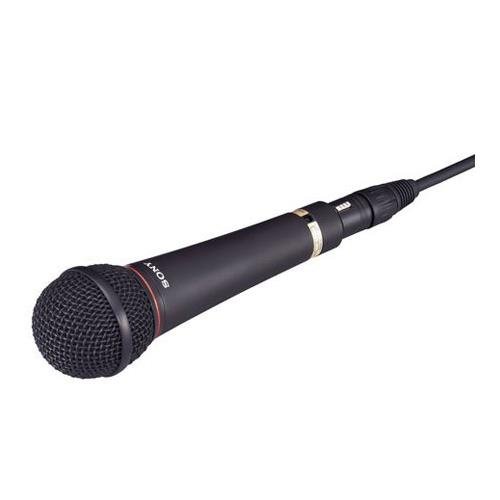
What's in the Box
Upon unpacking your Sony F-780 microphone, please ensure all components are present:
- Sony F-780 Dynamic Microphone
Setup
Connecting the Microphone
- Locate the XLR output connector at the base of the microphone.
- Connect a standard 3-pin XLR cable (not included) to the microphone's output. Ensure a secure connection.
- Connect the other end of the XLR cable to an input on your mixer, audio interface, or amplifier. Ensure the input is compatible with a dynamic microphone and provides appropriate gain.
Mounting
The Sony F-780 is designed for handheld use but can also be mounted on a microphone stand using a compatible microphone clip (often included with stands or sold separately). The microphone's rigid structure and urethane coating help reduce handling noise whether handheld or stand-mounted.
Operating Instructions
Optimal Performance
- Positioning: For best vocal reproduction, position the microphone directly in front of the sound source, typically 2-6 inches away. Experiment with distance to achieve the desired tone and presence.
- Gain Staging: Adjust the gain on your mixer or interface to achieve a strong signal without clipping. The F-780's high sensitivity allows for clear capture.
Feedback Control
The cardioid polar pattern of the F-780 is highly effective at rejecting sound from the sides and rear. To minimize feedback in live settings:
- Ensure stage monitors are positioned off-axis (not directly behind the microphone).
- Avoid pointing the microphone directly at loudspeakers.
- Utilize equalization on your mixer to cut problematic frequencies if feedback persists.
Maintenance
Cleaning
- Wipe the microphone body with a soft, dry cloth.
- For the grille, use a soft brush to gently remove any debris. Avoid using liquids directly on the grille or capsule.
Storage
Store the microphone in a dry, dust-free environment, preferably in its original packaging or a protective case, when not in use. Avoid extreme temperatures and humidity.
Troubleshooting
No Sound Output
- Check all cable connections to ensure they are secure.
- Verify that the input channel on your mixer or interface is selected and its gain is turned up.
- Test with a different XLR cable to rule out cable failure.
- Ensure the connected device (mixer, interface) is powered on.
Poor Sound Quality / Distortion
- Reduce the input gain on your mixer or interface if the signal is clipping.
- Ensure the microphone is positioned correctly relative to the sound source.
- Check for any damage to the microphone grille or capsule.
Excessive Feedback
- Reposition stage monitors or loudspeakers to avoid pointing them at the microphone.
- Lower the overall volume or specific frequency bands on your mixer.
- Ensure the microphone is being held or mounted correctly, utilizing its cardioid pattern.
Specifications
| Feature | Specification |
|---|---|
| Model Name | F780/9X |
| Brand | Sony |
| Microphone Form Factor | Handheld |
| Polar Pattern | Cardioid (Unidirectional) |
| Connectivity Technology | XLR |
| Power Source | Corded Electric |
| Material | Urethane (coating) |
| Item Weight | 1.25 pounds (approx. 0.57 kg) |
| Package Dimensions | 9 x 7 x 5 inches (approx. 22.86 x 17.78 x 12.7 cm) |
| Number of Channels | 1 |
| UPC | 636983057481 |
| ASIN | B01FSS7NOY |
| Date First Available | April 11, 2016 |
Warranty Information
Sony products are covered by a manufacturer's warranty. The specific terms and duration of the warranty may vary by region and product. Please refer to the warranty card included with your purchase or visit the official Sony website for detailed warranty information applicable to your location.
Support
For technical assistance, product inquiries, or service requests, please contact Sony customer support. You can find contact information, including phone numbers and online support resources, on the official Sony website:
Please have your product model number (F780/9X) and purchase date available when contacting support.