
1. Important Safety Information
Please read all instructions carefully before using this treadmill. Keep this manual for future reference. Failure to follow these instructions could result in injury or damage to the product.
- Consult your physician before beginning any exercise program.
- Keep children and pets away from the treadmill during operation.
- Place the treadmill on a level surface with adequate clearance around it.
- Wear appropriate exercise clothing and athletic shoes.
- Do not operate the treadmill if it is damaged or malfunctioning.
- Always use the safety key during operation.
- Maximum user weight: 250 pounds (113 kg).
2. Product Overview
The Weslo Cadence R 5.2 Treadmill is designed for home fitness, offering features to support various workout intensities. It includes a powerful motor, adjustable incline, and a comfortable running surface.
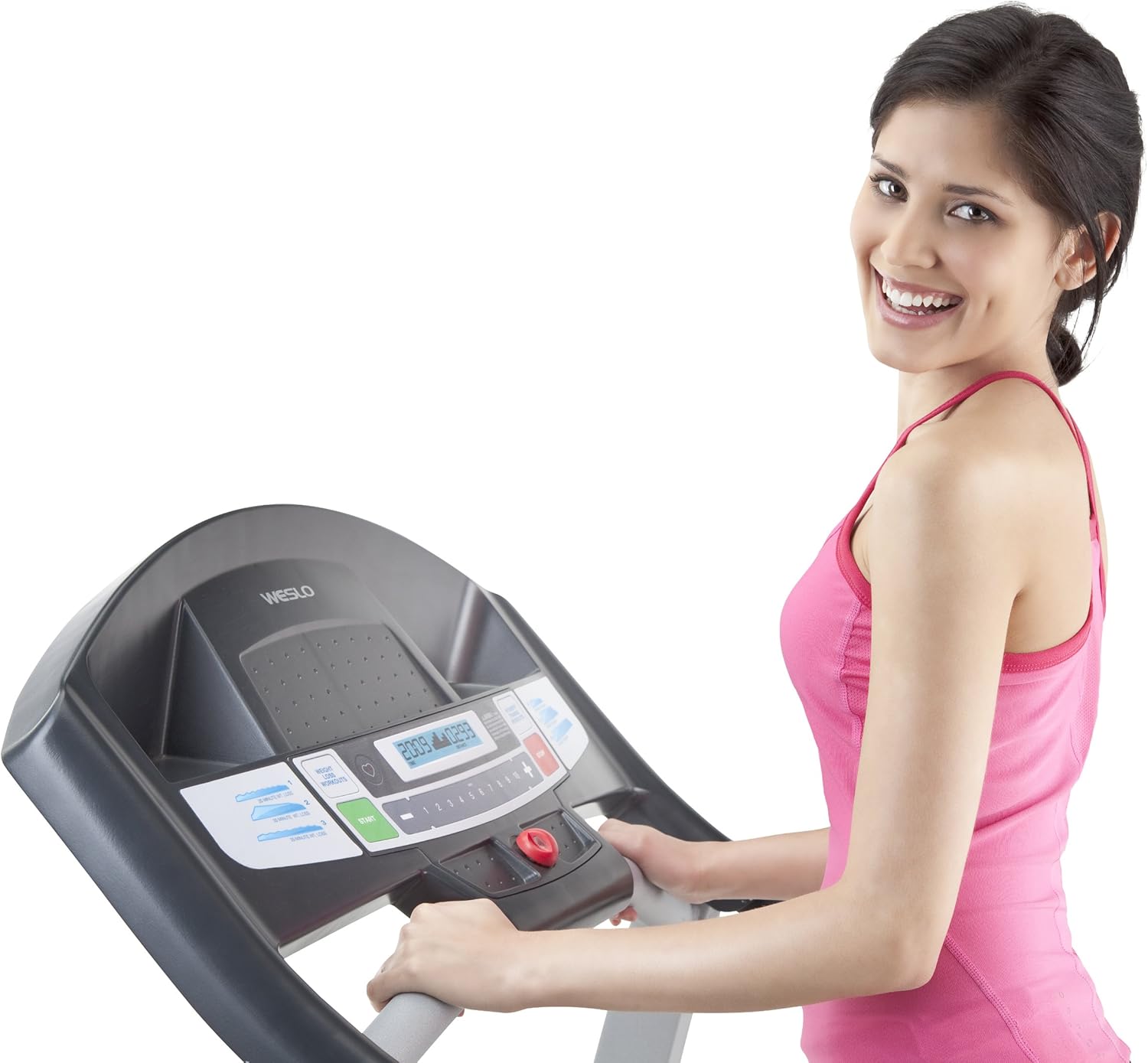
Figure 2.1: Treadmill Console. This image shows the control panel of the Weslo Cadence R 5.2 Treadmill, featuring the LCD display, speed adjustment buttons, and pre-set workout selections.
Key Features:
- 2.5 CHP Impulse Max Motor: Provides consistent power for various training types.
- 16" x 50" Tread Belt: Offers a spacious and comfortable walking or running surface.
- Comfort Cell Cushioning: Reduces impact on joints for a more comfortable workout.
- 2-Position Adjustable Incline: Allows for varied intensity and calorie burn.
- SpaceSaver Design: Enables easy folding for convenient storage.
- Large LCD Display: Tracks speed, time, distance, and calories burned.
3. Setup and Assembly
The Weslo Cadence R 5.2 Treadmill is designed for straightforward setup. While some components may require attachment, the primary structure is largely pre-assembled.
3.1 Unpacking and Placement
- Carefully remove all packaging materials from the treadmill.
- Place the treadmill on a flat, stable surface. Ensure there is at least 6 feet (1.8 meters) of clear space behind the treadmill and 2 feet (0.6 meters) on each side.
- Connect the power cord to a grounded outlet.

Figure 3.1: Treadmill Ready for Use. This image displays the Weslo Cadence R 5.2 Treadmill fully assembled and positioned for operation.
4. Operating Instructions
Familiarize yourself with the console and controls before starting your workout.
4.1 Starting a Manual Workout
- Ensure the safety key is properly inserted into the console.
- Step onto the treadmill belt.
- Press the START button. The belt will begin to move at a low speed.
- Adjust the speed using the + and - buttons on the console.
- To stop, press the STOP button or pull the safety key.

Figure 4.1: User Running on Treadmill. This image shows an individual actively running on the Weslo Cadence R 5.2 Treadmill, highlighting its operational use.
4.2 Using Pre-set Workout Programs
The treadmill includes six built-in weight loss programs designed by a certified personal trainer.
- With the treadmill stopped, press the WEIGHT LOSS WORKOUTS button to cycle through the available programs.
- Once you select a program, press START to begin. The treadmill will automatically adjust speed and incline according to the program.
4.3 Adjusting Incline
The treadmill features a 2-position adjustable incline to increase workout intensity.
- To adjust the incline, manually lift or lower the rear of the treadmill deck to one of the two available positions.
- Ensure the incline mechanism is securely locked in place before use.
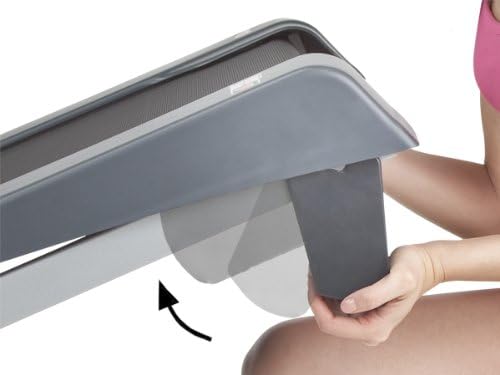
Figure 4.2: Manual Incline Adjustment. This image illustrates the manual adjustment point for changing the incline level of the treadmill deck.
4.4 SpaceSaver Design (Folding)
To save space, the treadmill deck can be folded vertically.
- Ensure the treadmill is turned off and unplugged.
- Lift the running deck until it locks into the vertical storage position.
- To unfold, gently release the locking mechanism and lower the deck to the floor.

Figure 4.3: Folding the Treadmill. This image demonstrates the SpaceSaver feature, showing a user folding the treadmill deck for compact storage.
5. Maintenance
Regular maintenance ensures the longevity and optimal performance of your treadmill.
5.1 Cleaning
- Wipe down the console and other surfaces with a damp cloth after each use. Avoid abrasive cleaners.
- Periodically vacuum underneath the treadmill to prevent dust buildup.
5.2 Belt Lubrication
The treadmill belt may require lubrication over time. Refer to the specific lubrication instructions provided with your treadmill or contact customer support for guidance on the correct lubricant and procedure.
5.3 Belt Adjustment
If the walking belt begins to slip or track off-center, it may need adjustment. Consult the detailed instructions in your full product manual or contact customer support for assistance.
6. Troubleshooting
This section addresses common issues you might encounter with your treadmill.
| Problem | Possible Solution |
|---|---|
| Treadmill does not start | Ensure the power cord is securely plugged in and the safety key is fully inserted. Check the circuit breaker. |
| Walking belt slips or hesitates | The walking belt may need tensioning or lubrication. Refer to maintenance section or contact support. |
| Unusual noises during operation | Check for loose parts. Ensure the treadmill is on a level surface. If noise persists, contact customer support. |
| Console display is not working | Check power connection. Ensure all console cables are properly connected. |
If you experience issues not listed here or if solutions do not resolve the problem, please contact customer support.
7. Specifications
| Feature | Detail |
|---|---|
| Brand | Weslo |
| Model Name | Weslo Cadence R 5.2 |
| Model Number | 56798 |
| Motor | 2.5 CHP Impulse Max Motor |
| Walking Belt Dimensions | 16 inches (width) x 50 inches (length) |
| Maximum Speed | 10 Miles per Hour |
| Incline | 2-Position Adjustable Incline |
| Cushioning | Comfort Cell Cushioning |
| Display Type | LCD |
| Maximum User Weight | 250 Pounds |
| Item Weight | 118 Pounds |
| Frame Material | Steel |
| Power Source | Corded Electric |
| UPC | 043619376432 |
8. Warranty and Support
8.1 Warranty Information
The Weslo Cadence R 5.2 Treadmill comes with a 5 Year Frame Warranty. For detailed terms and conditions, please refer to the warranty card included with your product or visit the official Weslo website.
8.2 Customer Support
For technical assistance, parts replacement, or any questions regarding your treadmill, please contact Weslo customer support. Have your model number (56798) and serial number ready when contacting support.


