
Roll-N-Lock CM449

Roll-N-Lock Cargo Manager
Instruction Manual for Model CM449
Product Overview
The Roll-N-Lock Cargo Manager is an innovative, movable truck bed divider designed to help organize and secure lightweight cargo within your truck bed. It is an optional companion product specifically engineered to work seamlessly with Roll-N-Lock retractable truck bed covers.
This system allows you to position the divider at various points along the length of the truck bed, preventing items from shifting during transit. Its user-friendly design ensures easy repositioning and removal when needed. The unit weighs approximately 11 pounds, facilitating easy handling.

Image: The Roll-N-Lock Cargo Manager installed in the rear of a truck bed, demonstrating its primary function as a cargo divider.
Compatibility and Important Notes
Important: The Cargo Manager is designed to attach exclusively to the rails of Roll-N-Lock truck bed covers. It is not intended for use as a standalone item or with truck bed covers from other brands. Ensure your truck bed cover is a Roll-N-Lock model for proper functionality and installation.
This product is compatible with 2009 - 2018 and 2019 - 2020 Classic Dodge Ram 1500/2500/3500 8' 2" Bed (98.3") models when paired with a compatible Roll-N-Lock tonneau cover.
Setup and Installation
The Cargo Manager is designed for straightforward installation onto existing Roll-N-Lock tonneau cover rails. While specific detailed steps are typically provided with the product packaging, the general process involves securing the divider's side mechanisms to the integrated tracks of your Roll-N-Lock cover.
- Preparation: Ensure your Roll-N-Lock truck bed cover is properly installed and its rails are clean and free of debris.
- Positioning: Align the Cargo Manager with the tracks on both sides of the truck bed cover rails.
- Engagement: Gently lower the Cargo Manager onto the rails, ensuring the locking mechanisms engage with the rail slots. The spring-activated mechanism will help secure it.
- Verification: Test the movement of the Cargo Manager along the rails to ensure it slides smoothly and locks securely into position at various points.

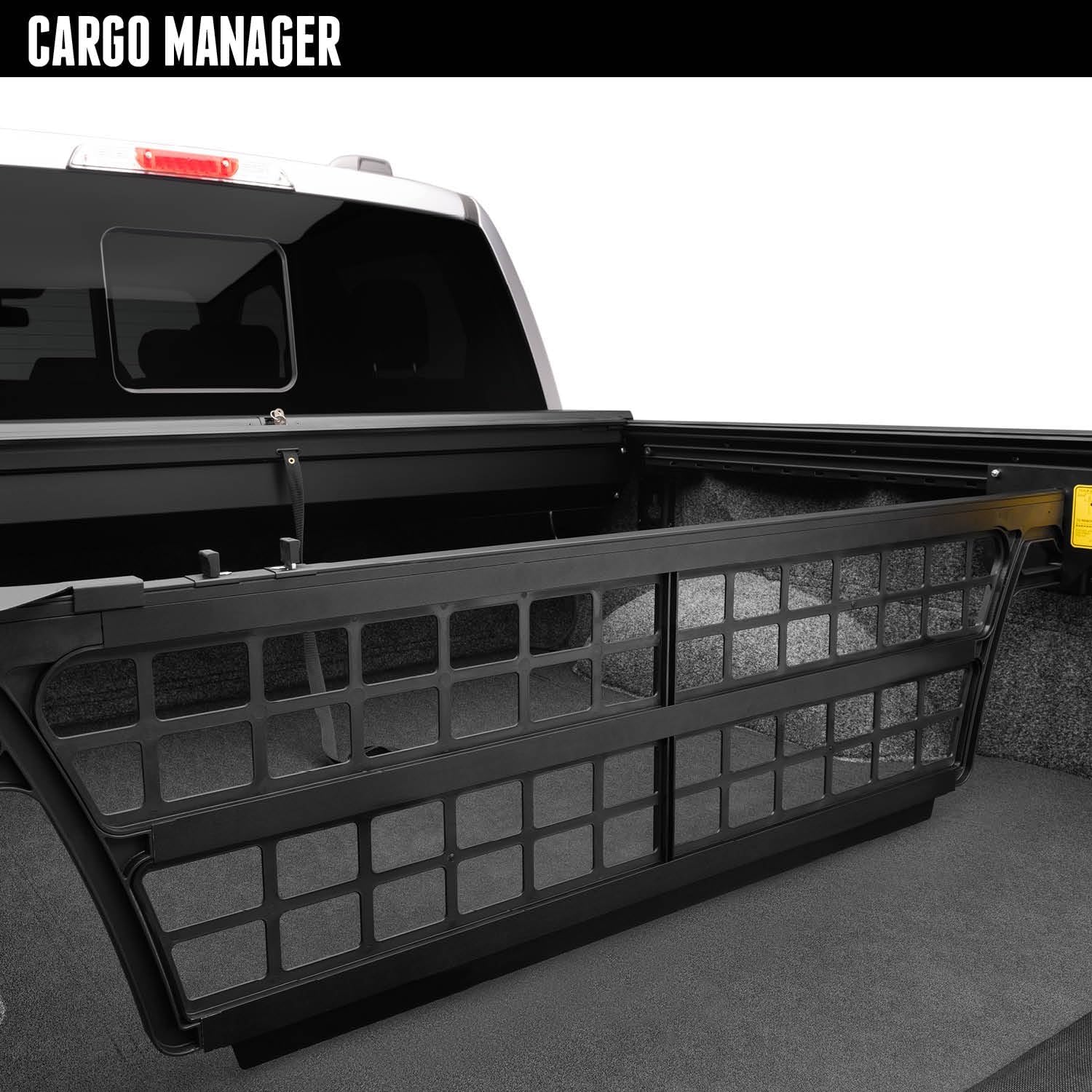
Image: Left: A close-up view of the Cargo Manager's attachment point on the truck bed cover rail, showing the mechanism that engages with the track. Right: The Cargo Manager installed in a truck bed, viewed from the side, illustrating its position relative to the truck's cab.
Operating Instructions
The Cargo Manager offers versatile cargo management through its easy-to-use design.
- Repositioning the Divider:
To move the Cargo Manager, access the control levers located on the driver's side. Simply squeeze these levers to disengage the divider from its current slot. Once disengaged, the Cargo Manager can be smoothly glided along the rails to your desired position. Release the levers, and the spring-activated mechanism will automatically pin the divider to the nearest available slot in the sidetrack, securing it in place.


Image: Left: A close-up view of the control levers on the Cargo Manager. Right: A hand demonstrating the operation of the levers to adjust the divider's position.
- Securing Cargo:
Once positioned, the Cargo Manager effectively contains lightweight cargo, preventing it from shifting or sliding around the truck bed, especially during sudden stops or turns. For optimal security, ensure cargo is placed snugly against the divider.


Image: Left: The Cargo Manager positioned to secure a cooler and other items in the truck bed. Right: A closer view of a cooler held in place by the Cargo Manager, demonstrating its cargo containment capability.
- Flip-Up Feature for Long Items:
For hauling longer items that need to extend underneath the Cargo Manager, utilize the flip-up feature. By disengaging the divider and swiveling it upwards, it can be locked into a parallel position approximately 12 inches above the bed floor. This creates clearance for items to slide underneath while still providing some containment.

Image: The Cargo Manager shown in its elevated, flip-up position, allowing longer items to be stored underneath.
- Removing the Cargo Manager:
When full bed access is required for large items like appliances, the Cargo Manager can be easily and quickly removed. Disengage the locking mechanisms and lift the unit out of the rails. Its lightweight design facilitates easy handling.
Maintenance
To ensure the longevity and smooth operation of your Roll-N-Lock Cargo Manager, follow these simple maintenance guidelines:
- Cleaning: Periodically clean the Cargo Manager and the truck bed cover rails with mild soap and water. Rinse thoroughly and allow to dry. Avoid abrasive cleaners or solvents that could damage the material.
- Lubrication: Occasionally apply a silicone-based lubricant to the rail tracks to ensure the Cargo Manager slides smoothly. Do not use oil-based lubricants as they can attract dirt and debris.
- Inspection: Regularly inspect the locking mechanisms and the overall structure for any signs of wear, damage, or loose components. Address any issues promptly to maintain optimal performance.
Troubleshooting
If you encounter issues with your Cargo Manager, consider the following common troubleshooting steps:
- Difficulty Moving: If the Cargo Manager is difficult to slide along the rails, check for any obstructions in the tracks (e.g., dirt, debris). Clean the tracks thoroughly and apply a silicone lubricant as described in the Maintenance section. Ensure the control levers are fully squeezed when attempting to move the unit.
- Not Locking Securely: If the divider does not lock firmly into place, inspect the locking pins and the rail slots for damage or obstructions. Ensure the Cargo Manager is properly aligned with the rail system.
- Unusual Noises: Any squeaking or grinding noises during operation may indicate a need for cleaning and lubrication of the rails.
If these steps do not resolve the issue, please refer to the Support section for further assistance.
Specifications
| Feature | Detail |
|---|---|
| Brand | Roll-N-Lock |
| Model Name | Cargo Manager |
| Item Model Number | CM449 |
| Material | Plastic |
| Exterior Finish | Aluminum (for associated cover rails) |
| Item Weight | 1 pounds |
| Product Dimensions | 66 x 18 x 3 inches |
| UPC | 725478162592 |
| OEM Part Number | CM449 |
| Manufacturer | Roll-N-Lock |
Warranty and Support
Warranty: The Roll-N-Lock Cargo Manager is backed by a three-year warranty from the manufacturer, Roll-N-Lock. This warranty covers defects in materials and workmanship under normal use.
Support: For technical assistance, warranty claims, or any questions regarding your Cargo Manager, please contact Roll-N-Lock customer support directly. Refer to the contact information provided on the official Roll-N-Lock website or your product packaging for the most current support details.
Ask a question about this manual
Ask about setup, troubleshooting, compatibility, parts, safety, or missing instructions. Manuals+ will review the question and use this page’s manual context to help answer it.