
1. Introduction
This manual provides essential instructions for the safe and efficient operation of your Fellowes Spectra 125 Laminator. Please read this guide thoroughly before using the device to ensure proper setup, usage, and maintenance. Retain this manual for future reference.
2. Important Safety Instructions
- Always plug the laminator into a grounded electrical outlet.
- Do not operate the laminator with a damaged power cord or plug.
- Keep hands, hair, and loose clothing away from the feed opening.
- Do not laminate metal objects or items thicker than the specified maximum.
- Unplug the laminator when not in use or before cleaning.
- Do not immerse the laminator in water or other liquids.
- This appliance is not intended for use by children. Supervise children around the device.
- Ensure adequate ventilation around the laminator during operation.
3. Product Overview
The Fellowes Spectra 125 Laminator is designed for personal and home office use, providing a simple and effective way to protect documents and photos. Familiarize yourself with the components below.

Figure 3.1: Top-down view of the Fellowes Spectra 125 Laminator. The device features a sleek black and silver design with control buttons on the front panel.
Key Components:
- Power Switch: Located on the side or rear, turns the unit on/off.
- Power Indicator Light: Illuminates when the laminator is powered on.
- Ready Indicator Light: Illuminates when the laminator has reached optimal operating temperature.
- Pouch Thickness Selector: Allows selection between 3 mil and 5 mil pouches.
- Entry Slot: Where the laminating pouch is inserted.
- Exit Slot: Where the laminated document emerges.
- Release Lever: Used to disengage rollers in case of a jam.
4. Setup
- Unpack: Carefully remove the laminator from its packaging. Retain packaging for storage or transport.
- Placement: Place the laminator on a stable, flat surface. Ensure there is enough clear space behind the machine for laminated items to exit freely.
- Power Connection: Plug the power cord into a standard electrical outlet.
- Power On: Turn on the laminator using the power switch. The power indicator light will illuminate.
- Warm-up: Allow the laminator to warm up. The ready indicator light will illuminate (typically green) when the machine is ready for use. This usually takes a few minutes.
5. Operating Instructions
Follow these steps for successful lamination:
- Prepare Document: Place the document or item to be laminated inside a laminating pouch. Ensure the item is centered and leaves a small margin around the edges for a proper seal.
- Select Pouch Thickness: Adjust the pouch thickness selector on the laminator to match the mil thickness of your pouch (e.g., 3 mil or 5 mil).
- Wait for Ready Light: Ensure the ready indicator light is illuminated, indicating the laminator has reached the correct temperature.
- Insert Pouch: Insert the sealed edge of the laminating pouch into the laminator's entry slot. Feed it straight and evenly. The laminator will automatically pull the pouch through.
- Retrieve Laminated Item: Once the pouch exits the rear of the machine, carefully remove the laminated document. It may be warm, so handle with care.
- Cool Down: Allow the laminated item to cool on a flat surface for a few moments to ensure a firm seal and prevent curling.
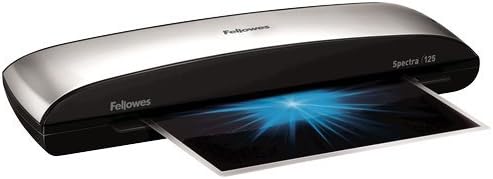
Figure 5.1: The Fellowes Spectra 125 Laminator actively processing a document. A laminating pouch with a document is shown exiting the machine, indicating the lamination process is underway.
Tips for Best Results:
- Use high-quality laminating pouches for optimal results.
- Do not force pouches into the entry slot.
- If laminating multiple items, allow the machine to maintain its temperature between uses.
6. Maintenance
Regular maintenance ensures the longevity and performance of your laminator.
- Cleaning: Unplug the laminator and allow it to cool completely. Wipe the exterior with a soft, damp cloth. Do not use abrasive cleaners or solvents.
- Roller Cleaning: Occasionally, run a laminator cleaning sheet (available separately) through the machine to remove adhesive residue from the rollers.
- Storage: Store the laminator in a clean, dry place when not in use.
7. Troubleshooting
| Problem | Possible Cause | Solution |
|---|---|---|
| Laminator not turning on. | No power, power switch off. | Check power cord connection. Ensure power switch is in the 'ON' position. Test outlet with another device. |
| Laminated document is cloudy or has bubbles. | Incorrect temperature, low-quality pouch, item too thick. | Ensure ready light is on. Use recommended Fellowes pouches. Do not laminate items thicker than 5 mil. |
| Pouch jams in the machine. | Pouch inserted incorrectly, item too thick, adhesive residue on rollers. | Immediately use the Release Lever to disengage rollers and carefully pull out the pouch. Ensure pouch is inserted sealed-edge first and straight. Clean rollers with a cleaning sheet. |
| Laminated document is curling. | Rapid cooling, uneven heat distribution, pouch quality. | Allow laminated items to cool completely on a flat surface. Ensure the laminator has fully warmed up. Consider using Fellowes brand pouches. |
8. Specifications
- Model: Fellowes Spectra 125 (FEL5739701)
- Lamination Width: Up to 12.5 inches
- Lamination Thickness: 3 mil and 5 mil pouches
- Warm-up Time: Approximately 4 minutes
- Item Weight: 3.75 pounds
- Compatible Sheet Sizes: A4, Letter
- Manufacturer: Fellowes, Inc.
9. Warranty and Support
For warranty information, technical support, or to purchase accessories and replacement parts, please visit the official Fellowes website or contact their customer service department. Keep your purchase receipt as proof of purchase.
Fellowes Official Website: www.fellowes.com


