1. Introduction and Overview
The CALPEDA EASYMAT 9,2MT is a variable speed system driven by a frequency converter, designed for precise pressure control in domestic and residential pumping applications. This system ensures optimal pump operation by maintaining constant pressure regardless of flow demand, leading to energy savings and extended pump life.
Model: EASYMAT 9,2MT
Input: Single phase 230 V, 50/60 Hz
Output: Three phase 230 V, max 70 Hz
Max Output Current: 9.2 A
Motor Power: 2.2 kW
The unit features an aluminum housing for efficient heat dissipation and is designed for simple installation by connecting directly to the pump's delivery pipe.
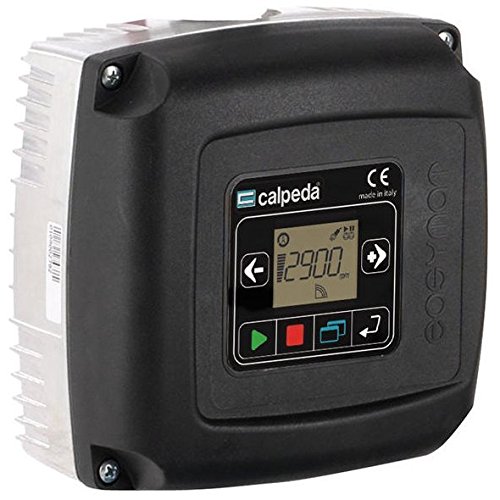
Figure 1: CALPEDA EASYMAT 9,2MT unit installed with a pump.
2. Features
- Constant Pressure Mode: The EASYMAT utilizes a frequency inverter to maintain constant pressure as water demand changes, ensuring stable system performance.
- Energy Saving: Variable speed operation ensures that only the necessary energy is consumed by the pump at any given moment, optimizing efficiency.
- System Reliability: The EASYMAT's operation is independent of the pumped liquid, making it resilient to fluid impurities. It supports integration with a float switch for dry-running protection.
- Installation Flexibility: Its patented design prevents contact with the pumped fluid, offering greater flexibility during installation and reducing the need for extensive pipe modifications or isolating valves.
- User-Friendly Interface: Equipped with a clear LCD display for straightforward setup and monitoring.
- Cascade Control Mode: Microprocessor-enabled flexibility allows for cascade operation of up to two EASYMAT units using a single pressure transducer.
3. Applications
The EASYMAT 9,2MT is suitable for automatic frequency inverter control in various pumping scenarios, primarily to:
- Increase network pressure in domestic and residential water supply systems.
- Maintain constant pressure by controlling pump operation in response to changing system demand.
It also provides comprehensive protection for the pump against:
- Dry running conditions.
- Operation with closed connection ports.
- Motor overcurrent.
- Overvoltage and undervoltage of the power supply.
4. Operating Conditions
- Input Voltage: 1~230V ±10%
- Output Voltage: 3~230V
- Input Frequency: 50-60 Hz
- Output Frequency: Up to 70 Hz
- Protection Rating: IP 55
- Max Ambient Temperature: 40°C
- Max Liquid Temperature: 40°C (50°C for 5MM, 5MT models)
- Minimum Flow: 3 l/min
- Altitude: No higher than 1000 m, in a closed environment.
5. Construction and Components
The EASYMAT system is designed for compact installation and efficient cooling. It includes:
- A pressure transducer (G 1/4 connection) with a 1.5 m cable.
- Pipe housing.
- Fixing screws.
- Terminal board.
- Cable glands.
- Multi-hole gaskets.

Figure 2: Exploded view of the EASYMAT unit, highlighting key internal components.
- Electronic card with protective coating.
- Integrated control panel with 6 buttons and LCD display.
- Square cover allowing four different mounting positions.
- High efficiency aluminum heatsink.
- G1 and G1 1/4 aluminum pipe housing (G 1 1/2 on request).
6. Control Panel and Display
The EASYMAT is equipped with an integrated control panel for system programming and monitoring. It features an LCD custom display and six buttons for navigation and control.
Figure 3: Control Panel of the EASYMAT unit.
6.1. Control Panel Functions
- Scroll Buttons (2): Used to navigate through different operating parameters displayed on the LCD. These buttons also allow movement within the setup menu and modification of options.
- Setup Buttons (4): These buttons enable movement between menus, system setup, and starting/stopping the pump. Symbols on the buttons clarify their functions.
- The combination of these six buttons allows full management of all setup and operating parameters without external control panels or computers.
6.2. LCD Display
The integrated LCD provides a clear overview of the system's status and operating parameters. Icons at the top and bottom of the display indicate the EASYMAT's current operating mode and any system issues.
Figure 4: Detailed view of the EASYMAT LCD display.
6.3. Operating Icons
- Constant Pressure Mode: Indicates the system is maintaining a constant pressure by adjusting pump speed according to user-defined settings and water demand.
- Fixed Speed Mode: Indicates the system is operating at a user-selected fixed speed.
6.4. System Icons
- Auto Mode: Signifies that the system is operating in automatic constant pressure mode. The constant pressure icon is also displayed.
- Manual Mode: Indicates the system is in manual (fixed speed) mode. Navigation buttons can be used to change the speed. The fixed speed icon is displayed.
- Set-up Mode: Shows that the setup menu is active, allowing modification of operating parameters using navigation buttons.
- Energy Mode: Indicates that the system is operating in energy-saving mode.
- Sensor State: Displays the status of the connected pressure transducer. An issue or incorrect connection will be indicated if the transducer is not working.
- Alarm: Indicates a system fault. An error number will appear in the display area.
- Cascade Mode: Indicates multi-pump operation (up to 2 pumps). The upper icon shows if the pump connected to the frequency converter is running or in standby. The lower icon indicates if the pump is the master (M) or slave (S, blinking) pump.
7. Dimensions and Weights
The EASYMAT 9,2MT unit has the following approximate dimensions and weight:
- Weight: 1.9 kg
Figure 5: Dimensions of the EASYMAT unit (measurements in mm).
8. Installation
Proper installation is crucial for the optimal performance and longevity of the EASYMAT system. Always ensure the power supply is disconnected before beginning installation.
8.1. General Installation Guidelines
- Mount the EASYMAT unit securely to the delivery pipe of the pump.
- Ensure adequate ventilation around the unit for proper heat dissipation.
- Connect the pressure transducer (G 1/4) to the system.
- Connect the EASYMAT to the electric motor and the main power supply (1x230V).
- Verify all connections are tight and secure.
8.2. Installation Examples
The EASYMAT can be integrated into various pumping systems:
Figure 6: Examples of EASYMAT installation for one, two, and three pump systems.
8.3. Plant Conversion Scheme (Fixed Speed to Variable Speed)
The EASYMAT facilitates easy conversion of existing fixed-speed pump systems to variable speed without extensive pipe modifications.
Figure 7: Conversion from a fixed speed system to a variable speed system using EASYMAT.
To convert an existing fixed speed system:
- Disconnect the existing pressure switch from the system.
- Connect the new pressure transducer (supplied with EASYMAT) in the same housing.
- Connect the EASYMAT unit to the pipework.
- Connect the EASYMAT to the electric motor.
- Connect the supply cable to the electrical grid.
9. Setup and Initial Configuration
After physical installation, the EASYMAT requires initial setup using its control panel.
- Power On: Connect the EASYMAT to the main power supply. The LCD display will illuminate.
- Access Setup Menu: Use the setup buttons to enter the configuration menu.
- Set Operating Pressure: Navigate to the pressure setting parameter and adjust the desired constant pressure using the scroll buttons.
- Configure Motor Parameters: Input relevant motor data (e.g., power, current) if prompted.
- Select Operating Mode: Choose between Constant Pressure Mode or Fixed Speed Mode based on application requirements.
- Save Settings: Confirm and save all configured parameters before exiting the setup menu.
10. Operation
Once configured, the EASYMAT operates automatically to manage pump functions.
- Start/Stop Pump: Use the designated buttons on the control panel to manually start or stop the pump. In Auto Mode, the pump will start and stop based on demand.
- Monitor Display: Regularly check the LCD display for current operating parameters such as pressure, frequency, and current.
- Observe Icons: Pay attention to the operating and system icons to understand the current status and identify any warnings or alarms.
- Adjust Settings (if needed): If operating conditions change, re-enter the setup menu to modify parameters as required.
11. Maintenance
Regular maintenance ensures the long-term reliability and efficiency of your EASYMAT system.
- Visual Inspection: Periodically inspect the unit for any signs of damage, loose connections, or corrosion.
- Cleaning: Keep the control panel and ventilation openings clean and free from dust and debris to ensure proper cooling. Use a soft, dry cloth.
- Connection Checks: Ensure all electrical and pipe connections remain secure.
- Pressure Transducer: Verify the pressure transducer is clean and functioning correctly.
- Professional Service: For any internal repairs or complex issues, contact qualified service personnel.
12. Troubleshooting
If the EASYMAT system encounters an issue, the display may show an alarm icon or error number. Refer to the following general troubleshooting steps:
- Alarm Icon Displayed: Check the LCD for a specific error code or message. Consult the full product manual (if available) for detailed error code explanations.
- No Power: Verify the main power supply connection and check circuit breakers.
- Pump Not Starting: Ensure the unit is in Auto Mode or manually started. Check for dry running protection activation or motor overcurrent alarms.
- Inconsistent Pressure: Check the pressure transducer connection and ensure it is functioning correctly. Verify the set pressure in the setup menu.
- System Fault: If an unresolvable fault occurs, disconnect power and contact CALPEDA technical support.
13. Specifications
| Parameter | Value |
|---|---|
| Brand | CALPEDA |
| Model | EASYMAT 9,2MT |
| Part Number | 44022200000 |
| Input Voltage | 1x230V ±10% |
| Input Frequency | 50/60 Hz |
| Output Voltage | 3x230V |
| Output Frequency | Up to 70 Hz |
| Max Output Current | 9.2 A |
| Motor Power | 2.2 kW |
| Protection Rating | IP 55 |
| Material | Aluminum |
| Max Ambient Temperature | 40°C |
| Max Liquid Temperature | 40°C (50°C for 5MM, 5MT) |
| Minimum Flow | 3 l/min |
| First Available Date | 12 May 2016 |
14. Warranty and Support
For warranty information, technical support, or service inquiries, please refer to the official CALPEDA website or contact your authorized dealer. Keep your purchase receipt and product model number (EASYMAT 9,2MT) readily available when seeking support.


