
Introduction
This manual provides detailed instructions for the installation, operation, and maintenance of your Sanwa JLF-TP-8YT Joystick and OBSF-30 Push Button Bundle Kit. These components are designed for arcade game applications, offering precise control and durability. Please read this manual thoroughly before installation and use.
Product Overview
The Sanwa JLF-TP-8YT joystick is a high-quality arcade joystick known for its short travel and light spring pressure, enabling quick and accurate inputs. The Sanwa OBSF-30 push buttons are snap-in type buttons featuring non-clicking micro switches for smooth, responsive, and quiet operation.

Image: Sanwa JLF-TP-8YT Joystick and OBSF-30 Push Button Bundle Kit (Gray color variant).
Setup and Installation
1. Joystick Installation (JLF-TP-8YT)
The JLF-TP-8YT joystick is suitable for control panels made of steel or plastic, with a maximum thickness of 5mm. It is compatible with most Hori and MadCatz joysticks.
- Mounting: Secure the joystick to your control panel using appropriate hardware. Ensure the mounting plate is flush against the panel.
- Wiring: Connect the included wiring harness to the joystick's 5-pin connector. The other end of the wires will connect to your arcade PCB or controller board. Refer to your specific board's documentation for correct pin assignments.
- 4-Way/8-Way Operation: The joystick can be switched between 4-way and 8-way operation using the included restrictor plate. To adjust, remove the restrictor plate from the bottom of the joystick, rotate it to the desired orientation (square for 8-way, diamond for 4-way), and re-secure it.

Image: Sanwa JLF-TP-8YT Joystick with pre-attached wiring harness.
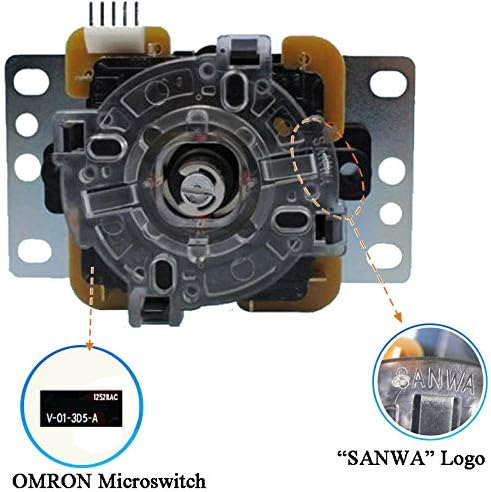
Image: Underside of the JLF-TP-8YT joystick, highlighting the OMRON microswitches and the Sanwa logo for authenticity.
2. Push Button Installation (OBSF-30)
Sanwa OBSF-30 buttons are snap-in type and fit into 30mm diameter holes. They are designed for custom joysticks using metal control panels.
- Mounting: Insert the button into the 30mm hole on your control panel. The snap-in tabs will secure it in place.
- Wiring: Each button has two terminals for connection. Connect one terminal to the signal input of your arcade PCB/controller board and the other to ground. The vertical microswitch has .110" lugs.

Image: Eight Sanwa OBSF-30 Push Buttons in Gray, ready for installation.

Image: Underside of the OBSF-30 push button, showing the terminals and the Sanwa logo.
Operation
Once installed and connected to your arcade system or compatible controller, the Sanwa JLF-TP-8YT joystick and OBSF-30 buttons provide a responsive and precise control experience. The joystick's light spring and short travel allow for quick directional changes, while the buttons offer fast reactive time and quick reset for rapid inputs.
- Joystick: Manipulate the ball top to control movement or direction in your game. The 4-way or 8-way setting determines the available directional inputs.
- Push Buttons: Press the buttons for actions such as attacking, jumping, or selecting options. The non-clicking micro switches ensure quiet and smooth actuation.
Maintenance
To ensure the longevity and optimal performance of your Sanwa components, follow these general maintenance guidelines:
- Cleaning: Periodically wipe down the joystick ball top and button surfaces with a soft, damp cloth. Avoid using harsh chemicals or abrasive cleaners.
- Inspection: Regularly check for any loose connections or wear on the wiring. Ensure the joystick's restrictor plate is securely in place.
- Storage: If storing your arcade setup, ensure it is in a dry, dust-free environment to prevent damage to the internal components.
Troubleshooting
If you encounter issues with your Sanwa joystick or buttons, consider the following:
- Unresponsive Inputs:
- Check all wiring connections to ensure they are secure and correctly seated on both the joystick/buttons and the control board. A loose connection can cause intermittent or complete unresponsiveness.
- Verify that the microswitches on the joystick and buttons are functioning correctly. You can often hear a faint click when actuated, or test continuity with a multimeter if available.
- Incorrect Directional Input (Joystick):
- Ensure the restrictor plate is correctly installed for your desired 4-way or 8-way operation. An improperly seated plate can lead to incorrect diagonal or cardinal inputs.
- Confirm that the joystick's wiring harness is fully inserted into the 5-pin connector. Sometimes, pins may not make full contact.
- Buttons Not Registering:
- Inspect the button terminals and wiring for any damage or corrosion.
- Ensure the button is fully seated in its mounting hole and not obstructed.
Specifications
| Feature | Detail |
|---|---|
| Brand | SANWA |
| Model Numbers | JLF-TP-8YT (Joystick), OBSF-30 (Push Button) |
| Joystick Operation | 4-way or 8-way adjustable |
| Button Mounting Hole Diameter | 30mm |
| Joystick Product Dimensions | 1.97 x 1.97 x 0.79 inches (approximate base dimensions) |
| Item Weight (Bundle) | 8.1 ounces |
| Compatible Devices | Playstation 2, Playstation 3, most arcade machines and fight sticks (e.g., Hori, MadCatz) |
| Connectivity Technology | USB (via compatible controller board, not included) |
| Origin | Japan |
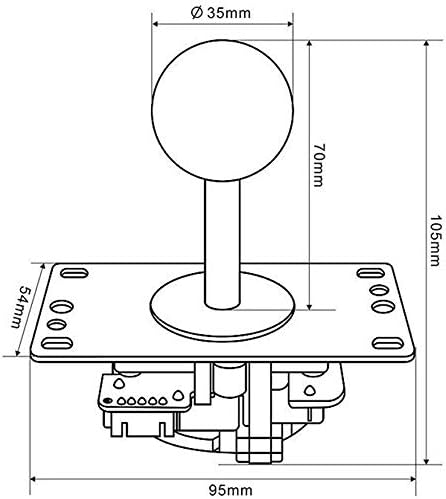
Image: Technical drawing illustrating the dimensions of the JLF-TP-8YT Joystick.

Image: Technical drawing illustrating the dimensions of the OBSF-30 Push Button.
Warranty Information
This product is covered by the manufacturer's standard warranty. Please refer to the official Sanwa website or contact your retailer for specific warranty terms and conditions.
Customer Support
For technical assistance, troubleshooting, or further inquiries regarding your Sanwa JLF-TP-8YT Joystick and OBSF-30 Push Button Bundle Kit, please visit the official Sanwa website or contact their customer support directly. Contact information can typically be found on the manufacturer's packaging or website.