
TELESIN COB-FLT01
Contents
TELESIN Floating Camera Wrist Strap Instruction Manual
Model: COB-FLT01
Introduction
The TELESIN Floating Camera Wrist Strap is designed to provide buoyancy for your waterproof camera, preventing it from sinking during water-based activities. Its bright colors enhance visibility, making it easier to locate your device in water. This manual outlines the proper use and care of your floating wrist strap.

Image: Two TELESIN floating wrist straps, one orange and one green, designed to keep cameras afloat.
Package Contents
- 2 x TELESIN Floating Camera Wrist Straps (Green & Orange)
Setup
Follow these steps to properly attach the floating wrist strap to your camera:
- Locate the attachment point on your waterproof camera or camera housing. This is typically a small loop or eyelet.
- Thread the thin cord loop of the floating wrist strap through the camera's attachment point.
- Pass the larger end of the floating strap through the cord loop you just created, then pull gently to secure the strap to the camera. Ensure the connection is tight and secure.
- Slide the soft, padded part of the strap onto your wrist. Adjust for a comfortable fit.
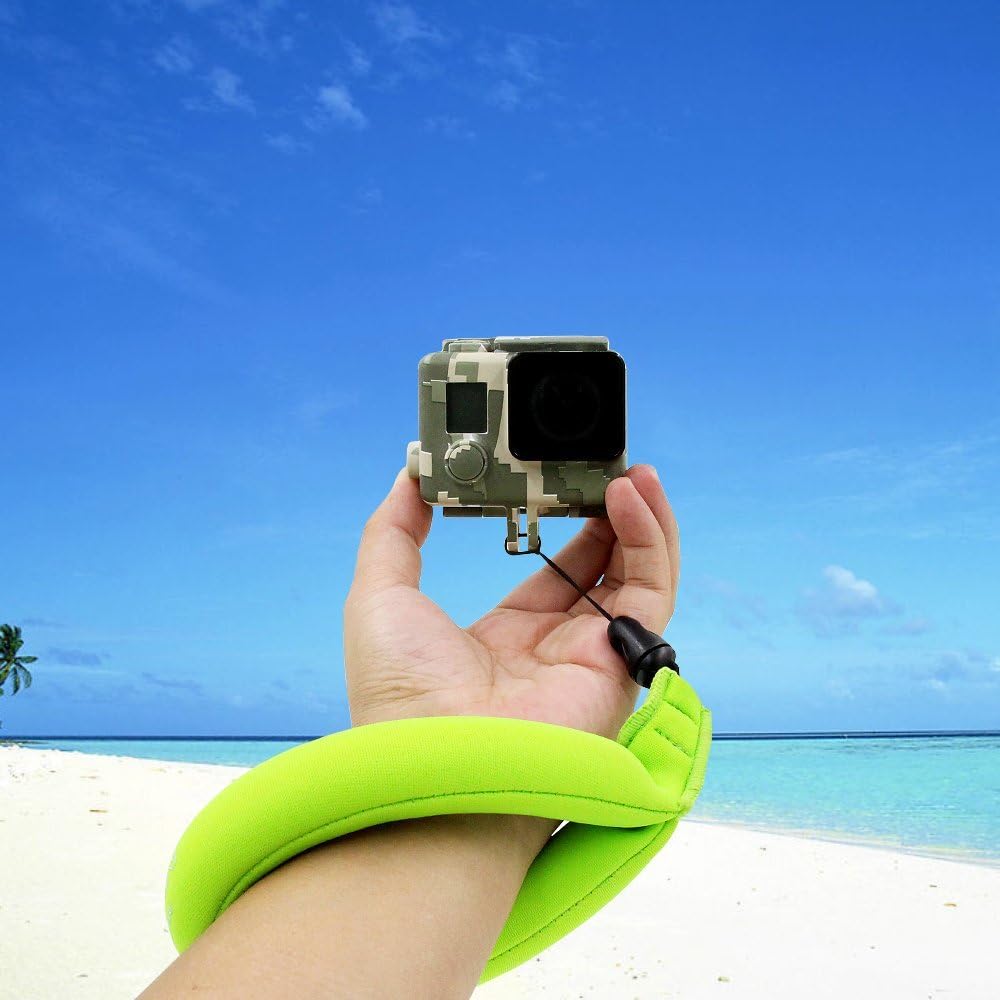
Image: A user demonstrating how to wear the green TELESIN floating wrist strap while holding an action camera.
Important: Before entering the water, always test the buoyancy of your camera with the strap attached in a shallow, controlled environment to confirm it floats correctly. Each strap is designed to float cameras weighing up to 7 ounces (200 grams). For heavier cameras, consider using two straps for added buoyancy.
Operating Instructions
Once the strap is securely attached and tested, you can confidently use your camera in various water environments:
- Water Sports: Ideal for swimming, diving, snorkeling, kayaking, surfing, and other water activities.
- Visibility: The bright orange and green colors of the straps make your camera highly visible if it detaches or is dropped in the water, aiding in quick retrieval.
- Security: The wrist strap design keeps your camera tethered to you, reducing the risk of loss.

Image: An action camera, secured by an orange TELESIN floating wrist strap, demonstrating its buoyancy in water.
Maintenance
To ensure the longevity and effectiveness of your TELESIN Floating Camera Wrist Strap, follow these maintenance guidelines:
- Rinse After Use: After each use in saltwater or chlorinated water, rinse the strap thoroughly with fresh water to remove salt, chlorine, and debris.
- Air Dry: Allow the strap to air dry completely in a shaded, well-ventilated area before storing. Avoid direct sunlight, which can degrade materials over time.
- Storage: Store the strap in a cool, dry place away from extreme temperatures and harsh chemicals.
- Inspect Regularly: Periodically check the strap and its attachment cord for any signs of wear, fraying, or damage. Replace the strap if any damage is observed to prevent camera loss.
Troubleshooting
Camera Does Not Float
- Check Weight: Ensure your camera's weight, including any accessories, does not exceed 7 ounces (200 grams) per strap.
- Use Multiple Straps: For cameras slightly over the weight limit, consider attaching a second TELESIN floating wrist strap for increased buoyancy.
- Verify Attachment: Confirm the strap is securely attached to the camera and that the cord is not compromised.
Specifications
| Brand | TELESIN |
| Model Number | COB-FLT01 |
| Item Weight | Approximately 0.01 ounces (per strap) |
| Package Dimensions | 9.6 x 6.1 x 1.2 inches |
| Color | Green & Orange |
| Buoyancy Capacity | Up to 7 ounces (200 grams) per strap |
| Manufacturer | COB International |
Warranty and Support
Specific warranty information for the TELESIN Floating Camera Wrist Strap (Model COB-FLT01) is not provided in the product details. For warranty claims or technical support, please refer to the retailer where the product was purchased or contact TELESIN customer service directly through their official website.
Ask a question about this manual
Ask about setup, troubleshooting, compatibility, parts, safety, or missing instructions. Manuals+ will review the question and use this page’s manual context to help answer it.