
1. Introduction
Thank you for purchasing the Axess SPBT1041 Portable Bluetooth Speaker. This device is designed to provide high-quality audio playback from various sources, including Bluetooth-enabled devices, USB drives, SD cards, and auxiliary input. It also features an FM radio function and a built-in microphone for hands-free calls. Its portable design with an adjustable strap makes it suitable for both indoor and outdoor use.
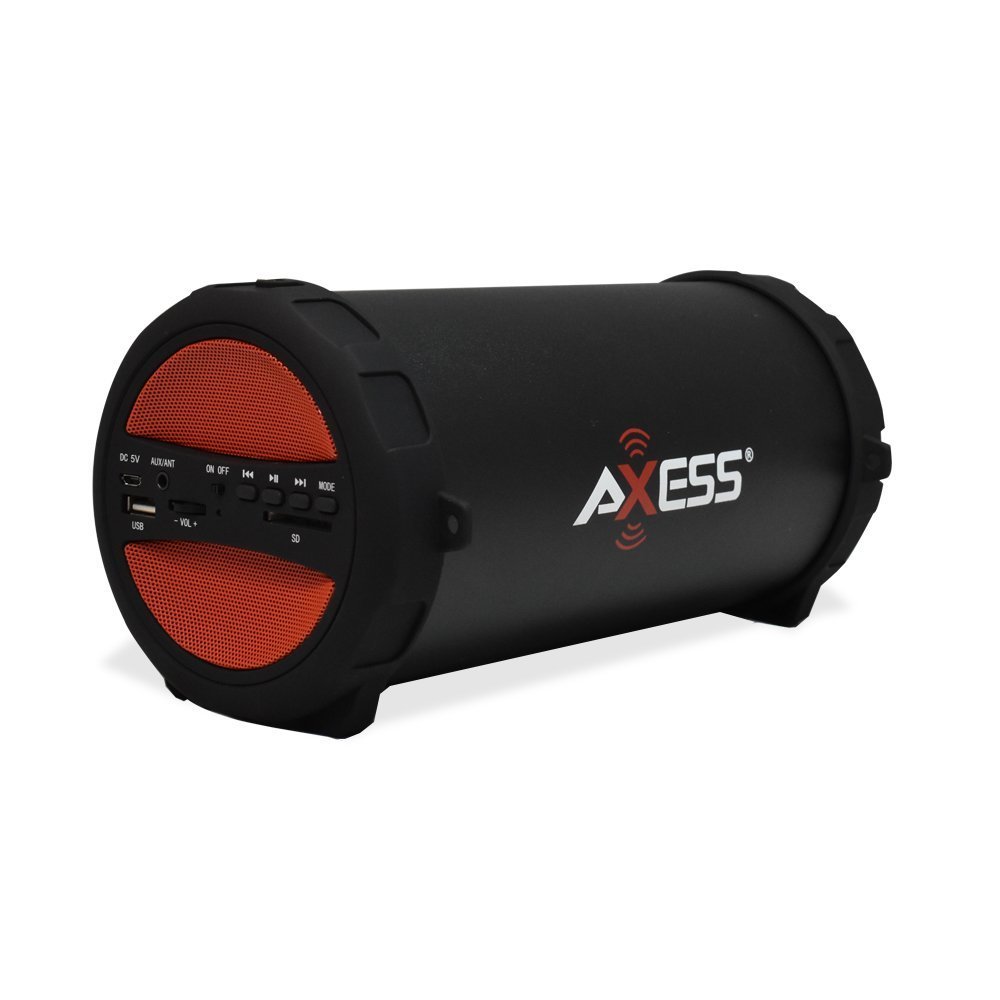
Figure 1: Axess SPBT1041 Portable Bluetooth Speaker (Red variant).

Figure 2: Key features of the SPBT1041 speaker, including FM Radio, USB Input, and AUX Input.
2. Package Contents
Please check the package for the following items:
- Axess SPBT1041 Portable Bluetooth Speaker
- USB Charging Cable
- Auxiliary Audio Cable
- Adjustable Shoulder Strap
- Instruction Manual
3. Device Overview
Familiarize yourself with the speaker's controls and ports.

Figure 3: Control panel and ports of the Axess SPBT1041 speaker.
- DC 5V Port: For charging the speaker.
- AUX/ANT Port: For auxiliary audio input or connecting an external FM antenna.
- ON/OFF Switch: Powers the speaker on or off.
- USB Port: For playing audio from a USB flash drive.
- SD Card Slot: For playing audio from an SD memory card.
- Volume Control (-VOL +): Adjusts the speaker volume.
- Previous Track/Rewind Button: Skips to the previous track or rewinds.
- Play/Pause Button: Plays or pauses audio. Also answers/ends calls in Bluetooth mode.
- Next Track/Fast Forward Button: Skips to the next track or fast forwards.
- MODE Button: Switches between Bluetooth, FM Radio, USB, SD, and AUX input modes.
4. Setup
4.1 Charging the Speaker
Before first use, fully charge the speaker. Connect the provided USB charging cable to the DC 5V port on the speaker and the other end to a USB power source (e.g., computer USB port, USB wall adapter). The charging indicator light will illuminate during charging and turn off when fully charged.

Figure 4: The speaker can be played while charging, featuring a 1500 mAh battery.
4.2 Powering On/Off
Slide the ON/OFF switch to the 'ON' position to power on the speaker. Slide it to 'OFF' to power off.
5. Operating Instructions
5.1 Bluetooth Mode
- Power on the speaker. It will automatically enter Bluetooth pairing mode, indicated by an audible prompt.
- Enable Bluetooth on your mobile device (smartphone, tablet, etc.).
- Search for available Bluetooth devices and select "SPBT1041" from the list.
- Once paired, the speaker will confirm with an audible sound. You can now play audio from your device through the speaker.
- To disconnect, disable Bluetooth on your device or press the MODE button on the speaker to switch modes.
5.2 USB/SD Card Mode
- Insert a USB flash drive into the USB port or an SD card into the SD card slot.
- The speaker will automatically detect the storage device and begin playing audio files. If not, press the MODE button to switch to USB or SD mode.
- Use the Previous/Next Track buttons to navigate and the Play/Pause button to control playback.
5.3 FM Radio Mode
- Power on the speaker and press the MODE button until you hear the FM radio prompt.
- For better reception, connect the auxiliary audio cable to the AUX/ANT port; it acts as an external antenna.
- Press and hold the Play/Pause button to automatically scan and save available FM stations.
- Use the Previous/Next Track buttons to switch between saved stations.
5.4 AUX Input Mode
- Connect one end of the auxiliary audio cable to the AUX/ANT port on the speaker and the other end to the audio output of your external device (e.g., MP3 player, laptop).
- Press the MODE button until the speaker enters AUX mode.
- Control playback and volume from your external device.
5.5 Call Function (Bluetooth Mode)
- When a call comes in during Bluetooth mode, press the Play/Pause button to answer.
- Press the Play/Pause button again to end the call.
Video 1: Demonstration of the Axess Portable Bluetooth Speaker's portability and ease of use in an outdoor setting. This video showcases the speaker's design and how it can be carried with its strap, highlighting its suitability for various activities.
6. Maintenance
6.1 Cleaning
Wipe the speaker with a soft, dry cloth. Do not use abrasive cleaners or solvents. Avoid exposing the speaker to excessive moisture.
6.2 Battery Care
To prolong battery life, avoid fully discharging the speaker frequently. Recharge the battery when the low battery indicator or audible prompt is heard. If storing the speaker for an extended period, charge it to approximately 50% every few months.
6.3 Storage
Store the speaker in a cool, dry place away from direct sunlight and extreme temperatures.
7. Troubleshooting
- No Power: Ensure the speaker is charged. Connect the USB charging cable and try again.
- No Sound: Check the volume level on both the speaker and your connected device. Ensure the correct input mode is selected (Bluetooth, USB, SD, AUX).
- Bluetooth Not Connecting: Ensure the speaker is in Bluetooth pairing mode. Disable and re-enable Bluetooth on your device, then search for "SPBT1041" again. Make sure the speaker is within the 30-foot operating range.
- Poor FM Reception: Extend the auxiliary audio cable and position it for better signal reception. Try scanning for stations again.
- USB/SD Card Not Playing: Ensure the USB drive or SD card is inserted correctly and contains compatible audio files (e.g., MP3 format).
8. Specifications
| Feature | Detail |
|---|---|
| Model Name | SPBT1041 |
| Speaker Type | Outdoor, Portable |
| Connectivity Technology | Bluetooth |
| Wireless Communication Technology | Bluetooth |
| Speaker Maximum Output Power | 10 Watts |
| Subwoofer Diameter | 3 Inches |
| Battery Capacity | 1500 Milliamp Hours (Lithium Ion) |
| Power Source | Battery Powered |
| Product Dimensions | 7"D x 8"W x 12"H |
| Item Weight | 2.1 Pounds |
| Material | Plastic |
| Water Resistance Level | Not Water Resistant |
| Included Components | Battery |
9. Warranty
The Axess SPBT1041 Portable Bluetooth Speaker comes with a Full Warranty. Please refer to the warranty card included in your package or contact Axess customer support for details regarding warranty terms and conditions.
10. Support
For further assistance, technical support, or inquiries regarding your Axess SPBT1041 speaker, please visit the official Axess website or contact their customer service department. Contact information can typically be found on the product packaging or the manufacturer's website.


