
SPT SR-184R
SPT Mr. Induction SR-184R 1800W Built-In Commercial Range
Model: SR-184R | Brand: SPT
1. Introduction
This manual provides essential information for the safe and efficient operation of your SPT Mr. Induction SR-184R 1800W Built-In Commercial Range. This advanced commercial induction equipment is designed to revolutionize food preparation in various settings, including demonstration cooking, suite service, catering, and buffets. It features Smart Scan enhancement and offers both COOK and TEMP modes for precise control. The separate control unit allows for flexible remote mounting.
2. Safety Information
Please read all safety instructions carefully before operating the appliance to prevent injury or damage.
- Always ensure the appliance is properly installed and grounded according to local electrical codes.
- Do not immerse the main unit or control box in water or other liquids.
- Keep children and pets away from the appliance during operation.
- Use only induction-compatible cookware. Non-induction cookware will not heat.
- Ensure adequate ventilation around the built-in unit to prevent overheating.
- Do not operate the appliance if it has a damaged cord, plug, or if it malfunctions or has been dropped or damaged in any manner.
- Disconnect power before cleaning or performing any maintenance.
- Avoid placing metallic objects (e.g., knives, forks, spoons, lids) on the cooktop surface as they can become hot.
3. Product Overview
3.1 Components
The SPT Mr. Induction SR-184R includes the following components:
- Induction Cooktop
- Control Box (for remote mounting)
- User Manual
3.2 Key Features
- SmartScan technology: Provides voltage, pan size, and type recognition for optimized cooking.
- Durable Cooktop: Features a 5mm thick tempered glass cooktop.
- Power Mode: Offers 1-20 levels of power, ranging from 350-1800W.
- Temperature Mode: Allows temperature control from 90-440°F (in 20°F increments, with specific exceptions at 170-180°F, 260-270°F, and 350-360°F).
- Certifications: FCC / CETL / ETL-Sanitation to NSF-4 compliant.
3.3 Product Views

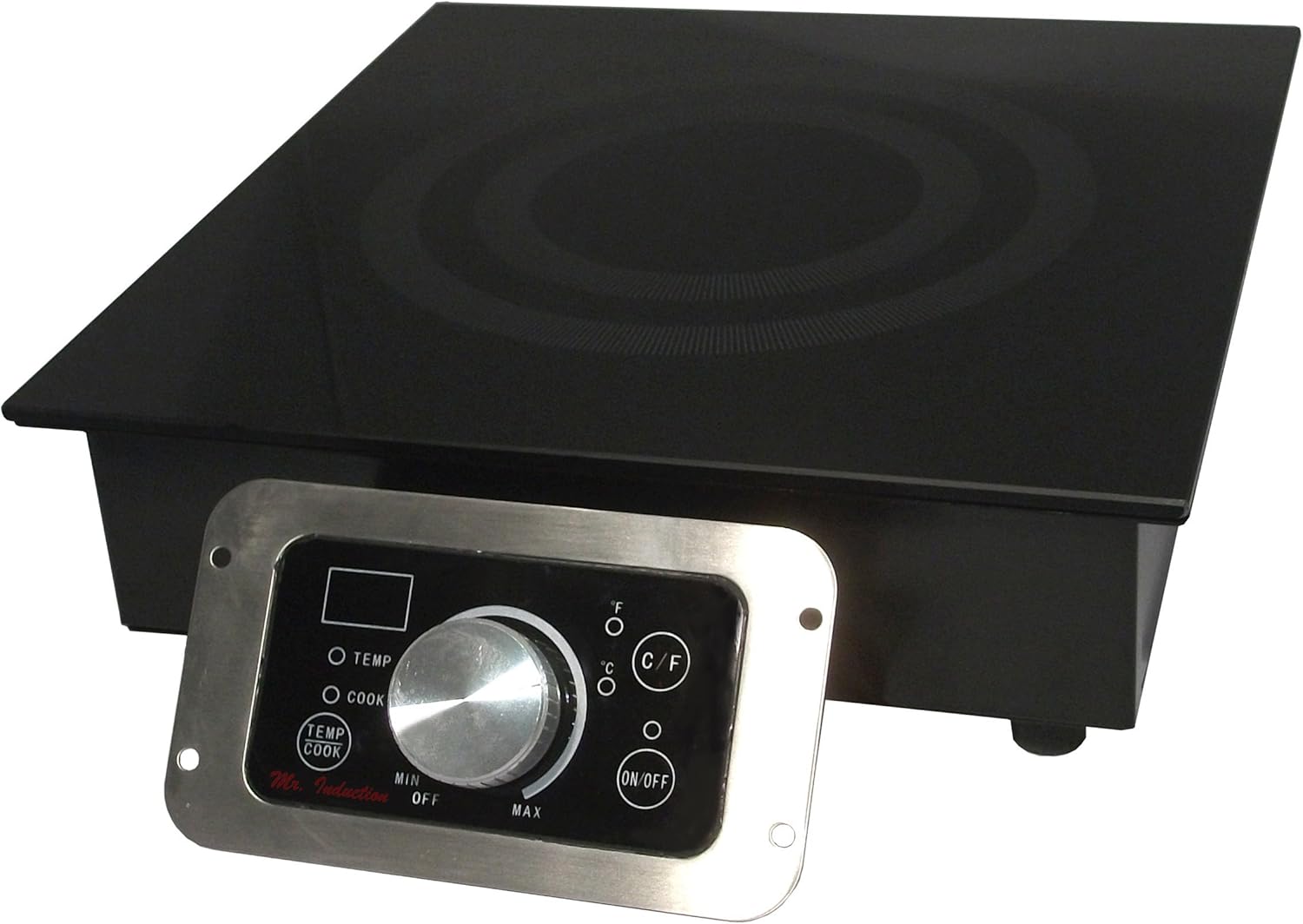

4. Setup and Installation
The SR-184R is a built-in unit designed for commercial use. Proper installation is crucial for safety and performance.
- Cabinet Cutout: Ensure your cabinet or countertop has the correct cutout dimensions to accommodate the cooktop. Refer to the product dimensions (13.38"D x 12.56"W x 3.94"H) for precise fitting.
- Control Box Mounting: The control box is separate and designed for remote mounting. Choose a location that is easily accessible for operation but protected from heat and moisture.
- Ventilation: Ensure adequate clearance around and beneath the cooktop for proper airflow and ventilation. This prevents overheating and ensures efficient operation.
- Electrical Connection: Connect the unit to a dedicated, grounded electrical outlet that meets the power requirements of the 1800W induction range. Consult a qualified electrician if unsure.
- Secure Placement: Once installed, ensure the cooktop is securely fastened in place and the control box is mounted firmly.
5. Operating Instructions
5.1 Control Panel
The remote control panel features a central knob, an ON/OFF button, and dedicated buttons for TEMP and COOK modes, along with a C/F button for temperature unit selection. The digital display shows current settings.
5.2 Power Mode (COOK Mode)
In Power mode, the unit operates based on a set wattage level. This mode is ideal for rapid heating or maintaining a consistent boil.
- Press the 'COOK' button to activate Power mode.
- Use the central knob to adjust the power level from 1 to 20.
- Power levels correspond to a wattage range of 350W to 1800W.
5.3 Temperature Mode (TEMP Mode)
Temperature mode allows for precise temperature control, suitable for simmering, frying, or holding food at a specific temperature.
- Press the 'TEMP' button to activate Temperature mode.
- Use the central knob to set the desired temperature between 90°F and 440°F.
- Temperature adjustments are typically in 20°F increments. Note that specific increments may vary slightly between 170-180°F, 260-270°F, and 350-360°F.
- Press the 'C/F' button to switch between Celsius and Fahrenheit display.
5.4 SmartScan Technology
The SmartScan technology automatically detects the voltage, size, and type of the cookware placed on the cooktop. This feature optimizes heating performance and ensures efficient energy use. Ensure your cookware is induction-compatible for proper detection and operation.
6. Maintenance and Cleaning
Regular cleaning and maintenance will prolong the life of your induction range and ensure optimal performance.
- Cooktop Cleaning: After the cooktop has completely cooled, wipe the tempered glass surface with a damp cloth and a mild detergent. For stubborn stains, use a non-abrasive ceramic cooktop cleaner. Do not use abrasive pads, scouring powders, or harsh chemicals, as these can scratch or damage the glass.
- Control Panel Cleaning: Wipe the control panel with a soft, dry cloth. If necessary, a slightly damp cloth can be used, but ensure no liquid enters the control unit.
- Ventilation: Periodically check and clean any ventilation openings to ensure they are free from dust and debris.
- General Care: Avoid dropping heavy objects on the glass cooktop. Do not slide rough-bottomed cookware across the surface to prevent scratches.
7. Troubleshooting
If you encounter issues with your induction range, refer to the following common problems and solutions:
| Problem | Possible Cause | Solution |
|---|---|---|
| Unit does not turn on | No power supply; Control box not connected; ON/OFF button not pressed. | Check power cord connection; Ensure control box is securely connected; Press the ON/OFF button firmly. |
| Cookware not detected | Cookware is not induction-compatible; Cookware is not centered; Pan is too small or too large. | Use induction-compatible cookware; Center the cookware on the cooking zone; Ensure cookware size is within the recommended range. |
| Food not heating properly | Incorrect power/temperature setting; Cookware issue. | Adjust power or temperature settings; Verify cookware is flat-bottomed and making good contact. |
| Error code displayed | Internal malfunction; Overheating; Sensor issue. | Turn off the unit, unplug, wait a few minutes, then restart. If the error persists, contact customer support. |
For issues not listed here or if troubleshooting steps do not resolve the problem, please contact SPT customer support.
8. Specifications
Detailed technical specifications for the SPT Mr. Induction SR-184R:
| Feature | Specification |
|---|---|
| Brand | SPT |
| Model Number | SR-184R |
| Wattage | 1800 watts |
| Power Mode Levels | 1-20 (350-1800W) |
| Temperature Mode Range | 90-440°F (in 20°F increments, with exceptions) |
| Cooktop Material | 5mm thick tempered glass |
| Control Type | Remote |
| Heating Elements | 1 |
| Product Dimensions | 13.38"D x 12.56"W x 3.94"H |
| Item Weight | 12.8 Pounds |
| Color | Black |
| Material | Iron |
| Certifications | FCC / CETL / ETL-Sanitation to NSF-4 |
| UPC | 735343992810, 876840015012 |
9. Warranty and Support
9.1 Warranty Information
The SPT Mr. Induction SR-184R comes with a 1 year warranty on labor and parts from the date of purchase. Please retain your proof of purchase for warranty claims. This warranty covers manufacturing defects under normal use conditions.
9.2 Customer Support
For technical assistance, warranty claims, or general inquiries, please contact SPT customer support. You can also visit the official SPT store for more product information and resources:
Related documentsSR-184R


Ask a question about this manual
Ask about setup, troubleshooting, compatibility, parts, safety, or missing instructions. Manuals+ will review the question and use this page’s manual context to help answer it.