1. Introduction and Overview
This manual provides detailed instructions for the safe and effective use of your Godox V860II-S TTL Flash. The Godox V860II-S is a high-performance, versatile speedlite designed for Sony cameras, offering advanced features such as TTL auto flash, high-speed sync (HSS), and a built-in 2.4G wireless X system. Its powerful Li-ion battery ensures quick recycle times and extended shooting sessions.
2. Product Features
- Full TTL Functions: Supports TTL auto flash, manual flash, 1/8000s high-speed sync, flash exposure compensation, flash exposure lock, second curtain sync, and modeling flash.
- High-Capacity Li-ion Battery: Equipped with a 2000mAh Li-ion battery, providing a maximum 1.5s recycle time and approximately 650 full power flashes.
- High Guide Number: Features a GN60 (Guide Number 60) and 22 steps of power output (1/1-1/128).
- Auto/Manual Zoom Head: Flash coverage automatically adjusts from 20 to 200mm to match the lens focal length and image size, with manual zoom control available.
- Built-in 2.4G Wireless X System: Offers all-in-one functions and a transmission distance of up to 100 meters. Can function as a master or slave unit with compatible Sony camera flashes (e.g., HVL-F60M, HVL-F43M, HVL-F32M) and other Godox X system flashes.
- User-Friendly Interface: Features an LCD display and control panel for easy operation and settings adjustment.
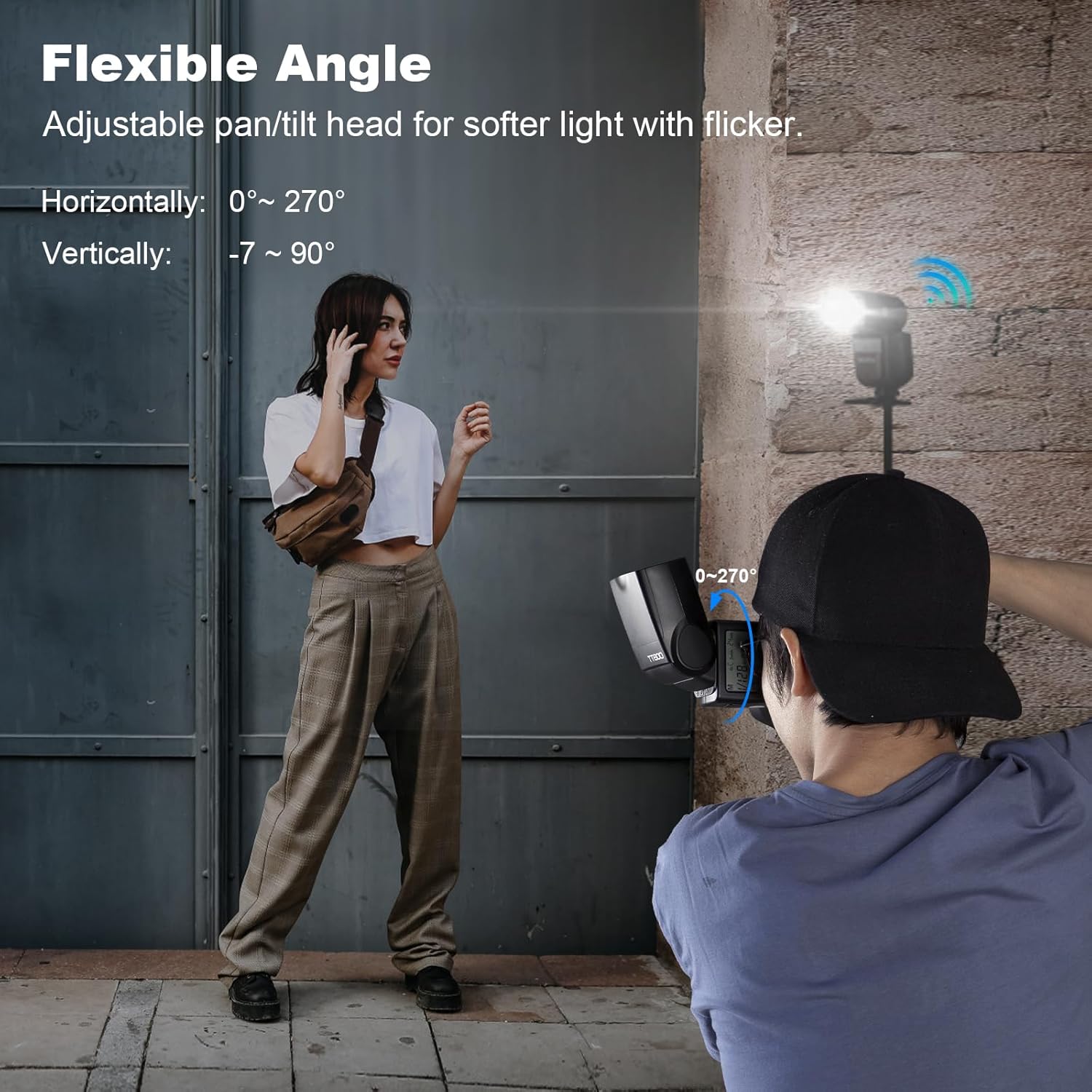
- Flexible Head Design: The flash head can pan horizontally from 0° to 270° and tilt vertically from -7° to 90° for versatile light positioning.
3. Components and What's in the Box
The Godox V860II-S package typically includes the following items:
- Godox V860II-S TTL Flash Unit
- 2000mAh Li-ion Battery (VB18)
- Battery Charger
- Mini Stand
- Protective Case
- Instruction Manual


4. Setup
4.1 Battery Installation
- Open the battery compartment cover located on the side of the flash unit.
- Insert the provided 2000mAh Li-ion battery (VB18) into the compartment, ensuring correct polarity.
- Close the battery compartment cover securely.

4.2 Mounting the Flash on Camera
- Slide the flash unit onto your camera's hot shoe until it clicks into place.
- Tighten the locking ring or lever on the flash unit to secure it to the hot shoe.
4.3 Powering On/Off
To power on the flash, slide the ON/OFF switch to the 'ON' position. To power off, slide it to the 'OFF' position.
5. Operating Instructions
5.1 Understanding the Control Panel and LCD Screen
The flash features an intuitive control panel with various buttons and a clear LCD screen for adjusting settings. The LCD screen displays current mode, power output, zoom settings, and battery status.

5.2 Flash Modes
The V860II-S supports several flash modes:
- TTL Auto Flash: Automatically sets flash output for optimal exposure.
- Manual Flash: Allows manual control over flash power output.
- Multi Flash (Stroboscopic): Fires a series of rapid flashes for creative effects.
Use the 'MODE' button on the control panel to cycle through these modes.

5.3 High-Speed Sync (HSS)
HSS allows the flash to synchronize with shutter speeds up to 1/8000s, enabling flash use in bright conditions or with wide apertures.

5.4 Wireless Operation (2.4G X System)
The V860II-S can operate as a master or slave unit within the Godox 2.4G wireless X system. This allows for off-camera flash control and multi-flash setups.

5.5 Flash Head Adjustment
The flash head can be rotated and tilted to bounce light off surfaces, providing softer and more diffused illumination.

5.6 Firmware Update
The flash unit supports firmware updates via its USB port to ensure compatibility and access to new features. Refer to the official Godox website for the latest firmware and update instructions.

5.7 Compatibility
The Godox V860II-S is designed for Sony cameras with a hot shoe. For specific model compatibility, please refer to the detailed compatibility list provided by Godox.

6. Maintenance
- Cleaning: Use a soft, dry cloth to clean the flash unit. For stubborn dirt, a slightly damp cloth can be used, followed by immediate drying. Do not use solvents or abrasive cleaners.
- Storage: Store the flash unit in a cool, dry place away from direct sunlight and extreme temperatures. Remove the battery if the flash will not be used for an extended period.
- Battery Care: Charge the Li-ion battery regularly, even if not in use, to maintain its lifespan. Avoid fully discharging the battery.
- Handling: Avoid dropping or subjecting the flash unit to strong impacts.
7. Troubleshooting
- Flash Not Firing:
- Ensure the flash is powered on and securely mounted on the camera's hot shoe.
- Check battery level and recharge if necessary.
- Verify camera and flash settings for proper synchronization.
- Inconsistent Exposure:
- In TTL mode, ensure the subject is within the effective flash range.
- In Manual mode, adjust power output as needed.
- Check for obstructions between the flash and subject.
- Wireless Triggering Issues:
- Confirm that both master and slave units are set to the same channel and group.
- Ensure units are within the effective wireless range.
- Check for interference from other 2.4G devices.
8. Specifications
| Feature | Specification |
|---|---|
| Model Number | V860II-S |
| Product Dimensions | 9.3 x 8.3 x 3.2 inches |
| Item Weight | 5 ounces |
| Batteries | 1 Lithium Ion battery required (included) |
| Compatible Mountings | Sony |
| Flash Sync Speed | 1/8000s |
| Guide Number | GN60 |
| Recycle Time | Max. 1.5s |
| Full Power Flashes | Approx. 650 |
9. Official Product Videos
10. Warranty and Support
For detailed warranty information, please refer to the warranty card included with your product or visit the official Godox website. For technical support, service, or inquiries, please contact Godox customer service through their official channels.


