Champion 8000-Watt Dual Fuel Portable Generator Model 100297 Instruction Manual
Brand: Champion Power Equipment | Model: 100297
1. Introduction
This manual provides essential information for the safe and efficient operation and maintenance of your Champion 8000-Watt Dual Fuel Portable Generator. This versatile generator offers the convenience of operating on either gasoline or propane, featuring an electric start for ease of use and Intelligauge technology to monitor power output and maintenance intervals.
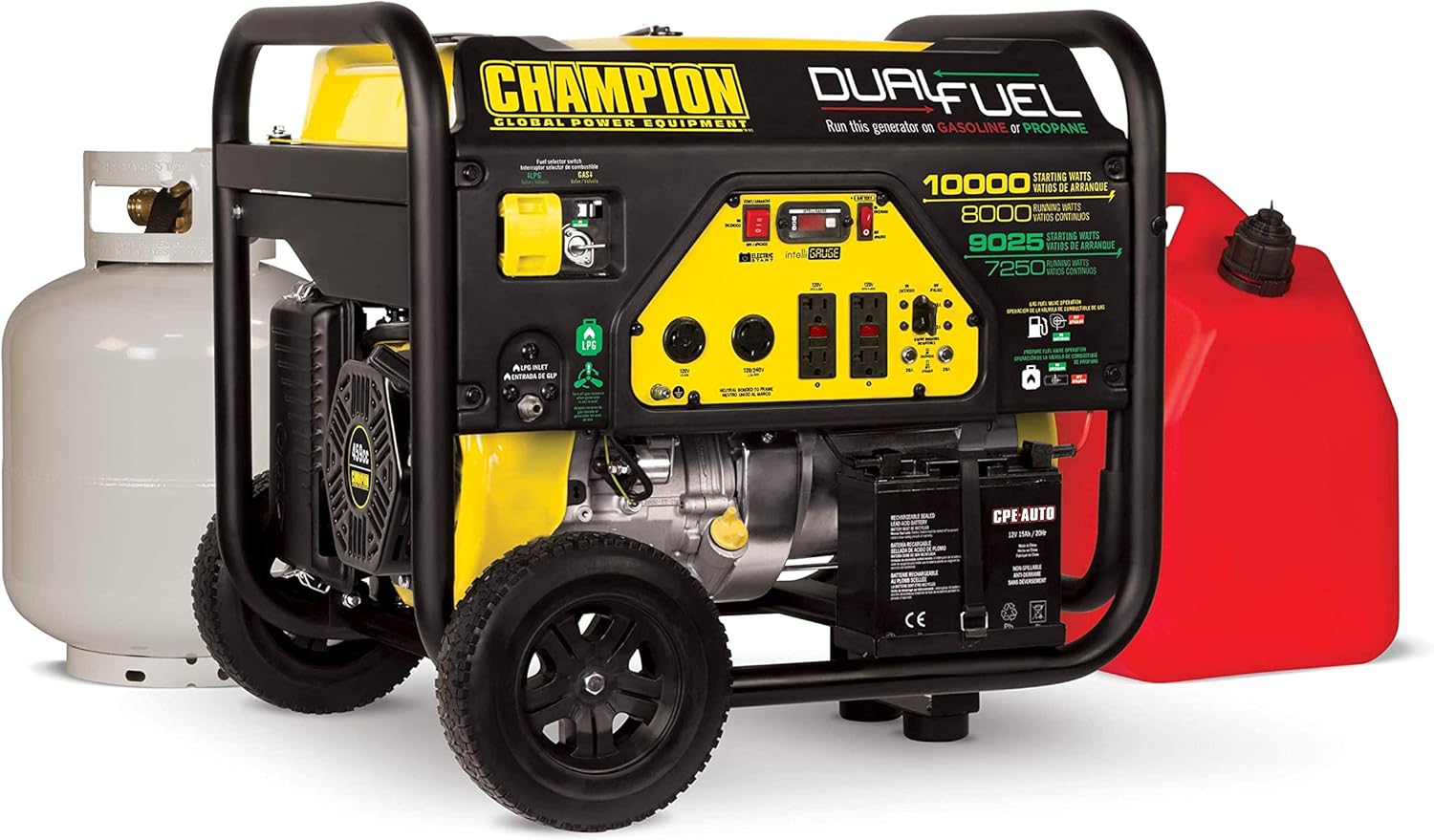
Figure 1: Champion 8000-Watt Dual Fuel Portable Generator. This image shows the generator from a front-side angle, highlighting its yellow and black frame, control panel, wheels, and dual fuel capabilities.
2. Safety Information
Always read and understand the entire instruction manual before operating the generator. Failure to follow safety instructions can result in serious injury or death.
2.1 Carbon Monoxide Safety
Generators produce carbon monoxide (CO), an odorless, colorless, and poisonous gas. Operating a generator indoors or in partially enclosed spaces can lead to carbon monoxide poisoning, which can be fatal. Always operate the generator outdoors in a well-ventilated area, far away from windows, doors, and vents.
Video 1: How Loud is a Generator? This video discusses generator noise levels and concludes with a crucial message about carbon monoxide safety, emphasizing the importance of operating generators outdoors.
2.2 General Safety Precautions
Never operate the generator in rain or wet conditions.
Ensure the generator is properly grounded.
Keep children and pets away from the generator.
Do not touch hot surfaces of the generator.
Store fuel in approved containers in a well-ventilated area away from ignition sources.
Always turn off the generator and allow it to cool before refueling.
Use appropriate personal protective equipment (PPE) when operating or maintaining the generator.
3. Setup
Proper setup is crucial for safe and efficient operation. Follow these steps to prepare your generator for first use.
Video 2: 8000-Watt Dual Fuel Portable Generator with Electric Start. This video provides a visual guide to the initial setup of the generator, including unboxing, attaching the wheel kit, adding oil, connecting the battery, moving the unit outdoors, adding fuel, selecting the fuel source, and starting the generator.
3.1 Unboxing and Assembly
Carefully remove the generator from its packaging. Inspect for any damage. The generator comes with a wheel kit for easy portability.
Attaching the Wheel Kit
Attach the included wheels and support legs as per the instructions in the owner's manual. This will allow for easier movement of the heavy unit.
3.2 Adding Engine Oil
The generator requires 1.2 quarts of 10W-30 oil, which is included. Locate the oil fill cap/dipstick and add the oil using a funnel. Ensure the oil level is correct before starting.
3.3 Connecting the Battery
For electric start models, connect the included battery following the positive (+) and negative (-) terminal instructions. Ensure connections are secure.
3.4 Moving the Generator Outdoors
Always move the generator to a flat, level, outdoor surface before adding fuel or starting. Ensure it is at least 20 feet (6 meters) away from any buildings or other equipment, and away from open windows or vents.
3.5 Adding Fuel (Gasoline or Propane)
This dual fuel generator can operate on either gasoline or propane.
Gasoline: Fill the 6.1-gallon fuel tank with fresh, unleaded gasoline. Do not overfill.
Propane: Connect a 20-pound propane tank (not included) to the generator using the provided 3.3-foot propane hose with a built-in regulator.
Figure 2: The Champion Dual Fuel Generator shown with a red gasoline can and a white propane tank, illustrating its versatile fuel options.
3.6 Selecting Fuel Source
Use the patented fuel selector switch on the control panel to choose between gasoline (GAS) or propane (LPG) operation. Ensure the switch is set to the desired fuel source before starting.
Figure 3: Close-up of the generator's control panel, showing the fuel selector switch, various outlets, and the Intelligauge display.
4. Operating Instructions
4.1 Starting the Generator
With the fuel source selected and the generator outdoors, use the electric start toggle switch to power up the 459cc Champion engine. For cold weather, Cold Start Technology assists in quick starting.
4.2 Connecting Electrical Equipment
The generator features multiple outlets for various needs:
One 120V 30A locking outlet (L5-30R)
One 120/240V 30A locking outlet (L14-30R)
Four 120V 20A GFCI protected household outlets (5-20R)
Plug in your equipment after the generator has started and is running smoothly. The Volt Guard built-in surge protector helps prevent overloads.
Figure 4: A hand plugging a 25 ft. generator cord into the generator's outlet, demonstrating how to connect electrical equipment.
4.3 Monitoring with Intelligauge
The Intelligauge display allows you to easily monitor power output and track maintenance intervals. It shows voltage, hertz, and run-time hours.
4.4 Fuel Consumption and Run Times
Gasoline: Produces 10,000 starting watts and 8000 running watts. Runs for 8 hours at 50% load with a full 6.1-gallon tank.
Propane: Produces 9025 starting watts and 7250 running watts. Runs for 5 hours at 50% load with a 20-pound propane tank.
5. Maintenance
Regular maintenance ensures the longevity and reliable performance of your generator.
Video 3: How to Remove a Generator From Storage. This video demonstrates the steps to prepare a generator for use after a period of storage, including checking fuel, oil, air filter, and battery connections.
5.1 Regular Checks
Oil Level: Check the engine oil level before each use and add 10W-30 oil if needed.
Air Filter: Inspect the air filter for cleanliness and obstructions. Clean or replace as necessary.
General Inspection: Periodically check for loose fasteners, fuel leaks, or any signs of wear or damage.
5.2 Fuel Storage
When storing the generator for extended periods, it is recommended to add a fuel stabilizer to the gasoline tank to prevent fuel from going stale or stagnant. For propane, ensure the tank is properly disconnected and stored.
5.3 Air Filter Maintenance
To clean the air filter, remove the air filter cover and foam element. Wash the foam element with liquid detergent and water, then squeeze it dry with a clean cloth. Saturate the filter in clean engine oil, then remove excess oil with an absorbent cloth before reassembling.
6. Troubleshooting
If your generator encounters issues, refer to the detailed troubleshooting section in your owner's manual. Common issues may include:
Engine not starting: Check fuel level, fuel selector switch position, oil level, and battery connections.
No power output: Check circuit breakers on the control panel.
Fuel leaks: If fuel leaks are found around the carburetor after storage, it may need to be disassembled and cleaned or replaced by a qualified technician.
Your Champion 8000-Watt Dual Fuel Portable Generator comes with a 3-year limited warranty. Champion Power Equipment also provides FREE lifetime technical support from dedicated experts.
Ask about setup, troubleshooting, compatibility, parts, safety, or missing instructions. Manuals+ will review the question and use this page’s manual context to help answer it.