
1. Introduction
Thank you for purchasing the Forever BS600 Bluetooth Speaker. This portable wireless speaker combines powerful audio with versatile playback options, including Bluetooth, FM radio, USB, and SD card support. It also features a built-in microphone for hands-free calling. Please read this manual carefully to ensure proper use and maintenance of your device.
Included Components:
- Forever BS600 Bluetooth Speaker
- 3.5mm Jack Cable
- USB Charging Cable
- Lithium Battery (pre-installed)

Image 1.1: Forever BS600 speaker with its accompanying 3.5mm audio cable and USB charging cable.
2. Safety Information
To ensure safe and optimal operation, please observe the following precautions:
- Do not expose the device to extreme temperatures, direct sunlight, or high humidity.
- Avoid dropping or subjecting the speaker to strong impacts.
- Do not disassemble, repair, or modify the device yourself. Refer all servicing to qualified personnel.
- Keep the speaker away from water and other liquids. It is not waterproof.
- Use only the provided or approved charging cables.
- Dispose of batteries according to local regulations. Do not expose batteries to excessive heat.
3. Product Overview
Familiarize yourself with the speaker's controls and ports:
Control Buttons:
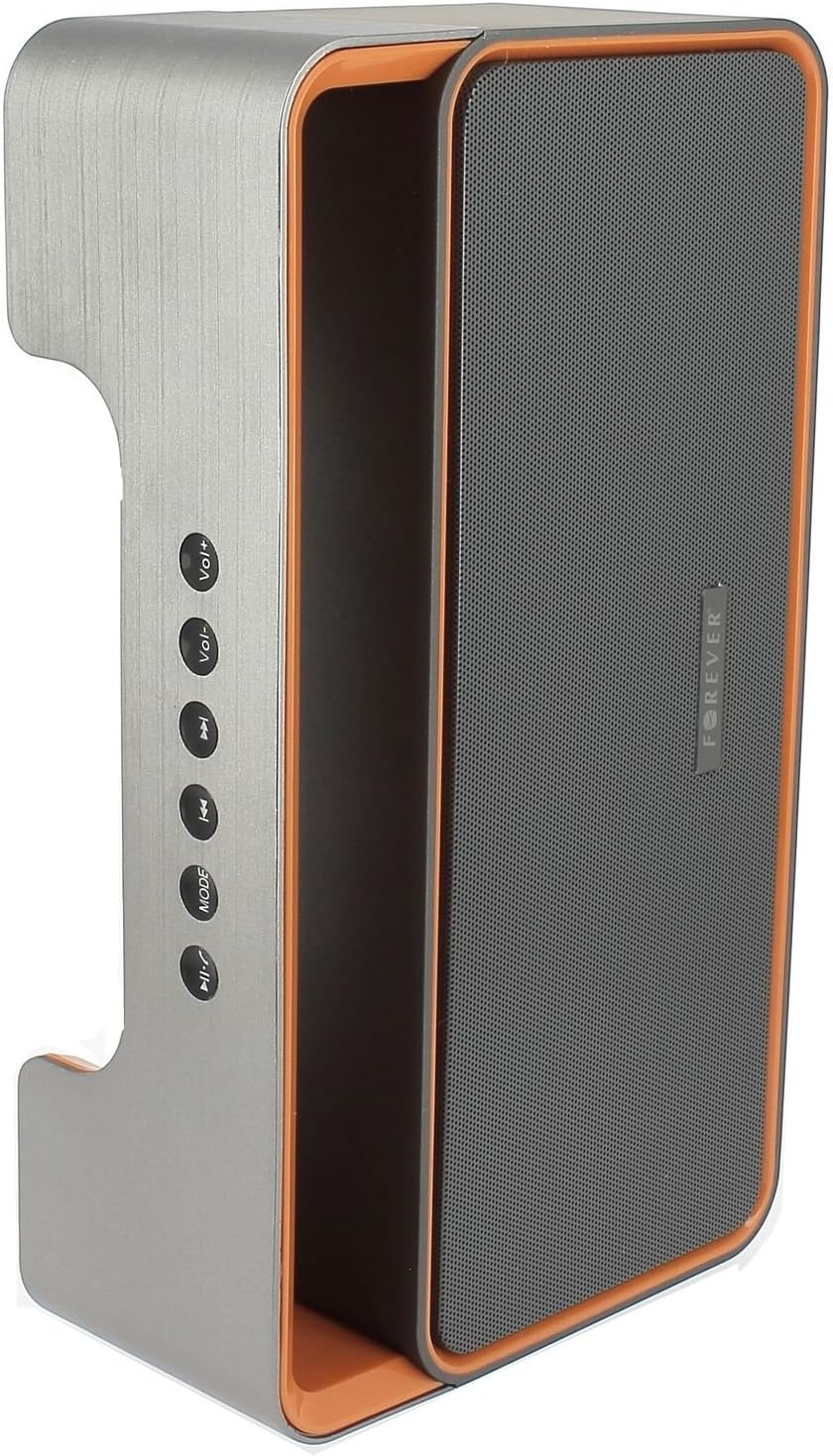
Image 3.1: Side panel with control buttons.
- Vol+ / Vol-: Adjust volume.
- Previous Track / Next Track: Navigate between tracks in playback modes or stations in FM mode.
- MODE: Switch between Bluetooth, FM Radio, USB, SD Card, and AUX modes.
- Play/Pause: Play or pause audio. Answer or end calls.
Ports and Connectors:

Image 3.2: Rear panel with ports and power switch.
- AUX Input: For connecting external audio devices via 3.5mm cable.
- Micro SD Card Slot: For playing music from a Micro SD card.
- USB Port: For playing music from a USB flash drive.
- Micro USB Charging Port: For charging the speaker's internal battery.
- ON/OFF Switch: To power the speaker on or off.
4. Setup
4.1 Charging the Speaker
- Connect the small end of the USB charging cable to the Micro USB port on the back of the speaker.
- Connect the larger end of the USB cable to a USB power adapter (not included) or a computer's USB port.
- The charging indicator light will illuminate (color may vary) to show that the speaker is charging.
- Once fully charged, the indicator light will change or turn off. Disconnect the charging cable.
Note: For first-time use, fully charge the speaker for approximately 3-4 hours.
4.2 Powering On/Off
- To power on, slide the ON/OFF switch on the rear panel to the 'ON' position. You will hear an audible prompt.
- To power off, slide the ON/OFF switch to the 'OFF' position.
5. Operating Instructions
5.1 Mode Selection
Press the MODE button repeatedly to cycle through the available modes: Bluetooth, FM Radio, USB, SD Card, and AUX.
5.2 Bluetooth Pairing
- Power on the speaker. It will automatically enter Bluetooth pairing mode, indicated by a flashing LED light and an audible prompt.
- Enable Bluetooth on your mobile device (smartphone, tablet, computer).
- Search for available Bluetooth devices. You should find "BS600" in the list.
- Select "BS600" to connect. Once paired, the LED light will stop flashing, and you will hear a confirmation sound.
- You can now play audio from your device through the speaker.
5.3 FM Radio Mode
- Switch the speaker to FM Radio mode using the MODE button.
- Press and hold the Play/Pause button to initiate an automatic scan for FM stations. The speaker will save all found stations.
- Use the Previous Track and Next Track buttons to navigate between saved stations.
5.4 USB/SD Card Playback
- Insert a USB flash drive or a Micro SD card (with MP3 audio files) into the corresponding port on the rear panel.
- The speaker will automatically switch to USB or SD card mode and begin playing music. If not, press the MODE button to select the correct mode.
- Use the Previous Track, Next Track, and Play/Pause buttons to control playback.
5.5 AUX Mode
- Connect one end of the 3.5mm audio cable to the AUX input port on the speaker.
- Connect the other end of the cable to the headphone jack of your external audio device.
- Switch the speaker to AUX mode using the MODE button.
- Control playback from your external audio device.
5.6 Call Handling (Bluetooth Mode)
- Answer Call: When a call comes in during Bluetooth mode, press the Play/Pause button once to answer.
- End Call: During a call, press the Play/Pause button once to end the call.
- Reject Call: When a call comes in, press and hold the Play/Pause button to reject the call.
5.7 Volume Control
Press the Vol+ button to increase the volume and the Vol- button to decrease the volume.
6. Maintenance
6.1 Cleaning
- Ensure the speaker is powered off and disconnected from any power source before cleaning.
- Use a soft, dry, lint-free cloth to wipe the exterior surfaces of the speaker.
- Do not use abrasive cleaners, solvents, or chemical sprays, as these may damage the finish or internal components.
6.2 Storage
- When not in use for extended periods, store the speaker in a cool, dry place, away from direct sunlight and extreme temperatures.
- It is recommended to charge the battery at least once every three months to maintain its lifespan.
7. Troubleshooting
| Problem | Possible Cause | Solution |
|---|---|---|
| Speaker does not power on. | Battery is depleted. | Charge the speaker using the USB cable. |
| No sound. | Volume is too low; incorrect mode selected; device not connected. | Increase volume; press MODE button to select correct source; ensure Bluetooth/AUX connection is active. |
| Bluetooth pairing fails. | Speaker not in pairing mode; device too far; Bluetooth not enabled on source. | Ensure speaker is in Bluetooth mode and flashing; move device closer; enable Bluetooth on your device. |
| Poor FM radio reception. | Weak signal; environmental interference. | Relocate the speaker to an area with better reception. |
| USB/SD card not playing. | Incorrect file format; card/drive not inserted correctly; corrupted media. | Ensure files are MP3 format; reinsert media; try a different USB drive/SD card. |
8. Specifications
| Model Name | BS600 |
| Brand | Forever |
| Connectivity Technology | Bluetooth, Auxiliary, USB |
| Speaker Type | Portable Bluetooth Speaker |
| Special Features | FM Radio, USB Reader, SD Card Reader |
| Maximum Output Power | 10 Watts (2 x 5W) |
| Audio Output Mode | Mono |
| Power Source | Battery Powered (Lithium-ion) |
| Control Method | Tactile Buttons |
| Dimensions (approx.) | Height: 13 cm, Width: 24 cm |
| Color | Grey / Orange |
| Waterproof | No |
9. Warranty Information
The Forever BS600 Bluetooth Speaker comes with a limited warranty. Please refer to the warranty card included with your purchase or contact your retailer for specific terms and conditions. This warranty typically covers manufacturing defects but does not cover damage caused by misuse, accidents, unauthorized modifications, or normal wear and tear.
10. Support
If you encounter any issues not covered in the troubleshooting section or require further assistance, please contact the retailer where you purchased the product or visit the official Forever website for support resources. Please have your product model (BS600) and purchase details ready when seeking support.


