
Introduction
This manual provides essential information for the safe and effective operation, maintenance, and care of your Ryobi P2080 ONE+ 18-Volt Lithium-Ion Cordless String Trimmer/Edger. Please read and understand all instructions before use to ensure proper function and user safety.

Figure 1: Ryobi P2080 ONE+ 18-Volt Lithium-Ion Cordless String Trimmer/Edger
Safety Information
Always prioritize safety when operating power tools. Adhere to the following guidelines:
- Always wear eye protection and gloves when using the trimmer/edger.
- Be cautious of flying debris when trimming or edging.
- Keep bystanders and pets at a safe distance from the operating area.
- Do not operate the tool if the battery is damaged or leaking.
- Always follow the instructions in this user manual for safe operation.
Product Features
- Up to 1-hour of run time with the included 4.0 Ah battery.
- Premium 0.080 inch twisted single line for effective cutting.
- Pivoting head for a simple transition between trimming and edging functions.
- Variable speed trigger allows for more powerful cutting or extended battery life.
- 11 inch to 13 inch adjustable cutting width for longer run time or a wider cutting path.
Setup
Assembly
The Ryobi P2080 typically comes in two main pieces that easily screw together. Ensure the connection is secure before operation.
Battery Installation
- Align the 18-Volt Lithium+ battery pack with the battery port on the tool's handle.
- Slide the battery into place until it clicks securely.
- To remove, press the release button on the battery and slide it out.
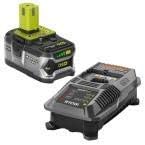
Figure 2: Ryobi ONE+ 18V Lithium+ battery and charger
Operating Instructions
Starting the Trimmer/Edger
- Ensure the battery is fully charged and securely installed.
- Hold the tool firmly with both hands.
- Press the safety button and then squeeze the variable speed trigger to start the motor.
Trimming Operation
For general trimming, hold the tool with the cutting head parallel to the ground. Use a sweeping motion to cut grass and weeds.

Figure 3: Trimming grass with the Ryobi P2080
Edging Operation
To switch to edging mode, pivot the head 90 degrees. The integrated wheel assists in maintaining a consistent cutting depth along sidewalks and driveways.

Figure 4: Edging a lawn with the Ryobi P2080
Line Feeding
The trimmer features an automatic line feed system. If the line becomes too short, lightly tap the bump head on the ground while the motor is running to advance more line.
Battery and Charging
The Ryobi P2080 uses an 18-Volt Lithium+ battery. The included charger can fully recharge a depleted battery in approximately 1 to 1.5 hours.
Charging Procedure
- Connect the charger to a standard electrical outlet.
- Slide the battery pack onto the charger until it is fully seated.
- Indicator lights on the charger will show the charging status. Refer to the charger's specific instructions for light patterns.
- Once fully charged, remove the battery from the charger.
Video 1: Overview of the Ryobi P2080 ONE+ 18-Volt Lithium-Ion Cordless String Trimmer, demonstrating its features and operation.
Maintenance
Cleaning
- After each use, disconnect the battery and clean the cutting head and shield of any grass clippings or debris.
- Use a damp cloth to wipe down the exterior of the tool. Do not use harsh chemicals.
Line Replacement
When the cutting line is depleted, it will need to be replaced. Refer to the specific instructions for your Reel Easy+ bump feed head for detailed steps on how to reload the line. This process typically involves feeding new line through the head and winding it.
Troubleshooting
If you encounter issues with your Ryobi P2080, consider the following common solutions:
- Tool not starting: Ensure the battery is fully charged and properly seated. Check that the safety button is pressed before squeezing the trigger.
- Line not feeding: Verify that the line is not tangled or jammed in the spool. Ensure the line is correctly wound on the spool.
- Reduced cutting performance: The cutting line may be too short or worn. Replace the line if necessary. Ensure the cutting width is appropriate for the task.
- Battery not charging: Check the charger's connection to the power outlet and the battery. Ensure the battery is not damaged.
For persistent issues, contact Ryobi customer support or an authorized service center.
Specifications
| Brand | Ryobi |
| Model Number | P2080 |
| Power Source | Battery Powered (18-Volt Lithium-Ion) |
| Cutting Width | 11 to 13 Inches (Adjustable) |
| Line Type | Premium 0.080 inch twisted single line |
| Item Weight | 0.01 Ounces (Note: This weight seems unusually low and may refer to packaging or a component, not the full tool.) |
| Item Dimensions (L x W) | 33.1"L x 9"W |
| UPC | 046396014917 |
Warranty and Support
For warranty information, please refer to the documentation included with your product at the time of purchase or visit the official Ryobi website. For technical support, replacement parts, or service inquiries, please contact Ryobi customer service.


