
1. Product Overview
The Definitive Technology BP9020 tower speaker is engineered to deliver high-resolution audio with a lifelike 3D soundstage for home entertainment systems. This speaker features Definitive's patented Forward-Focused Bipolar Technology, which utilizes both front and rear speaker arrays to maximize sound dispersion and create a wide, immersive soundstage.
Key components include a 1-inch aluminum dome tweeter, two 3.5-inch Balanced Double Surround System (BDSS) midrange drivers on the front, and an additional 3.5-inch BDSS midrange driver on the rear. An integrated 8-inch powered subwoofer with a bass reflex port provides deep, impactful bass, eliminating the need for a separate subwoofer in many setups. The speaker also includes Intelligent Bass Control for balanced low-frequency output.
The BP9020 is designed with a sleek aesthetic, supported by a sturdy cast aluminum base, and includes provisions for carpet spikes and floor glides to ensure stability. It features a built-in docking port for an optional A90 height speaker module (sold separately), allowing for seamless integration of Dolby Atmos and DTS:X surround sound configurations.

Figure 1.1: Definitive Technology BP9020 Tower Speaker, showcasing its sleek black design and stable base.
2. Important Safety Instructions
Please read all safety and operating instructions before operating your speaker. Retain these instructions for future reference.
- Power Source: Connect the speaker only to a power supply of the type described in the operating instructions or as marked on the appliance. Ensure the voltage matches your local power supply.
- Power Cord Protection: Protect the power cord from being walked on or pinched, particularly at plugs, convenience receptacles, and the point where they exit from the appliance.
- Ventilation: Do not block any ventilation openings. Install in accordance with the manufacturer's instructions. Ensure adequate space around the speaker for proper airflow.
- Heat: Do not install near any heat sources such as radiators, heat registers, stoves, or other apparatus (including amplifiers) that produce heat.
- Water and Moisture: Do not use this apparatus near water (e.g., near a bathtub, washbowl, kitchen sink, laundry tub, in a wet basement, or near a swimming pool).
- Cleaning: Clean only with a dry cloth. Do not use liquid cleaners or aerosol cleaners.
- Object and Liquid Entry: Never push objects of any kind into this product through openings as they may touch dangerous voltage points or short-out parts that could result in a fire or electric shock. Do not expose this product to dripping or splashing.
- Servicing: Do not attempt to service this product yourself as opening or removing covers may expose you to dangerous voltage or other hazards. Refer all servicing to qualified service personnel.
- Stability: Ensure the speaker is placed on a stable, level surface to prevent tipping. Use the provided stabilizer base, carpet spikes, or floor glides as appropriate for your flooring.
3. Package Contents
Carefully unpack your Definitive Technology BP9020 speaker and verify that all the following items are included:
- One (1) Definitive Technology BP9020 Tower Loudspeaker
- One (1) 6.5-foot AC Power Cord
- One (1) Top-plate (pre-installed)
- One (1) Stabilizer Base
- Four (4) Floor Guides (for hard floors)
- Four (4) Carpet Spikes (for carpeted floors)
If any items are missing or damaged, please contact your dealer or Definitive Technology customer support immediately.
4. Setup Guide
4.1 Unpacking and Base Assembly
To safely unpack and assemble the base, it is recommended to open the box upside down. The speaker is well-protected with styrofoam blocks and cloth covers.
- Carefully open the bottom flaps of the packaging box.
- Invert the box so the speaker stands on its top, then lift the box off the speaker.
- Attach the stabilizer base to the bottom of the speaker using the provided screws. Ensure it is securely fastened.
- Depending on your flooring, screw in either the four floor guides (for hard surfaces) or the four carpet spikes (for carpeted surfaces) into the stabilizer base.
- Carefully lift the speaker and place it upright in its desired location.
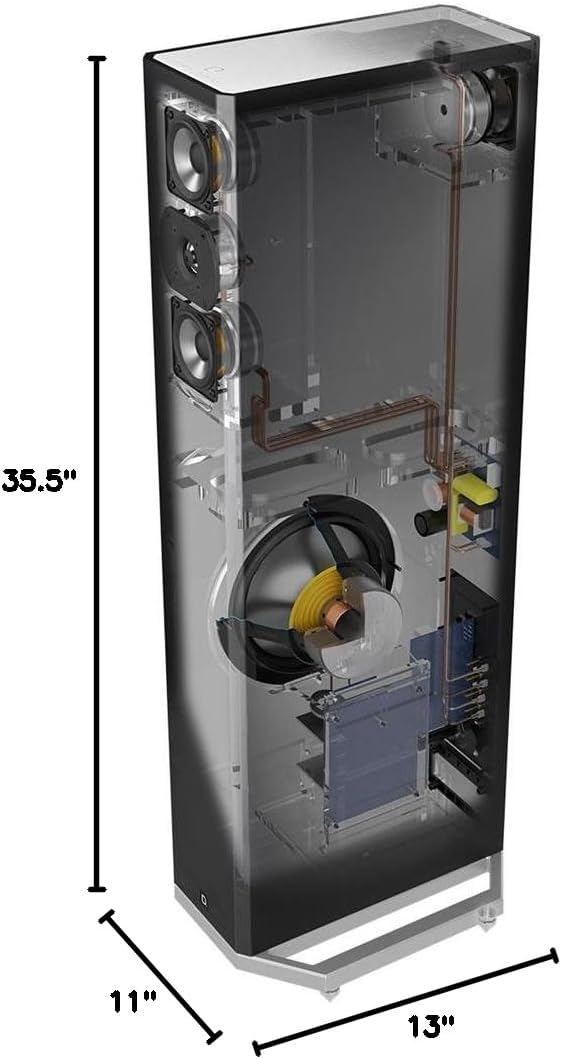
Figure 4.1: Dimensions of the BP9020 speaker, illustrating its height, width, and depth for placement planning.
4.2 Speaker Placement
Due to the Forward-Focused Bipolar Technology, the BP9020 offers greater placement flexibility compared to conventional speakers. For optimal performance, consider the following:
- Stereo Pair: For a stereo setup, place the speakers equidistant from your primary listening position, forming an equilateral triangle.
- Distance from Walls: While bipolar speakers are less sensitive to wall proximity, avoid placing them directly against a wall. A few inches of clearance can enhance soundstage depth.
- Room Acoustics: Experiment with toe-in (angling the speakers slightly towards the listening position) to fine-tune the soundstage and imaging.

Figure 4.2: The BP9020 speaker integrated into a home entertainment setup, demonstrating typical placement next to a media console.
4.3 Connections
The BP9020 features multiple input options for versatile integration into your audio system.

Figure 4.3: Rear panel of the BP9020, showing the various input terminals and controls for connection and adjustment.
- Speaker Level Input: Connect your amplifier's speaker outputs to the BP9020's speaker level inputs using high-quality speaker wire. Ensure correct polarity (+ to + and - to -).
- LFE Input (RCA): For systems with a dedicated subwoofer output from an AV receiver, connect a single RCA cable from the receiver's LFE/Subwoofer output to the BP9020's LFE input. This allows the receiver to manage the subwoofer's crossover.
- Height Channel Input: If using the optional A90 height speaker module, connect it to the dedicated height channel input on the top of the BP9020.
- AC Power: Plug the provided 6.5-foot AC power cord into the speaker's power inlet and then into a wall outlet. The integrated subwoofer requires AC power to operate.
4.4 Subwoofer Level Adjustment
The BP9020 features an integrated powered subwoofer with a dedicated level control on the rear panel. Adjust this knob to blend the subwoofer's output seamlessly with the main speaker drivers and your room acoustics. Start with the knob at the midpoint and adjust incrementally while listening to various audio content.
The Intelligent Bass Control feature helps maintain an overall balance between the lows and mids, ensuring clear sound even with enhanced bass.
5. Operating Instructions
5.1 Powering On/Off
Once connected to an AC power source, the integrated subwoofer will automatically power on when an audio signal is detected. The LED indicator on the rear panel will illuminate. The subwoofer will enter a low-power standby mode when no audio signal is present for a period of time.
To manually control the LED indicator, use the "LED ON/OFF" switch located on the rear panel.
5.2 Audio Playback
Ensure your audio source (receiver, amplifier) is powered on and configured correctly. Begin playing audio content at a low volume and gradually increase to your desired listening level. The BP9020's bipolar design will create a wide and immersive soundstage.
For optimal performance, ensure your receiver's speaker settings are configured appropriately for full-range speakers or with a crossover point that complements the integrated subwoofer, especially if using the LFE input.
6. Maintenance and Care
Proper care will ensure the longevity and performance of your Definitive Technology BP9020 speakers.
- Cleaning: Dust the speaker cabinet and grille cloth with a soft, dry, lint-free cloth. Do not use abrasive cleaners, waxes, or solvents.
- Grille: The speaker grille is designed to be non-removable for optimal acoustic performance and protection of the drivers. Do not attempt to remove it.
- Placement: Avoid placing the speaker in direct sunlight or near sources of extreme heat or cold.
- Moving the Speaker: When moving the speaker, always lift it carefully from the base. Avoid dragging or pushing it, which could damage the base or flooring.
7. Troubleshooting
If you encounter issues with your BP9020 speaker, refer to the following common problems and solutions:
| Problem | Possible Cause | Solution |
|---|---|---|
| No sound from speaker. |
|
|
| Distorted or unclear sound. |
|
|
| Subwoofer not producing bass. |
|
|
If the problem persists after trying these solutions, please contact Definitive Technology customer support.
8. Technical Specifications
| Feature | Detail |
|---|---|
| Model Name | BP9020 |
| Item Model Number | IEDA-A |
| Mounting Type | Floor Standing |
| Speaker Type | Tower Speaker with Integrated Subwoofer |
| Material | Aluminum (Base) |
| Color | Black |
| Product Dimensions (D x W x H) | 13"D x 11"W x 35.5"H |
| Item Weight | 21 Pounds |
| Tweeter Diameter | 1 Inch (Aluminum Dome) |
| Midrange Drivers | (2) 3.5 Inch BDSS (Front), (1) 3.5 Inch BDSS (Rear) |
| Subwoofer Diameter | 8 Inches (Integrated Powered) |
| Impedance | 8 Ohm |
| Speaker Maximum Output Power | 300 Watts |
| Connectivity Technology | Wired |
| Audio Output Mode | Surround |
| Input Voltage | 120 Volts |
| Control Method | Touch (Subwoofer Level) |
| Recommended Uses | Indoor Home Audio, Home Theater |
| UPC | 747192126469 |
| Date First Available | May 5, 2016 |
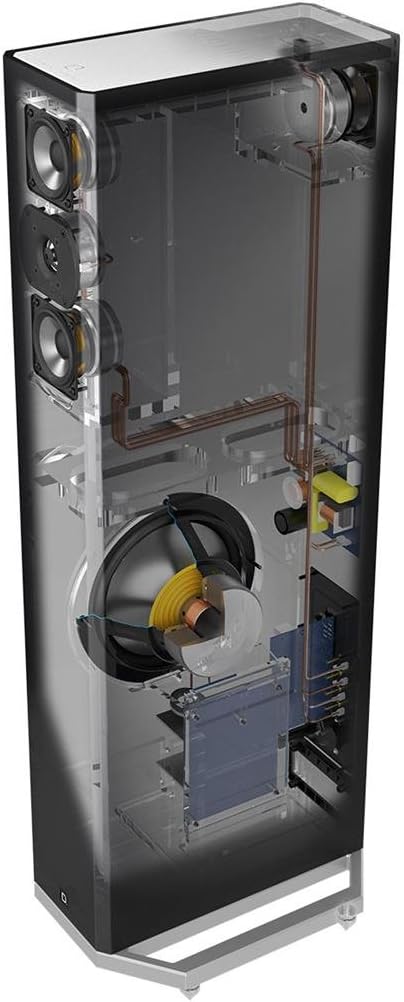
Figure 8.1: Internal view of the BP9020, illustrating the placement of the tweeter, midrange drivers, and integrated subwoofer.
9. Warranty and Support
9.1 Warranty Information
The Definitive Technology BP9020 speaker comes with a Full Warranty. Specific terms and duration of the warranty may vary by region and retailer. Please retain your proof of purchase for warranty claims.
For detailed warranty information, please refer to the warranty card included with your product or visit the official Definitive Technology website.
9.2 Customer Support
For technical assistance, troubleshooting beyond this manual, or service inquiries, please contact Definitive Technology customer support. You can typically find contact information on the official brand website or through your authorized dealer.
When contacting support, please have your product model number (BP9020) and serial number (located on the rear panel of the speaker) ready.


