
Introduction
The Claber 90915 Rain Sensor is an essential component for modern, efficient garden irrigation systems. It is designed to automatically detect rainfall and temporarily suspend the irrigation cycle, preventing overwatering and conserving water resources. This manual provides comprehensive instructions for the proper installation, operation, and maintenance of your Claber 90915 Rain Sensor, ensuring optimal performance and longevity.
Safety Information
- Always disconnect power to the irrigation controller before installing or servicing the rain sensor.
- Ensure all electrical connections are secure and protected from moisture.
- Do not attempt to modify the sensor or its wiring. Refer to qualified personnel for repairs.
- Install the sensor in a location where it can accurately detect rainfall, away from obstructions or artificial water sources.
Setup and Installation
The Claber 90915 Rain Sensor is designed for wall mounting and connects via a wired electrical connection to your irrigation system's control unit. Ensure the sensor is positioned in an open area that receives direct rainfall and is not affected by roof runoff, trees, or other obstructions that could block rain from reaching it.

Figure 1: The Claber 90915 Rain Sensor main unit, showing the black sensor body, orange rain collection funnel, and attached wiring.
Mounting the Sensor
- Select a suitable location for wall mounting. This should be an elevated position, free from overhead obstructions, where the sensor can accurately collect rainfall.
- Use the integrated mounting bracket to secure the sensor to a wall or post. Ensure it is level to allow for proper water collection and drainage.
- The sensor comes with a 2-meter cable for connection to your irrigation controller. Plan your mounting location to ensure the cable can reach the controller without excessive tension or bending.

Figure 2: Installation diagram illustrating the rain sensor mounted with its 2-meter cable extending downwards to connect to the irrigation system.
Wiring Connections
The Claber 90915 Rain Sensor operates on 24 Volts and connects directly to the sensor terminals of your irrigation controller. Refer to your irrigation controller's manual for specific wiring instructions for rain sensors. Typically, the sensor wires connect to the "SEN" or "RAIN" terminals and the common terminal on the controller.
- Ensure power to the irrigation controller is off before making any wiring connections.
- Connect the two wires from the rain sensor to the designated rain sensor terminals on your irrigation controller. The polarity typically does not matter for simple rain sensors.
- Secure all connections with waterproof connectors if exposed to outdoor elements.
Operating Principles
The Claber 90915 Rain Sensor utilizes a hygroscopic disc system that expands when it absorbs water (rain) and contracts when it dries. This expansion and contraction activate a switch that signals your irrigation controller to either pause or resume watering.
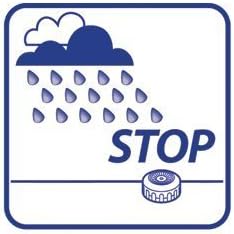
Figure 3: When rain is detected, the sensor signals the irrigation system to stop watering, indicated by the cloud and raindrops with a "STOP" sign.
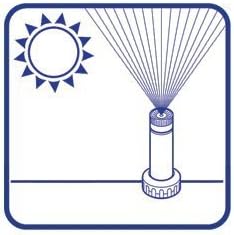
Figure 4: When the sensor is dry and no rain is detected, the irrigation system operates normally, indicated by the sun and sprinkler icon.
When sufficient rainfall has been collected by the sensor, the internal mechanism triggers, sending a signal to the irrigation controller to interrupt scheduled watering cycles. Once the hygroscopic discs dry out, the sensor resets, allowing the irrigation controller to resume its normal programming.
Maintenance
Regular maintenance ensures the continued accuracy and reliability of your Claber 90915 Rain Sensor.
- Cleaning: Periodically inspect the rain collection funnel and the hygroscopic discs for debris such as leaves, dirt, or insects. Gently clean with a soft cloth and water if necessary. Do not use harsh chemicals or abrasive materials.
- Location Check: Ensure the sensor remains free from obstructions that could prevent rain from reaching it. Trim any overgrown vegetation around the sensor.
- Winterization: In regions with freezing temperatures, it is advisable to disconnect and store the rain sensor indoors during winter to prevent damage from ice.
Troubleshooting
| Problem | Possible Cause | Solution |
|---|---|---|
| Irrigation system does not stop during rain. | Sensor is obstructed or dirty; wiring issue; sensor malfunction. | Check sensor for debris and clean. Verify wiring connections to controller. Test sensor operation (refer to controller manual for testing procedures). |
| Irrigation system does not resume after rain. | Sensor is still wet; sensor malfunction. | Allow sufficient time for sensor to dry. Ensure sensor is in an open area for drying. If problem persists, sensor may need replacement. |
| Sensor appears damaged. | Physical impact; extreme weather. | Inspect for cracks or broken parts. Replace sensor if significantly damaged. |
Specifications
| Model Number | 90915 |
| Brand | Claber |
| Sensor Technology | Rain Sensor (Hygroscopic Disc) |
| Power Source | Wired Electric |
| Voltage | 24 Volt |
| Mounting Type | Wall Mounting |
| Color | Orange |
| Item Weight | 260 g |
| Package Dimensions | 18 x 9.2 x 9.2 cm |
Warranty and Support
For detailed warranty information, please refer to the documentation included with your product packaging or visit the official Claber website. Claber provides customer support for product inquiries, technical assistance, and warranty claims.
Claber Official Website: www.claber.com
Contact information for support may vary by region. Please check the website for the most current contact details.


