
Defiant DFI-5983-BZ
Defiant 180 Bronze LED Motion Outdoor Security Light User Manual
Model: DFI-5983-BZ
Introduction
Thank you for purchasing the Defiant 180 Bronze LED Motion Outdoor Security Light. This manual provides detailed instructions for the installation, operation, and maintenance of your new security light. Please read this manual thoroughly before installation and keep it for future reference.
This LED motion light is designed to provide seamless light coverage for increased safety, security, and peace of mind. Featuring DualBrite technology, it offers accent lighting from dusk-to-dawn and full brightness when motion is detected. The integrated LED technology ensures you will never need to change a bulb.
Important Safety Information
WARNING: Risk of electric shock. Disconnect power at the fuse or circuit breaker before installation or servicing.
WARNING: Risk of fire. Keep combustible materials away from the lamp.
- Read all instructions before installing.
- This fixture is intended for outdoor use only.
- Ensure the light is installed by a qualified electrician if you are unsure about the wiring process.
- Do not connect to a dimmer switch.
- Operating temperature range: -25°C (-13°F) to +50°C (+120°F).
What's Included
The Defiant 180 Bronze LED Motion Outdoor Security Light package includes:
- Defiant 180 Bronze LED Motion Outdoor Security Light unit
- Timer (integrated)
- Mounting hardware (not explicitly listed but implied for installation)
- User Manual (this document)

Figure 1: Front view of the Defiant 180 Bronze LED Motion Outdoor Security Light. This image shows the main unit with its two adjustable LED light panels and the motion sensor located below.
Setup and Installation
The Defiant 180 Bronze LED Motion Outdoor Security Light is designed for quick and safe installation with DIY-friendly 3 Easy Steps to Connect.
Pre-Installation Checklist:
- Ensure power is OFF at the circuit breaker.
- Gather necessary tools: screwdriver, wire strippers, electrical tape, ladder.
- Choose a suitable mounting location (wall or eave mount) that provides the desired coverage and is within reach of existing wiring.
Installation Steps:
- Prepare Wiring: Turn off power at the main circuit breaker. Remove the existing fixture (if any) and expose the electrical wires.
- Mounting the Fixture: Secure the mounting plate to the junction box. Connect the light fixture's wires to your household wiring (black to black, white to white, ground to ground) using wire nuts. Ensure all connections are secure and insulated with electrical tape.
- Attach Light Fixture: Carefully attach the light fixture to the mounting plate, ensuring no wires are pinched. Seal the fixture to the mounting surface with silicone caulk to prevent water intrusion.
- Restore Power: Turn the power back on at the circuit breaker.

Figure 2: Diagram illustrating the three easy installation steps for the Defiant security light, showing preparation, wiring, and mounting.
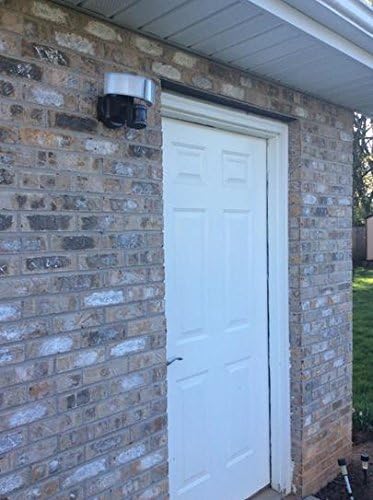
Figure 3: The Defiant security light mounted on an exterior brick wall next to a door, demonstrating a typical installation scenario.
Operating Instructions
The Defiant 180 Bronze LED Motion Outdoor Security Light features adjustable settings for optimal performance.
Adjusting the Light Heads and Sensor:
The two LED light heads are independently adjustable, allowing you to direct light precisely where needed. The motion sensor can also be adjusted to cover the desired detection area.
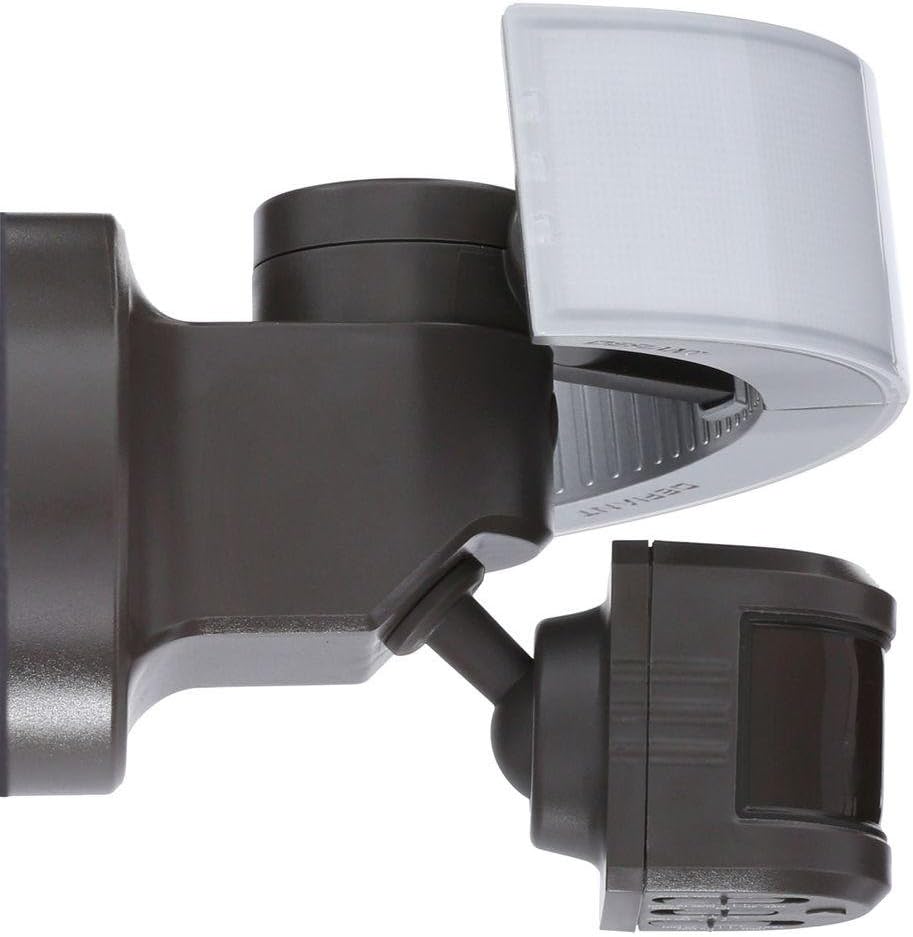
Figure 4: Side view of the security light, highlighting the adjustable lamp heads and the motion sensor's pivot point.
Control Settings:
The control panel for the light's settings is located on the underside of the motion sensor. It includes switches for TEST, ON TIME, SENSITIVITY, and DUAL BRITE functions.

Figure 5: Close-up view of the control panel on the motion sensor, showing the switches for TEST, ON TIME (1 MIN, 5 MIN, 20 MIN), SENSITIVITY (L, M, H), and DUAL BRITE (OFF, 3H, 6H, DUSK TO DAWN).
- TEST Mode: Use this setting during installation to quickly check the motion detection and light activation. The light will turn on for a short period when motion is detected, regardless of ambient light.
- ON TIME: This setting determines how long the light stays on after motion is detected and the light activates. Options typically include 1 minute, 5 minutes, and 20 minutes.
- SENSITIVITY (SENS.): Adjusts the range and sensitivity of the motion sensor.
- L (Low): Reduced detection range.
- M (Medium): Standard detection range.
- H (High): Maximum detection range (up to 70 ft.).
- DUAL BRITE: This feature provides two levels of lighting.
- OFF: DualBrite feature is disabled.
- 3H / 6H: The light will stay on at a low accent level for 3 or 6 hours after dusk, then switch to motion-activated full brightness.
- DUSK TO DAWN: The light will stay on at a low accent level from dusk until dawn, switching to full brightness only when motion is detected. This feature beautifies, protects, and saves energy.
For optimal performance, ensure the sensor is not obstructed and is positioned to cover the desired area.
Maintenance
The Defiant 180 Bronze LED Motion Outdoor Security Light is designed for minimal maintenance due to its integrated LED technology, meaning no bulbs to change.
- Cleaning: Periodically clean the fixture with a soft, damp cloth. Do not use abrasive cleaners or solvents. Ensure the power is off before cleaning.
- Inspection: Regularly inspect the fixture for any signs of damage, loose wiring, or wear. Address any issues promptly.
- Sensor Clarity: Keep the motion sensor lens clean and free from obstructions (e.g., spiderwebs, dirt) to ensure optimal detection performance.
Troubleshooting
| Problem | Possible Cause | Solution |
|---|---|---|
| Light does not turn on. | No power; faulty wiring; sensor obstructed; ambient light too high. | Check circuit breaker. Verify wiring connections. Clear sensor. Adjust DUSK TO DAWN setting or wait for darker conditions. |
| Light stays on continuously. | Continuous motion detected; TEST mode active; wiring error. | Ensure no constant motion in detection area. Switch out of TEST mode. Recheck wiring. |
| Light turns on for no apparent reason. | Sensor sensitivity too high; environmental factors (wind, small animals). | Reduce SENSITIVITY setting. Reposition sensor to avoid unwanted triggers. |
| Detection range is poor. | Sensor sensitivity too low; sensor obstructed; incorrect angle. | Increase SENSITIVITY setting. Clear sensor lens. Adjust sensor angle. |
Specifications
| Feature | Detail |
|---|---|
| Model Number | DFI-5983-BZ |
| Brand | Defiant |
| Light Output | 2050 Lumens |
| Motion Detection Range | 180 degrees, up to 70 ft. |
| Color Temperature | 5000K (Daylight) |
| Color Rendering Index (CRI) | 82 |
| Power Type | Hardwired |
| Fixture Material | Plastic, Frosted Glass/Lens |
| Fixture Color/Finish | Bronze |
| Dimensions (H x W x D) | 7.375 in. x 8.5 in. x 7.25 in. |
| Product Weight | 1.39 lbs |
| Watt Equivalence | 24.99 Watts |
| Certifications | UL Listed, cUL Listed |
| Operating Temperature | -25°C (-13°F) to +50°C (+120°F) |
Warranty and Support
Specific warranty information is not provided in the product details. For warranty claims or technical support, please contact Defiant customer service. Keep your purchase receipt as proof of purchase.
For further assistance, please refer to the official Defiant website or contact their customer support line.
Related documentsDFI-5983-BZ


Ask a question about this manual
Ask about setup, troubleshooting, compatibility, parts, safety, or missing instructions. Manuals+ will review the question and use this page’s manual context to help answer it.