1. Introduction
Thank you for purchasing the Supersonic IQ-1428BT Bluetooth Active Portable Hi-Fi Speaker. This manual provides essential information for the safe and efficient operation of your device. Please read it thoroughly before use and retain it for future reference.
The IQ-1428BT is a versatile 2.1 channel outdoor Bluetooth speaker designed to deliver clear sound and heavy bass. It features Bluetooth 3.0 connectivity, USB/SD inputs, FM radio, 3.5mm Aux input, and two microphone inputs, all powered by a rechargeable battery.
2. Important Safety Information
- Do not expose the speaker to extreme temperatures, humidity, or direct sunlight.
- Avoid dropping or subjecting the speaker to strong impacts.
- Do not attempt to disassemble or modify the speaker. This will void the warranty.
- Keep the speaker away from water and other liquids. While it is listed as waterproof, prolonged submersion or exposure to high-pressure water jets should be avoided.
- Use only the provided charging cable or a certified equivalent.
- Keep out of reach of children.
- Ensure proper ventilation when operating the speaker.
3. Package Contents
Please check that all items are present in your package:
- Supersonic IQ-1428BT Bluetooth Active Portable Hi-Fi Speaker
- Micro USB Charging Cable
- 3.5mm Aux Cable
- User Manual (this document)
4. Product Overview
Familiarize yourself with the speaker's components and controls.
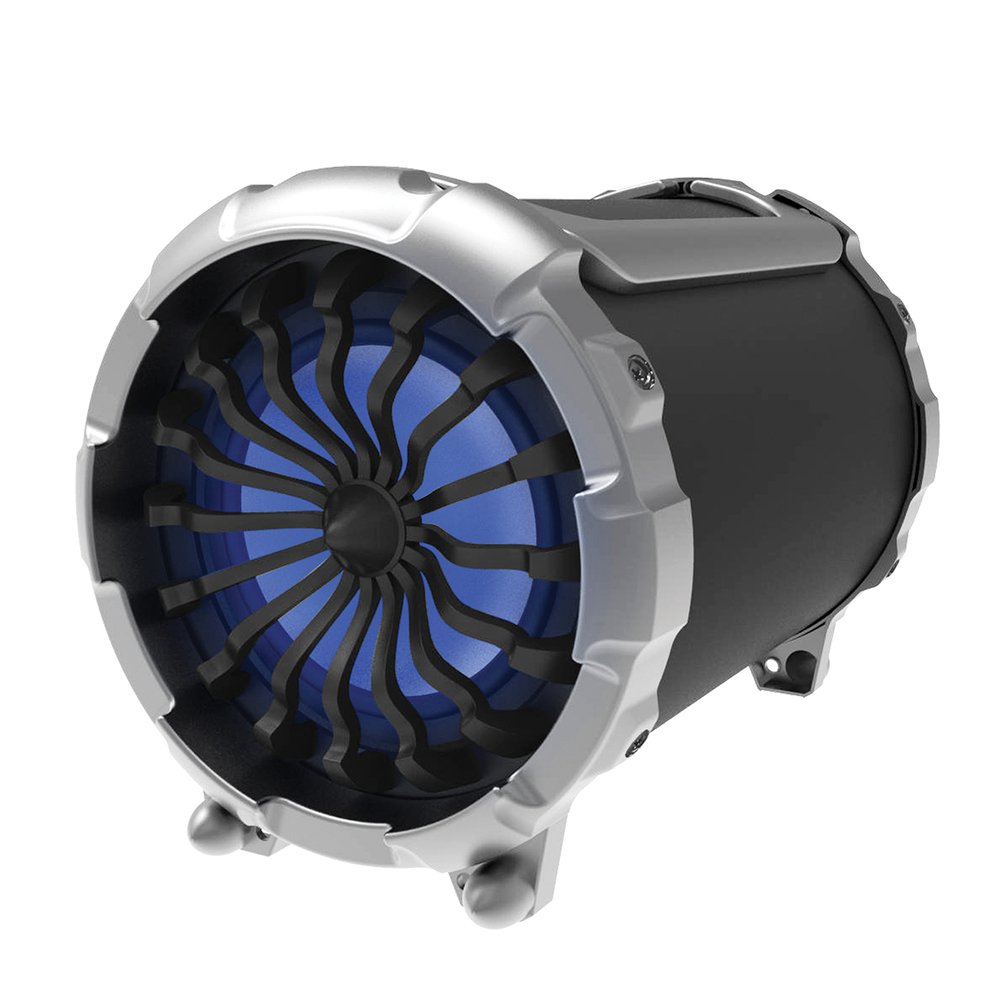
Image: Front view of the Supersonic IQ-1428BT speaker, showing the main speaker grille and control panel.
4.1. Control Panel and Ports
- Power Button: Turns the speaker on or off.
- Mode Button: Switches between Bluetooth, FM Radio, USB, SD, and Aux input modes.
- Play/Pause Button: Plays or pauses audio playback.
- Previous/Next Track Buttons: Skips to the previous or next track. Also used for FM station tuning.
- Volume Control: Adjusts the master volume.
- USB Input: For playing audio from USB flash drives.
- SD Card Slot: For playing audio from SD memory cards.
- AUX Input (3.5mm): For connecting external audio devices via a 3.5mm cable.
- Microphone Inputs (x2): For connecting wired microphones.
- Micro USB Charging Port: For charging the internal battery.
5. Setup
5.1. Initial Charging
- Before first use, fully charge the speaker.
- Connect the Micro USB charging cable to the speaker's charging port.
- Connect the other end of the cable to a DC5V USB power adapter (not included) or a computer USB port.
- The charging indicator light will illuminate. Charging takes approximately 6 hours.
- Once fully charged, the indicator light may change or turn off. Disconnect the charging cable.
5.2. Powering On/Off
- To power on, press and hold the Power button until the speaker activates.
- To power off, press and hold the Power button again until the speaker shuts down.
6. Operating Instructions
6.1. Bluetooth Mode
- Power on the speaker. It will automatically enter Bluetooth pairing mode, indicated by an audible prompt or flashing LED.
- On your Bluetooth-enabled device (smartphone, tablet, laptop), enable Bluetooth and search for available devices.
- Select "IQ-1428BT" from the list of devices.
- Once paired, the speaker will confirm with an audible prompt. You can now stream music wirelessly.
- The operating range for Bluetooth is approximately 10 meters (33 feet).
6.2. USB/SD Card Playback
- Insert a USB flash drive or SD card into the corresponding slot.
- The speaker will automatically switch to USB/SD mode and begin playing audio files. If not, press the Mode button to select the correct input.
- Use the Play/Pause and Previous/Next Track buttons to control playback.
6.3. FM Radio
- Press the Mode button to switch to FM Radio mode.
- Press and hold the Play/Pause button to automatically scan and save available FM stations.
- Use the Previous/Next Track buttons to navigate between saved stations.
6.4. AUX Input
- Connect one end of the 3.5mm Aux cable to the speaker's AUX input port.
- Connect the other end to the headphone jack or audio output of your external device.
- Press the Mode button to switch to AUX input mode.
- Control playback and volume from your external device.
6.5. Microphone Use
- Connect up to two wired microphones (not included) to the microphone input jacks.
- Adjust the microphone volume using the dedicated control (if available) or the main volume control.
7. Charging the Speaker
The speaker is equipped with a 2200mAh rechargeable Lithium Ion battery. Follow these guidelines for charging:
- Charging Port: Micro USB
- Charging Voltage: DC5V
- Charging Current: 400mA
- Charging Time: Approximately 6 hours for a full charge.
- Battery Life: Approximately 6 hours at 50% volume, or 4 hours at 80% volume.
- Always use the provided Micro USB cable for charging.
8. Maintenance
- Cleaning: Use a soft, dry cloth to clean the speaker's exterior. Do not use abrasive cleaners or solvents.
- Storage: When not in use for extended periods, store the speaker in a cool, dry place. It is recommended to charge the battery at least once every three months to maintain its lifespan.
- Water Resistance: The speaker is waterproof. However, ensure all port covers are securely closed before exposure to water. Do not submerge for long periods or expose to high-pressure water.
9. Troubleshooting
| Problem | Possible Cause | Solution |
|---|---|---|
| Speaker does not power on. | Battery is depleted. | Charge the speaker for at least 30 minutes. |
| No sound. | Volume is too low or muted. Incorrect input mode. | Increase volume. Press the Mode button to select the correct input (Bluetooth, AUX, USB/SD, FM). |
| Cannot pair via Bluetooth. | Speaker is not in pairing mode. Device Bluetooth is off. Too far from speaker. | Ensure speaker is in Bluetooth mode. Turn Bluetooth on your device. Move device closer to speaker (within 10m). |
| FM radio reception is poor. | Weak signal. | Relocate the speaker to an area with better reception. |
10. Specifications
| Feature | Detail |
|---|---|
| Model Number | IQ-1428BT |
| Bluetooth Version | 3.0 |
| Bluetooth Operating Range | Up to 10 meters (33 feet) |
| Speaker Configuration | 2.1 Channel Outdoor HiFi Speaker |
| Watts Per Channel | 15W + 3W*2 |
| Driver Size | 6.5 inch + 3 inch x 2 |
| Frequency Response | 100Hz-20KHz |
| Nominal Impedance | 4 Ohms |
| Inputs | USB, SD, FM Radio, 2x Microphone, 3.5mm Aux |
| Battery Type | Rechargeable Lithium Ion |
| Battery Capacity | 2200mAh |
| Charging Voltage | DC5V |
| Charging Time | Approx. 6 hours |
| Playback Time (50% volume) | Approx. 6 hours |
| Playback Time (80% volume) | Approx. 4 hours |
| Dimensions (LxWxH) | 30.23 x 25.91 x 36.07 cm (11.9 x 10.2 x 14.2 inches) |
| Weight | 2.95 kg (6.5 lbs) |
| Waterproof | Yes |
11. Warranty and Support
Supersonic products are designed and manufactured to the highest quality standards. For detailed warranty information or technical support, please refer to the warranty card included with your purchase or visit the official Supersonic website. Do not attempt to repair the product yourself, as this may void the warranty.
For customer service inquiries, please contact your retailer or the manufacturer directly.


