1. Product Overview
The Nuheat AC0006 is a robust 120V, 20 AMP relay designed to expand the capabilities of your Nuheat thermostat. This device enables a single thermostat to effectively control multiple heating zones, providing greater flexibility and control over your heating system. It acts as an intermediary switch, allowing the thermostat to manage higher current loads or distribute power to additional heating elements beyond its direct capacity.

Figure 1: Front view of the Nuheat AC0006 Relay, displaying its electrical specifications and model number.
2. Safety Information
Please read and understand all instructions before installing or operating this product. Failure to follow these instructions could result in electrical shock, fire, or property damage. Always adhere to local electrical codes and regulations.
- WARNING: Risk of electrical shock. Disconnect power at the circuit breaker or fuse box before installing or servicing.
- Installation should be performed by a qualified electrician in accordance with all national and local electrical codes.
- Ensure all wiring connections are secure and properly insulated to prevent short circuits.
- Do not exceed the specified voltage and current ratings of the relay.
- Keep the device away from water and excessive moisture.
3. Product Features
- Model: NH AC0006
- Voltage Rating: 120V
- Current Rating: 20 AMP
- Designed to allow a single Nuheat thermostat to control multiple heating zones.
- Robust construction for reliable performance.
4. Specifications
| Specification | Value |
|---|---|
| Model Number | AC0006 |
| Brand | Nuheat |
| Voltage | 120 Volts |
| Current Rating | 20 Amps |
| Item Package Quantity | 1 |
| ASIN | B01F41IF6A |
| Date First Available | November 8, 2016 |
5. Setup and Installation
Installation of the Nuheat AC0006 relay involves electrical wiring and should only be performed by a qualified electrician or a licensed professional. Ensure all local and national electrical codes are strictly followed.
5.1 Pre-Installation Steps
- Disconnect Power: Locate the circuit breaker or fuse controlling the heating circuit and turn off the power completely. Verify power is off using a voltage tester.
- Gather Tools: Ensure you have the necessary tools, including screwdrivers, wire strippers, and a voltage tester.
- Identify Wiring: Clearly identify the line voltage wires (hot and neutral), the load wires for each heating zone, and the low-voltage control wires from the Nuheat thermostat.
5.2 Wiring Instructions
The Nuheat AC0006 relay typically has terminals for line voltage input, load output for the heating zones, and control input from the thermostat. Refer to the wiring diagram provided with your specific Nuheat thermostat and the relay for precise connections.
- Connect the 120V line voltage (hot and neutral) to the designated input terminals on the relay.
- Connect the heating zone load wires to the corresponding output terminals on the relay. Each zone will have its own set of load wires.
- Connect the low-voltage control wires from the Nuheat thermostat to the control input terminals on the relay. This allows the thermostat to switch the relay on and off.
- Ensure all connections are tight and secure. Use appropriate wire connectors.
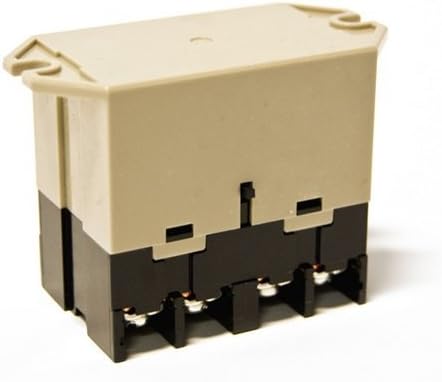
Figure 2: Side view of the Nuheat AC0006 Relay, illustrating the terminal connections for wiring.
5.3 Post-Installation
- Secure the relay in a suitable electrical box or mounting location, ensuring it is protected and accessible for future servicing.
- Once all wiring is complete and verified, restore power at the circuit breaker.
- Test the system by operating the Nuheat thermostat to ensure all connected heating zones respond correctly.
6. Operating Instructions
The Nuheat AC0006 relay operates in conjunction with your Nuheat thermostat. It does not have user-operable controls directly on the unit. Its function is to switch the power to the heating zones based on the signals received from the thermostat.
- Thermostat Control: The thermostat sends a low-voltage signal to the relay when heat is required for a specific zone.
- Relay Activation: Upon receiving the signal, the AC0006 relay closes its internal contacts, allowing 120V power to flow to the designated heating zone(s).
- Zone Management: If multiple zones are connected via multiple relays or a single relay configured for multiple outputs, the thermostat will manage each zone independently or collectively as programmed.
- Power Disconnection: When the thermostat no longer calls for heat, the relay opens its contacts, disconnecting power to the heating zone(s).
For detailed operation of your heating system and zone programming, refer to the instruction manual for your specific Nuheat thermostat model.
7. Maintenance
The Nuheat AC0006 relay is designed for long-term, maintenance-free operation. However, periodic checks can help ensure continued reliable performance.
- Annual Inspection: It is recommended to have a qualified electrician inspect the relay and its connections annually to ensure all wiring remains secure and free from corrosion.
- Cleaning: If the relay is installed in an accessible area, ensure it remains free of dust and debris. Use a dry, soft cloth for cleaning. Do not use liquid cleaners.
- Avoid Tampering: Do not attempt to open or repair the relay. There are no user-serviceable parts inside.
Always disconnect power before performing any inspection or cleaning near the relay.
8. Troubleshooting
If you experience issues with your heating zones after installing the Nuheat AC0006 relay, consider the following troubleshooting steps. Always ensure power is disconnected before inspecting any wiring.
| Problem | Possible Cause | Solution |
|---|---|---|
| Heating zone not turning on. | No power to the relay. Loose wiring connections. Thermostat not calling for heat. Faulty relay. | Check circuit breaker. Verify all wiring connections are secure (power off). Check thermostat settings and operation. Consult a qualified electrician for relay testing/replacement. |
| Heating zone not turning off. | Relay contacts stuck closed. Thermostat continuously calling for heat. | Disconnect power and consult a qualified electrician for relay inspection/replacement. Check thermostat settings and ensure it's functioning correctly. |
| Intermittent operation. | Loose wiring. Overheating (unlikely for this product). Interference. | Check and secure all wiring connections (power off). Ensure proper ventilation if enclosed. Consult a qualified electrician. |
If troubleshooting steps do not resolve the issue, contact a qualified electrician or Nuheat customer support for further assistance.
9. Warranty and Support
For information regarding the warranty of your Nuheat AC0006 relay, please refer to the warranty documentation provided with your original purchase or visit the official Nuheat website. Warranty terms and conditions may vary.
For technical support, installation inquiries, or assistance with troubleshooting, please contact Nuheat customer service. You can typically find contact information on the Nuheat official website or within your product packaging.
Nuheat Official Website: www.nuheat.com
Please have your product model number (AC0006) and purchase details ready when contacting support.


