
1. Introduction
Thank you for choosing the Lexon LA73H5 Bamboo Alarm Clock Radio. This manual provides detailed instructions for the proper setup, operation, and maintenance of your device. Please read this manual thoroughly before use and retain it for future reference.
2. Safety Instructions
- Do not expose the device to water, moisture, or extreme temperatures.
- Avoid placing the device near heat sources such as radiators, heat registers, stoves, or other apparatus (including amplifiers) that produce heat.
- Use only attachments/accessories specified by the manufacturer.
- Clean only with a dry cloth.
- Ensure proper ventilation. Do not block any ventilation openings.
- Dispose of batteries properly according to local regulations.
3. Package Contents
Please check that all items are present in your package:
- Lexon LA73H5 Bamboo Alarm Clock Radio
- Power Adapter
- 4 x AA Batteries (included)
- User Manual
4. Product Overview
Familiarize yourself with the components of your Lexon LA73H5 Alarm Clock Radio.
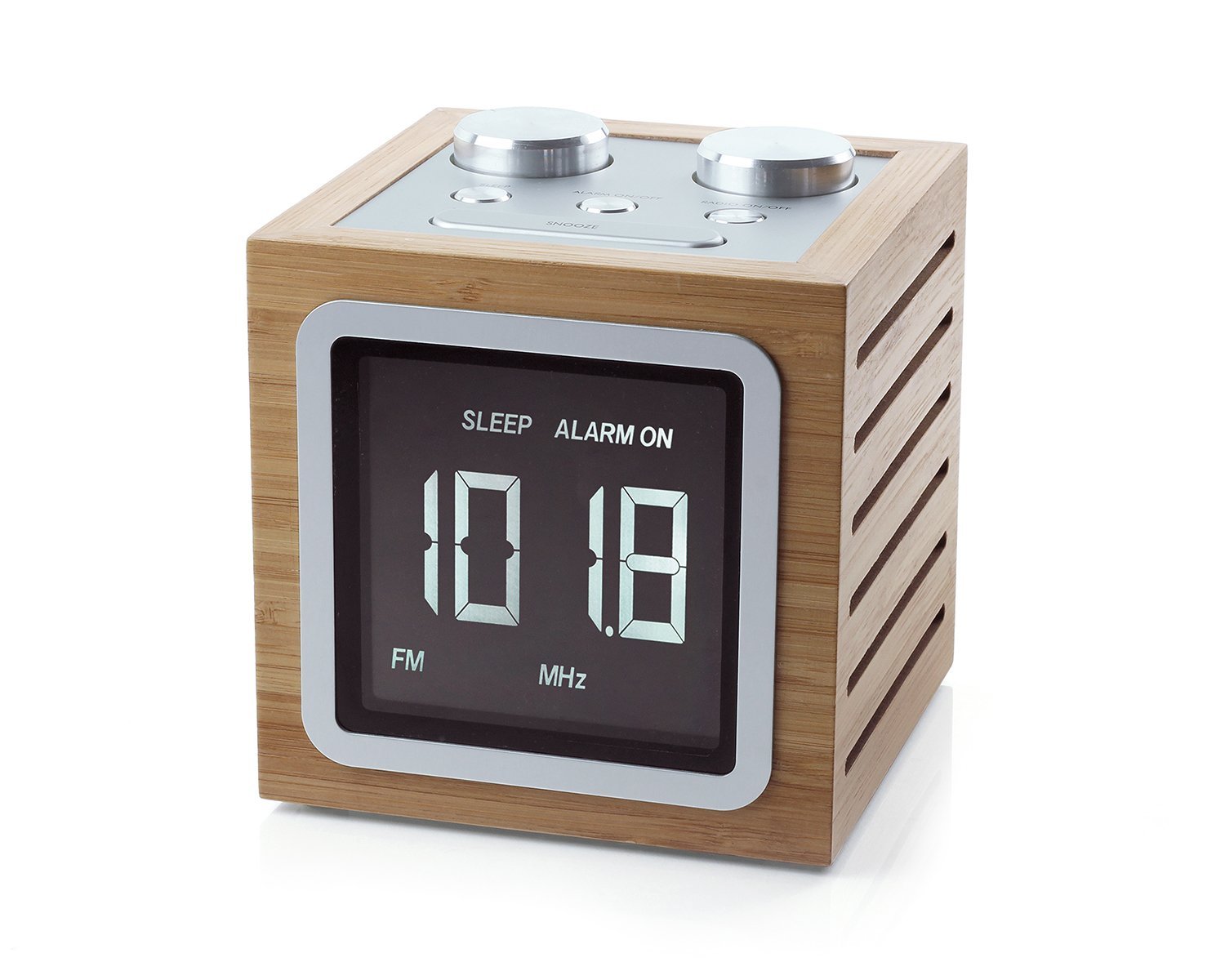
Front view of the Lexon LA73H5 Bamboo Alarm Clock Radio, showcasing its digital display and top control knobs. The display shows the time and alarm status, indicating 'SLEEP' and 'ALARM ON'.

Rear view of the Lexon LA73H5 Bamboo Alarm Clock Radio, highlighting the AUX input and DC IN power port. The bamboo casing features ventilation slats on the sides.
Key Components:
- Digital Display: Shows time, alarm status, and radio frequency.
- Control Knobs (Top): For setting time, alarm, tuning radio, and volume.
- AUX Input: For connecting external audio devices (MP3 amplifier).
- DC IN Port: For connecting the power adapter.
- Battery Compartment (Bottom): For 4 x AA batteries.
5. Setup
5.1 Battery Installation
- Locate the battery compartment on the bottom of the alarm clock.
- Open the compartment cover.
- Insert 4 AA batteries, ensuring correct polarity (+/-).
- Close the battery compartment cover securely.
5.2 Power Connection
- Connect the power adapter to the DC IN port on the back of the alarm clock.
- Plug the power adapter into a standard wall outlet.
- The device will power on, and the display will illuminate.
6. Operating Instructions
6.1 Setting the Time
- Press and hold the 'TIME SET' button (refer to product diagram for exact location, typically one of the top knobs or a button).
- Use the 'HOUR' and 'MINUTE' adjustment knobs/buttons to set the current time.
- Press 'TIME SET' again to confirm and exit time setting mode.
6.2 Setting the Alarm
- Press and hold the 'ALARM SET' button.
- Use the 'HOUR' and 'MINUTE' adjustment knobs/buttons to set your desired alarm time.
- Press 'ALARM SET' again to confirm.
- To activate/deactivate the alarm, press the 'ALARM ON/OFF' button. An alarm icon will appear/disappear on the display.
6.3 Radio Operation (AM/FM)
- Press the 'RADIO' button to turn on the radio.
- Press the 'BAND' button to switch between AM and FM frequencies.
- Use the 'TUNING' knob to manually search for radio stations.
- Adjust the volume using the 'VOLUME' knob.
- To turn off the radio, press the 'RADIO' button again.
6.4 MP3 Amplifier (AUX Input)
- Connect an external audio device (e.g., smartphone, MP3 player) to the 'AUX' input port on the back of the alarm clock using a 3.5mm audio cable (not included).
- The alarm clock will automatically switch to AUX mode or require you to press a 'MODE' or 'AUX' button.
- Play audio from your connected device. The alarm clock will amplify the sound.
- Adjust the volume using the 'VOLUME' knob on the alarm clock and/or your external device.
6.5 Automatic Dimming
The Lexon LA73H5 features automatic backlight dimming. The display brightness will adjust automatically based on ambient light conditions to ensure comfortable viewing without being overly bright in dark environments.
7. Maintenance
7.1 Cleaning
Wipe the device with a soft, dry cloth. Do not use liquid cleaners or abrasive materials, as they may damage the bamboo finish or electronic components.
7.2 Battery Replacement
If the device is primarily used with batteries and the display becomes dim or functions intermittently, replace all 4 AA batteries with new ones. Ensure correct polarity.
8. Troubleshooting
- No Power/Display Off: Check if the power adapter is securely connected to both the device and the wall outlet. Ensure batteries are correctly inserted and not depleted.
- Alarm Not Sounding: Verify that the alarm time is set correctly and the alarm function is activated (alarm icon visible on display). Check volume settings.
- Poor Radio Reception: Extend the antenna fully. Try repositioning the device to improve signal reception.
- No Sound from AUX Input: Ensure the audio cable is fully inserted into both the alarm clock and the external device. Check the volume on both devices. Confirm the alarm clock is in AUX mode.
9. Specifications
| Feature | Specification |
|---|---|
| Model Number | LA73H5 Radio Réveil Dolmen |
| Dimensions | 11.5 x 11.5 x 12.4 cm |
| Weight | 753 g |
| Power Source | Power Adapter / Batteries |
| Battery Type | 4 x AA (included) |
| Display Type | LCD |
| Radio Bands | AM/FM |
| Additional Features | Automatic Backlight Dimming, MP3 Amplifier (AUX Input), Bamboo Finish |
10. Warranty and Support
The Lexon LA73H5 Bamboo Alarm Clock Radio comes with a 2-year manufacturer's warranty from the date of purchase. This warranty covers defects in materials and workmanship under normal use.
For technical support, warranty claims, or further assistance, please contact your retailer or visit the official Lexon website for customer service information.