1. Introduction and Key Features
The Texsens Bluetooth Smart Light Bulb Speaker Generation II combines energy-efficient LED lighting with a built-in Bluetooth speaker, offering multi-color illumination and audio playback. This manual provides detailed instructions for its installation, operation, and maintenance.
Key Features:
- New feature to make the colorful light dance with the music.
- Multicolored, energy-efficient smart LED light with Bluetooth 3.0 support.
- One remote controller can control multiple bulbs (for light) simultaneously, but one Bluetooth device connects to only one bulb (for sound).
- Adjustable volume for both light and music.
- Comparable to a 50 Watts halogen bulb in brightness.
2. Setup and Installation
To set up your Texsens Smart Light Bulb Speaker, follow these steps:
- Unpack the Bulb: Carefully remove the light bulb and remote control from the packaging.
- Install the Bulb: Screw the E26 base of the light bulb into a standard light socket. Ensure the power is off before installation.
- Power On: Turn on the light switch to power the bulb. The bulb will emit a white light by default.
- Pair via Bluetooth: On your smartphone or Bluetooth-enabled device, search for "Texsens" in the Bluetooth settings and pair with the bulb. A confirmation sound will indicate successful pairing.

The Texsens Bluetooth Smart Light Bulb Speaker, Generation II, shown alongside its compact remote control. The bulb features a speaker grille at the top and a standard E26 base.

The Texsens Smart Light Bulb Speaker installed in a typical ceiling light fixture, demonstrating its appearance when in use.
3. Operating Instructions
3.1. Light Control
Use the included remote control to manage the light functions:
- Power On/Off: Press the 'ON' or 'OFF' buttons.
- Brightness Adjustment: Use the brightness up/down buttons to adjust the light intensity.
- Color Selection: Choose from a variety of colors using the RGB color buttons.
- White Light: Press the 'W' button for pure white light.
- Dynamic Modes:
- Flash (Fast/Slow): Activates a rapid or slow flashing color change.
- RGB Fade: Cycles through colors with a smooth fade transition.
- Flicker as Music Goes: Synchronizes light changes with the rhythm of the playing music.
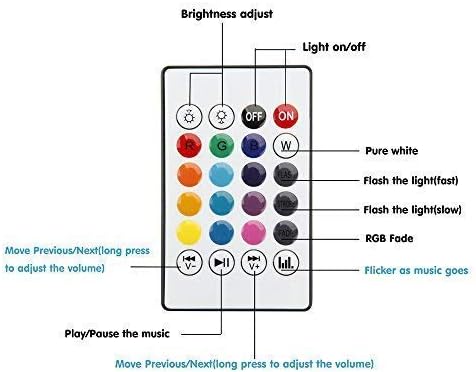
A close-up view of the remote control for the Texsens Smart Light Bulb Speaker, detailing the buttons for power, brightness, color selection, music control, and special lighting modes.
3.2. Music Playback
Once paired via Bluetooth, you can play audio through the bulb's speaker:
- Volume Control: Use the volume up/down buttons on the remote. Long press to adjust volume continuously.
- Track Navigation: Use the previous/next track buttons to skip songs.
- Play/Pause: Use the play/pause button to control audio playback.
- Music Sync: Activate the 'Flicker as Music Goes' mode for dynamic lighting synchronized with your audio.

An image highlighting the music capabilities of the Texsens Smart Light Bulb Speaker, featuring musical notes and a dancer's silhouette to convey its use for entertainment.
4. Product Specifications
| Specification | Value |
|---|---|
| Brand | Texsens |
| Light Type | LED |
| Wattage | 6 watts |
| Bulb Base | E26 |
| Voltage | 120 Volts |
| Light Color | Multi colors (RGBW) |
| Color Temperature | 6300 Kelvin |
| Brightness | 328 Lumens (White) / 400 Lumens (Overall) |
| Speaker Power | 3W |
| Frequency Response | 135Hz-15KHz |
| Bluetooth Version | 3.0 and Bluetooth Smart |
| Radio Range | 10m/33ft |
| Life Span | 50,000 hours |
| Dimensions | 5.12"H x 3.74"W |

An illustration providing the physical dimensions of the Texsens Smart Light Bulb Speaker, measuring 3.74 inches in width and 5.12 inches in height.
5. Maintenance and Care
To ensure the longevity and optimal performance of your Texsens Smart Light Bulb Speaker:
- Clean the bulb with a soft, dry cloth. Do not use liquid cleaners.
- Ensure the bulb is completely cool before handling or cleaning.
- Do not disassemble the bulb; this will void the warranty.
6. Troubleshooting
If you encounter issues with your Texsens Smart Light Bulb Speaker, try the following:
- No Light: Ensure the bulb is screwed in properly and the light switch is on. Check if the remote control battery needs replacement.
- No Sound: Verify that the bulb is successfully paired with your Bluetooth device. Check the volume levels on both the bulb (via remote) and your device. Ensure only one Bluetooth device is connected to the bulb for audio output.
- Remote Not Responding: Check the battery in the remote control. Ensure there are no obstructions between the remote and the bulb.
- Intermittent Connection: Ensure your Bluetooth device is within the 10m/33ft radio range. Reduce interference from other electronic devices.
7. Important Safety Information
Please read and adhere to the following safety guidelines:
- Keep the bulb away from fire and high temperatures.
- Do not use in corrosive environments.
- Avoid placing the bulb in damp places or areas with excessive moisture.
- This product is intended for indoor use only.
- Do not look directly into the LED light for extended periods.
8. Warranty and Support
The Texsens Bluetooth Smart Light Bulb Speaker Generation II comes with a 1-year warranty for quality-related issues and a 30-day money-back guarantee for any reason. For support or warranty claims, please refer to the contact information provided with your purchase or visit the official Texsens website.