
Introduction
Thank you for purchasing the Andoer AD-980II E-TTL Flash Speedlite. This powerful flash unit is designed for Canon EOS DSLR cameras, offering advanced features such as High-Speed Sync (HSS) up to 1/8000s, a Guide Number of 58 (ISO 100, 180mm), and versatile Master/Slave capabilities. This manual provides detailed instructions for proper setup, operation, and maintenance to ensure optimal performance and longevity of your device.
Safety Precautions
- Do not disassemble or modify the flash unit. High voltage components are present.
- Keep the flash unit dry. Do not expose it to rain or moisture.
- Avoid direct eye exposure to the flash, especially at close range, as it can cause temporary vision impairment.
- Use only specified batteries (AA alkaline or Ni-MH). Do not mix old and new batteries or different types.
- Turn off the flash and camera before attaching or detaching the flash unit.
- Store the flash in a cool, dry place away from direct sunlight.
Product Overview
Familiarize yourself with the various components of your Andoer AD-980II flash unit.
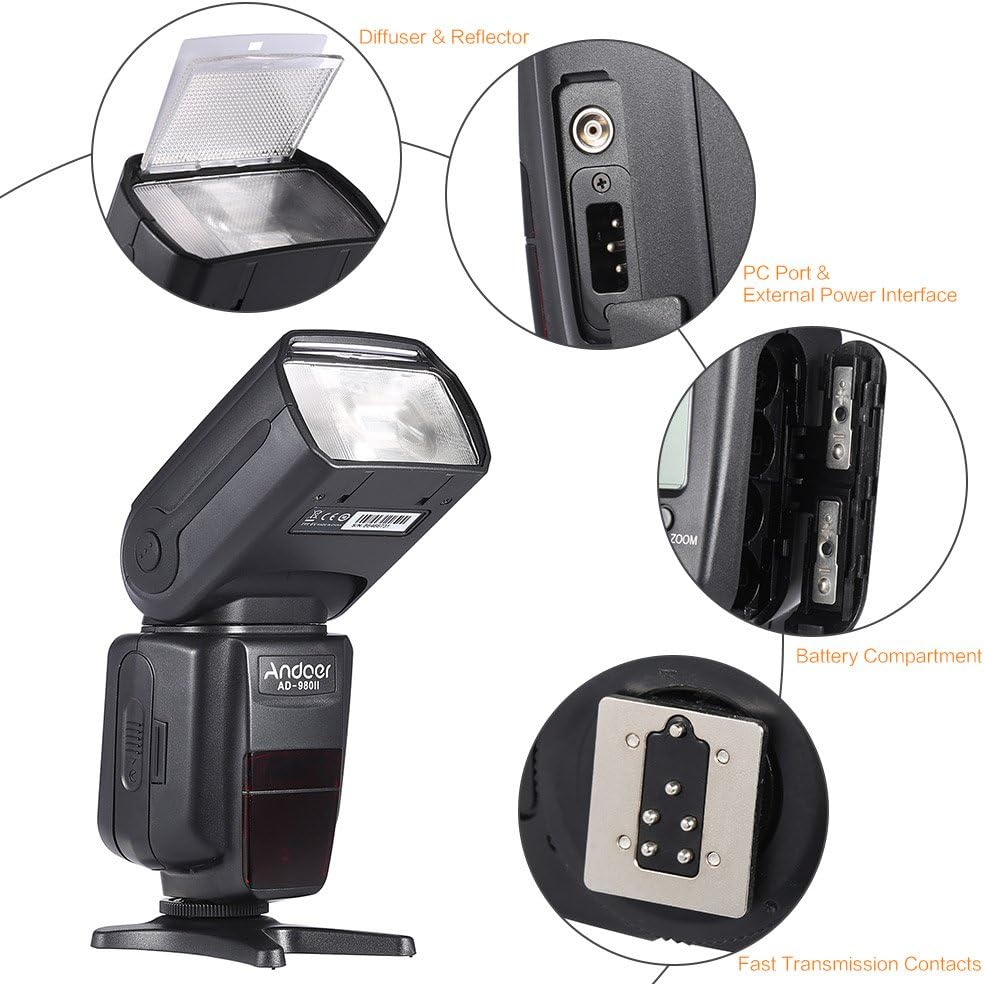
This image illustrates the key components of the Andoer AD-980II flash. It highlights the built-in diffuser and reflector, the PC port and external power interface for additional connectivity, the battery compartment for power, and the fast transmission contacts on the hot shoe for reliable camera communication.
- Flash Head: Contains the flash tube, diffuser, and reflector. Can be rotated and tilted.
- Diffuser & Reflector: Integrated pull-out diffuser and reflector panel for light modification.
- PC Port: For connecting to cameras or triggers via a PC sync cable.
- External Power Interface: For connecting an external power pack to reduce recycle times.
- Battery Compartment: Holds 4 AA batteries.
- Hot Shoe Contacts: For mounting the flash onto a camera's hot shoe and communicating with the camera.
- Control Panel: LCD screen and buttons for mode selection and settings adjustment.
Setup
1. Battery Installation
- Open the battery compartment cover located on the side of the flash unit.
- Insert four (4) AA batteries, ensuring correct polarity (+/-) as indicated inside the compartment.
- Close the battery compartment cover securely.
2. Mounting on Camera
- Ensure both the camera and flash are powered off.
- Slide the flash's hot shoe foot into the camera's hot shoe mount.
- Tighten the locking ring or lever on the flash unit to secure it firmly to the camera.
Operating Modes
The Andoer AD-980II offers multiple flash modes to suit various photographic needs. Use the MODE button on the control panel to cycle through the available modes.

This image displays the Andoer AD-980II flash unit alongside a graphic illustrating its various operational modes and features, including its Guide Number (GN58), E-TTL, Manual, Multi (Stroboscopic), High-Speed Sync (HSS), Rear-Curtain Sync, S1/S2 optical slave modes, Master and Slave wireless functions, fine control, and zoom capabilities.
1. E-TTL Mode (Automatic Flash)
In E-TTL (Evaluative Through-The-Lens) mode, the flash automatically determines the optimal flash output based on the camera's metering system. This mode is ideal for quick and accurate exposures in various lighting conditions.

This image shows the Andoer AD-980II flash in use, highlighting its E-TTL functionality for automatic and balanced flash exposure when photographing subjects like a model.
2. Manual Mode (M)
Manual mode allows you to set the flash output power manually from 1/1 (full power) to 1/128 in 1/3 stop increments. This provides precise control over lighting for creative effects.
3. Multi Mode (Stroboscopic Flash)
Multi mode fires a series of rapid flashes during a single exposure, creating a stroboscopic effect that captures multiple movements of a subject in one frame. You can adjust the flash frequency (Hz), number of flashes, and flash output.
4. S1/S2 Slave Modes (Optical Triggering)
- S1 Mode: The flash will fire in response to the first flash from a master flash. Suitable for manual flash units.
- S2 Mode: The flash will ignore the pre-flash from a master flash (e.g., TTL flash) and fire on the main flash.
5. Master and Slave Functionality
The AD-980II can function as both a master unit to control other slave flashes or as a slave unit triggered by a master flash. It supports 4 channels in 3 groups for flexible wireless setups.
6. High-Speed Sync (HSS) - Max 1/8000s
HSS allows the flash to synchronize with shutter speeds faster than the camera's native sync speed (e.g., 1/250s), up to 1/8000s. This is useful for freezing fast motion or using wide apertures in bright conditions.
7. Rear-Curtain Sync
In Rear-Curtain Sync mode, the flash fires just before the second curtain closes. This creates a natural-looking trail of light behind moving subjects, especially effective with slower shutter speeds.

This image demonstrates the photographic effects achievable with the Andoer AD-980II, including freezing fast motion with 1/8000s HSS, capturing multiple exposures with Multi Mode, and creating motion trails with Rear-Curtain Sync.
8. Other Features
- Sound Prompt: Audible alerts for flash readiness and other functions.
- Power Saving Mode: Automatically enters sleep mode after a period of inactivity to conserve battery life.
- Over-Heat Protection: Automatically reduces flash output or temporarily disables the flash to prevent overheating during rapid firing.
- Zoom Coverage: 18-180mm. Features fixed zoom, auto zoom, and manual zoom capabilities.
- Rotation Angles: Vertical rotation from -7 to 90 degrees; Horizontal rotation from 0 to 360 degrees.
- Recycle Time: Approximately 2.9 seconds at full power.
Maintenance
- Cleaning: Use a soft, dry cloth to clean the flash body. For stubborn dirt, a slightly damp cloth can be used, followed by a dry cloth. Do not use solvents or abrasive cleaners.
- Battery Care: Remove batteries if the flash will not be used for an extended period to prevent leakage.
- Storage: Store the flash unit in its protective pouch (if included) in a cool, dry, and dust-free environment.
- Hot Shoe Contacts: Keep the hot shoe contacts clean and free of debris to ensure proper communication with the camera.
Troubleshooting
| Problem | Possible Cause | Solution |
|---|---|---|
| Flash does not fire. |
|
|
| Flash output is too weak/strong. |
|
|
| Slow recycle time. |
|
|
| Flash overheats. |
|
|
Specifications
| Model Number | AD-980II |
| Guide Number | GN58 (ISO 100, 180mm) |
| Flash Coverage | 18-180mm (Fixed, Auto, Manual Zoom) |
| Flash Modes | E-TTL, M, Multi, S1, S2, Master, Slave |
| High-Speed Sync (HSS) | Up to 1/8000s |
| Rear-Curtain Sync | Supported |
| Wireless Communication | Optical Pulse (4 Channels, 3 Groups) |
| Vertical Rotation Angle | -7 to 90 degrees |
| Horizontal Rotation Angle | 0 to 360 degrees |
| Recycle Time | Approx. 2.9 seconds (full power) |
| Power Source | 4 x AA batteries (Alkaline or Ni-MH) |
| Dimensions | 19.56 x 5.08 x 7.62 cm |
| Weight | 594.21 g (without batteries) |
| Compatible Mounts | Canon, Canon EOS |
Warranty and Support
For warranty information and technical support, please refer to the documentation provided with your purchase or contact your retailer. Keep your proof of purchase for any warranty claims.