
1. Product Overview
The Godox TT600S Thinklite Flash is a versatile speedlight designed for use with Sony DSLR cameras, featuring a built-in 2.4GHz X Wireless Radio System for advanced remote control capabilities. It offers a powerful guide number and various flash modes to support diverse photographic needs.

Figure 1: Godox TT600S Thinklite Flash unit shown with included accessories such as color gels, a mini stand, and a carrying bag. This image provides a comprehensive view of the product and its accompanying items.

Figure 2: A detailed front view of the Godox TT600S flash unit, highlighting the LCD display and control buttons. The display shows current settings like power output (1/32) and zoom (85mm).
2. Setup
2.1 Battery Installation
The TT600S flash requires 4 AA batteries (Ni-MH batteries are recommended for optimal performance and recycle times). To install batteries:
- Open the battery compartment cover located on the side of the flash unit.
- Insert 4 AA batteries according to the polarity indicators inside the compartment.
- Close the battery compartment cover securely.
2.2 Mounting on Camera
The TT600S is compatible with Sony A7, A7R, A7S Mark II/III, A6500, A6300, A6000, and RX100 DSLR cameras with an MI Shoe. To mount the flash:
- Slide the flash's hot shoe into the camera's hot shoe mount until it clicks into place.
- Tighten the locking ring or lever on the flash unit to secure it to the camera.
Note: When the TT600S is mounted directly onto the camera's hot shoe, the high-speed sync (HSS) function is not available. HSS is effective only when the TT600S is used with compatible Godox X series triggers (e.g., X1T-S, XPro-S, X2T-S).
3. Operating Instructions
3.1 Power On/Off
To power on the flash, slide the ON/OFF switch to the 'ON' position. To power off, slide it to 'OFF'.
3.2 Flash Modes
Press the MODE button to cycle through the available flash modes:
- M (Manual Mode): Allows manual adjustment of flash power output from 1/1 (full power) to 1/128 in 1/3 stop increments.
- Multi (Stroboscopic Mode): Fires a series of rapid flashes within a single exposure to capture multiple movements of a subject.
- S1/S2 (Optical Slave Modes):
- S1 Mode: The flash will fire in response to the first flash from a master flash.
- S2 Mode: The flash will ignore the pre-flash from a master flash and fire in response to the main flash, suitable for cameras with pre-flash functions.
3.3 Power Output and Zoom Adjustment
Use the select dial and SET button to adjust flash power and zoom settings displayed on the LCD panel.

Figure 3: Illustration of the Godox TT600S's convenient LCD panel and the adjustable flash head. The LCD provides clear information for settings, and the select dial allows for easy navigation and adjustment.
3.4 Wireless Triggering (2.4GHz X System)
The TT600S features a built-in Godox 2.4G wireless X system, enabling it to function as both a master and slave unit. This system offers stable output and remote control.
- Master Unit: When used as a master, the TT600S can set its group as M/A/B/C/D/E.
- Slave Unit: When used as a slave, the TT600S can set its group as A/B/C/D/E.
- There are 32 channels available for selection.
- High-speed sync (up to 1/8000s) is achievable when the TT600S is triggered by a compatible Godox X series transmitter (e.g., X1T-S, XPro-S, X2T-S).
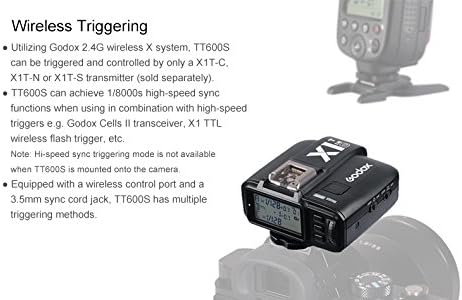
Figure 4: The Godox TT600S flash unit shown in conjunction with a Godox X1T-S wireless trigger. This setup enables advanced wireless control and high-speed sync capabilities.

Figure 5: The Godox TT600S (center) displayed with other Godox flash models (TT685S and WITSTRO AD360II-C). This illustrates the compatibility and integration within the Godox 2.4G Wireless X System.
4. Maintenance
4.1 Cleaning
To maintain the flash unit's performance and appearance:
- Use a soft, dry cloth to wipe the flash body.
- For stubborn dirt, use a slightly damp cloth with a mild detergent, then wipe dry immediately.
- Avoid using strong solvents or abrasive cleaners.
- Keep the hot shoe contacts clean and free of debris.
4.2 Storage
When not in use for extended periods:
- Remove the batteries to prevent leakage and damage.
- Store the flash in a cool, dry place, away from direct sunlight and excessive humidity.
- Use the provided carrying bag for protection during storage and transport.
5. Troubleshooting
If you encounter issues with your Godox TT600S flash, refer to the following common problems and solutions:
| Problem | Possible Cause | Solution |
|---|---|---|
| Flash does not fire. |
|
|
| "E1" error displayed on LCD. | Overheating protection activated. | Allow the flash to cool down for several minutes. Reduce the frequency of flashes. |
| High-Speed Sync (HSS) not working. |
|
|
| Flash coverage does not match lens focal length. | Incorrect zoom setting. | Adjust the flash zoom to match the lens focal length to avoid dark peripheries in your images. |
If the problem persists after attempting these solutions, please contact Godox customer support for further assistance.
6. Specifications
| Feature | Detail |
|---|---|
| Guide No. | GN60 (m ISO 100@200mm) |
| Flash Coverage | 20-200mm (14mm with wide panel) |
| Power Supply | Ni-MH batteries (recommended) or 4*LR6 alkaline batteries |
| Full Power Flashes | Approx. 230 times (2500mA Ni-MH battery) |
| Recycle Time | Approx. 0.1~2.6 seconds (eneloop Ni-MH batteries of Panasonic) |
| Vertical Rotate Angle | -7° to 90° |
| Horizontal Rotate Angle | 0 to 360° |
| Flash Duration | 1/300 to 1/20000s |
| High-Speed Sync | Up to 1/8000 seconds HSS (Requires High Speed Transmitter) |
| Wireless Flash Function | Master, Slave, Off Camera |
| Trigger Distance | 100 meters (2.4G Wireless) |
| Groups | 5 (A, B, C, D, E) |
| Channels | 32 |
| Product Dimensions | 4.33 x 3.94 x 7.87 inches |
| Item Weight | 1.15 pounds |
| Model Number | GDTT600S |
| Compatible Mountings | Sony Alpha |
| Included Components | Speedlight, mini stand, color gel, carrying bag |
7. Warranty and Support
Godox products are manufactured to high quality standards. For information regarding warranty coverage and terms, please refer to the warranty card included with your product or visit the official Godox website.
For technical support, troubleshooting assistance beyond this manual, or service inquiries, please contact Godox customer service through their official channels. Keep your purchase receipt and product serial number handy when seeking support.
You can visit the official Godox store on Amazon for more information: Godox Store