
Introduction
Thank you for choosing the HMS M9239 Magnetic Exercise Bike. This manual provides essential information for the safe assembly, operation, and maintenance of your new fitness equipment. Please read this manual thoroughly before using the exercise bike and keep it for future reference.
Important Safety Information
- Consult your physician before starting any exercise program.
- Ensure all parts are securely fastened before each use.
- Keep children and pets away from the equipment during operation.
- Place the exercise bike on a flat, stable surface.
- Wear appropriate exercise clothing and footwear.
- The maximum user weight for this device is 120 kg. Do not exceed this limit.
Package Contents
Before assembly, verify that all components are present and undamaged. If any parts are missing or damaged, contact customer support.
- Main frame
- Front and rear stabilizers
- Handlebar assembly
- Seat post and saddle
- Pedals (left and right)
- Computer console
- Hardware kit (bolts, washers, nuts, tools)
- User manual
Setup Instructions
Follow these steps to assemble your HMS M9239 Magnetic Exercise Bike:
- Attach Stabilizers: Secure the front and rear stabilizers to the main frame using the provided bolts and washers. Ensure they are firmly tightened for stability.
- Install Pedals: Identify the left (L) and right (R) pedals. The left pedal screws counter-clockwise, and the right pedal screws clockwise. Tighten them securely to the crank arms.
- Assemble Seat: Insert the seat post into the main frame and adjust it to your desired height. Secure the saddle to the seat post.
- Attach Handlebars: Connect the handlebar assembly to the main frame. Ensure all cables are properly routed and not pinched.
- Mount Console: Attach the computer console to the handlebar post. Connect the sensor wires from the main frame to the console.
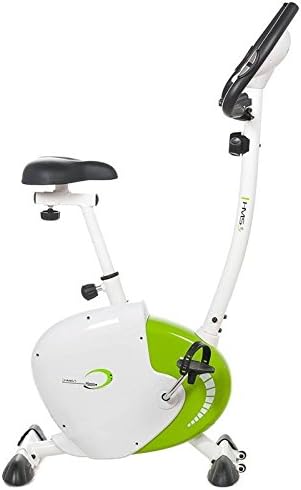
Overall view of the HMS M9239 Magnetic Exercise Bike.
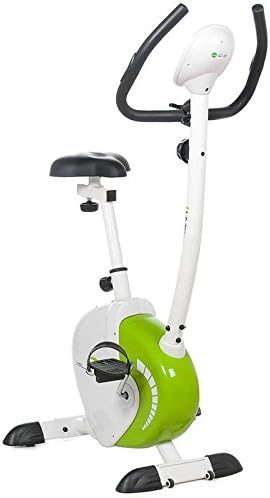
Side view of the HMS M9239 Magnetic Exercise Bike.
Operating Instructions
Adjusting the Seat
The seat height can be adjusted vertically to accommodate different user heights. Loosen the adjustment knob located on the seat post, slide the seat to the desired height, and then firmly tighten the knob to secure the seat in place.
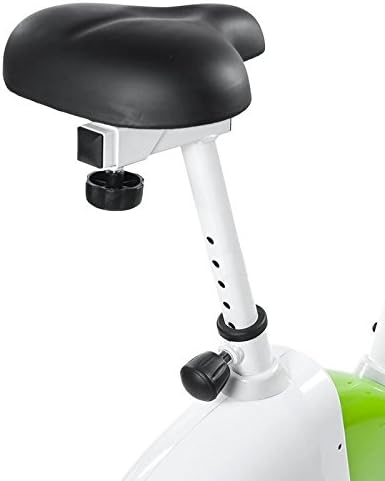
Close-up of the adjustable seat post on the HMS M9239 Magnetic Exercise Bike.
Adjusting Resistance
The HMS M9239 features 8 levels of manual tension control. Turn the resistance knob, usually located below the handlebars, clockwise to increase resistance and counter-clockwise to decrease it. Start with a lower resistance and gradually increase as your fitness improves.
Using the Computer Console
The integrated computer console displays various workout metrics. It typically operates on 4 AA batteries (included).
- SCAN: Automatically cycles through all display functions.
- TIME: Shows the duration of your workout.
- SPEED: Displays your current speed.
- DISTANCE: Tracks the total distance covered during your session.
- PULSE: Measures your heart rate (if equipped with pulse sensors on handlebars).
- CALORIES: Estimates the calories burned during your workout.
Refer to the console's specific instructions for setting goals or resetting values.

The digital display console of the HMS M9239 Magnetic Exercise Bike, showing speed, time, distance, pulse, and calories.
Maintenance
Regular maintenance ensures the longevity and safe operation of your exercise bike.
- Cleaning: Wipe down the bike with a damp cloth after each use to remove sweat and dust. Avoid abrasive cleaners.
- Inspection: Periodically check all bolts, nuts, and moving parts for tightness. Tighten any loose components.
- Lubrication: The magnetic resistance system is generally maintenance-free. However, if you notice any squeaking from moving parts, apply a small amount of silicone-based lubricant.
- Battery Replacement: Replace the console batteries (4 AA) when the display becomes dim or unresponsive.
Troubleshooting
| Problem | Possible Cause | Solution |
|---|---|---|
| Console not displaying data | Loose sensor cable, dead batteries | Check sensor cable connection, replace batteries. |
| Pedals feel loose or wobbly | Pedals not tightened correctly | Ensure pedals are fully tightened (left pedal counter-clockwise, right pedal clockwise). |
| Bike is unstable or rocks | Uneven surface, loose stabilizers | Move to a flat surface, adjust leveling caps on stabilizers, tighten stabilizer bolts. |
| Squeaking noise during use | Loose parts, need for lubrication | Check and tighten all bolts. Apply silicone lubricant to moving joints if necessary. |
Specifications
| Feature | Detail |
|---|---|
| Model Name | M9239 |
| Brand | HMS |
| Resistance Mechanism | Magnetic |
| Resistance Levels | 8 Manual Tension Levels |
| Flywheel Weight | 9 kg |
| Maximum User Weight | 120 kg |
| Product Dimensions (L x W x H) | 93 x 52 x 138 cm |
| Item Weight | 24.5 Kilograms |
| Seat | Vertically Adjustable Saddle |
| Console Functions | Scan, Time, Speed, Distance, Pulse, Calories |
| Power Source | Battery Powered |
| Batteries | 4 AA (included) |
| Color | White/Green |
| Material | Foam (for saddle/grips) |
Warranty and Support
For warranty information, technical support, or to order replacement parts, please refer to the contact information provided with your purchase documentation or visit the official HMS website. Keep your purchase receipt as proof of purchase.

