
1. Introduction
This manual provides essential information for the safe and efficient operation of your Oursson MO3020/DC Mini Electric Convection Oven. Please read these instructions thoroughly before first use and retain them for future reference. This appliance is designed for domestic use to bake, roast, grill, and warm various food items.

Image 1.1: Oursson MO3020/DC Mini Electric Convection Oven
2. Safety Instructions
To prevent personal injury or damage to the appliance, always observe the following safety precautions:
- Ensure the voltage indicated on the appliance corresponds to your local mains voltage before connecting.
- Do not immerse the appliance, cord, or plug in water or any other liquid.
- Always supervise children when the appliance is in use.
- Do not operate the oven if the power cord or plug is damaged, or if the appliance malfunctions or has been damaged in any way.
- Place the oven on a stable, heat-resistant surface, away from walls and other appliances to allow for proper ventilation.
- The exterior surfaces of the oven become very hot during operation. Use oven mitts when handling hot parts or accessories.
- Do not place anything on top of the oven while it is operating.
- Unplug the oven from the power outlet when not in use and before cleaning.
3. Package Contents
Carefully unpack your Oursson MO3020/DC oven and check that all items are present and in good condition. The package should contain:
- Oursson MO3020/DC Mini Electric Convection Oven
- Round Tray
- Rotisserie Accessory
- Rotisserie Basket
- Baking Tray
- Crumb Tray
- Grill Rack
- Instruction Manual

Image 3.1: Included Accessories
4. Product Features
The Oursson MO3020/DC Mini Electric Convection Oven is equipped with several features designed for versatile cooking:
- 30-Liter Capacity: Spacious interior suitable for various dishes, including an entire pizza or multiple muffins.
- 12 Cooking Programs: Offers a wide range of cooking options for different food types.
- Convection Heating: A powerful fan circulates hot air for even and faster cooking results.
- Catalytic Self-Cleaning: Three internal catalytic walls simplify cleaning by breaking down grease and food residue during operation at high temperatures.
- Adjustable Temperature: Temperature can be set between 100°C and 230°C.
- Automatic Timer: Features a timer with automatic shut-off and an audible alert when cooking is complete.
- Rotisserie Function: Includes a rotisserie accessory and basket for roasting poultry and other meats.
- Interior Lighting: Allows for easy monitoring of food during cooking.
5. Setup and Installation
Follow these steps to set up your oven for the first time:
- Unpacking: Remove all packaging materials, including any protective films or stickers from the oven's interior and exterior.
- Placement: Position the oven on a flat, stable, and heat-resistant surface. Ensure there is adequate space (at least 10-15 cm) around the oven for proper air circulation. Do not place it near flammable materials or under cabinets.
- Initial Cleaning: Wipe the interior and exterior surfaces with a damp cloth. Wash all accessories (trays, racks, rotisserie) with warm soapy water, rinse, and dry thoroughly.
- First Use (Burn-off): Before cooking food, operate the oven empty for approximately 15 minutes at the maximum temperature (230°C) using the convection function. This will burn off any manufacturing residues and odors. Ensure the area is well-ventilated during this process. A slight odor or smoke is normal during this initial burn-off.
6. Operating Instructions
Your Oursson MO3020/DC oven features intuitive controls for various cooking functions.
6.1 Control Panel Overview
The oven typically has four control knobs:
- Temperature Control Knob: Sets the desired cooking temperature (100°C to 230°C).
- Function Selector Knob: Chooses the cooking mode (e.g., upper heating, lower heating, both, convection, rotisserie).
- Timer Knob: Sets the cooking duration (up to a certain limit, usually 60-120 minutes) with an automatic shut-off and bell signal.
- Power Indicator Light: Illuminates when the oven is operating.

Image 6.1: Oven Front Panel with Controls
6.2 General Cooking Procedure
- Place food on the appropriate accessory (baking tray, grill rack, or rotisserie) and insert it into the oven.
- Close the oven door securely.
- Turn the Temperature Control Knob to the desired temperature.
- Turn the Function Selector Knob to the desired cooking mode.
- Turn the Timer Knob to the desired cooking time. The oven will start operating, and the power indicator light will illuminate.
- When the set time elapses, the oven will automatically switch off, and a bell will sound.
- Carefully remove the cooked food using oven mitts.
6.3 Using the Convection Function
Select a cooking mode that includes the convection fan. The fan circulates hot air, reducing cooking time and ensuring more even browning, especially for baked goods and roasted items.

Image 6.2: Baking with Convection

Image 6.3: Cooking Multiple Items
6.4 Using the Rotisserie Function
To use the rotisserie, secure the food (e.g., a whole chicken) onto the rotisserie spit. Insert the spit into the designated slots inside the oven and select the rotisserie function on the Function Selector Knob. The rotisserie will rotate the food for even roasting.
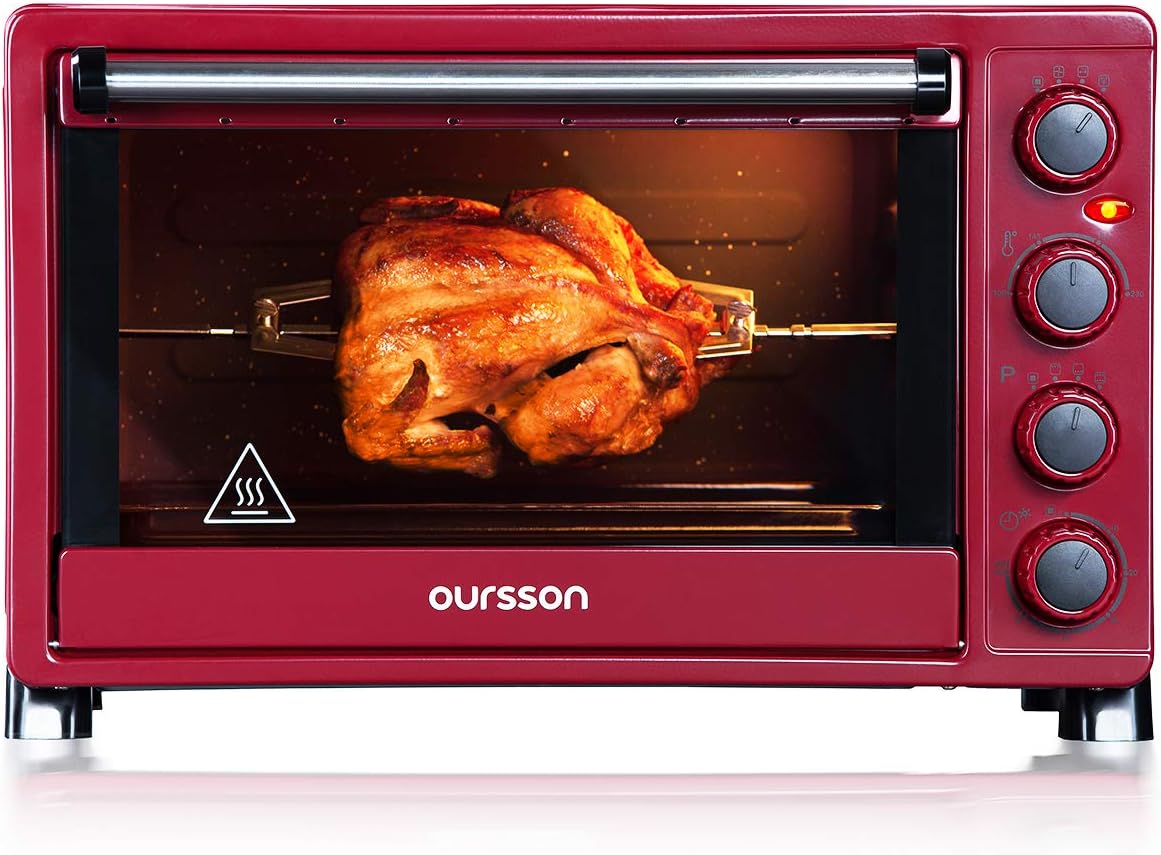
Image 6.4: Rotisserie in Operation
7. Maintenance and Cleaning
Regular cleaning and maintenance will prolong the life of your oven.
7.1 Catalytic Self-Cleaning
The oven features three catalytic walls (sides and back) that absorb and oxidize grease and food residues at high temperatures. To activate this function, simply operate the oven at its maximum temperature (230°C) for approximately 15-20 minutes after cooking. The catalytic process helps to keep the oven interior clean with minimal effort. Note that the bottom and door are not catalytic and require manual cleaning.
7.2 General Cleaning
- Always unplug the oven and allow it to cool completely before cleaning.
- Wipe the exterior with a damp cloth and mild detergent. Do not use abrasive cleaners or scouring pads.
- Remove the crumb tray from the bottom of the oven and empty it after each use. Wash it with warm soapy water.
- Wash all removable accessories (trays, racks, rotisserie) in warm soapy water, rinse, and dry thoroughly.
- For the non-catalytic interior surfaces (bottom, door), wipe with a damp cloth and mild detergent. For stubborn stains, a non-abrasive oven cleaner designed for conventional ovens can be used, but ensure it does not come into contact with the catalytic panels.
- Never immerse the oven body in water.
8. Troubleshooting
If you encounter issues with your oven, refer to the following common problems and solutions:
- Oven does not turn on: Check if the power cord is securely plugged into a working outlet. Ensure the timer knob is set to a cooking duration and not 'OFF'.
- Food not cooking evenly: Ensure the oven is preheated. Use the convection function for better heat distribution. Avoid overcrowding the oven.
- Excessive smoke during cooking: This may be due to food spills or grease accumulation. Clean the oven interior and accessories thoroughly. If it's the first use, some smoke is normal during the burn-off process.
- Interior light not working: The bulb may need replacement. Consult customer support for assistance.
If the problem persists after attempting these solutions, please contact customer support.
9. Specifications
Technical details for the Oursson MO3020/DC Mini Electric Convection Oven:
| Specification | Detail |
|---|---|
| Model Number | MO3020/DC |
| Capacity | 30 Liters |
| Power | 1500 Watts |
| Temperature Range | 100°C - 230°C |
| Dimensions (L x W x H) | 52.2 x 36 x 32.2 cm |
| Weight | 9.3 Kilograms |
| Material | Alloy Steel |
| Color | Bordeaux |

Image 9.1: Product Dimensions
10. Warranty and Support
Your Oursson MO3020/DC Mini Electric Convection Oven comes with a 4-year warranty from the date of purchase. This warranty covers manufacturing defects under normal household use.
For warranty claims, technical assistance, or any questions not covered in this manual, please contact Oursson customer support. Keep your proof of purchase for warranty validation.


