
1. Introduction
Thank you for choosing the Yato YT-82250 Soldering Iron. This manual provides essential information for the safe and efficient operation, maintenance, and troubleshooting of your device. Please read these instructions carefully before use and retain them for future reference.
2. Safety Warnings
FAILURE TO FOLLOW THESE INSTRUCTIONS CAN RESULT IN PERSONAL INJURY OR EQUIPMENT DAMAGE.
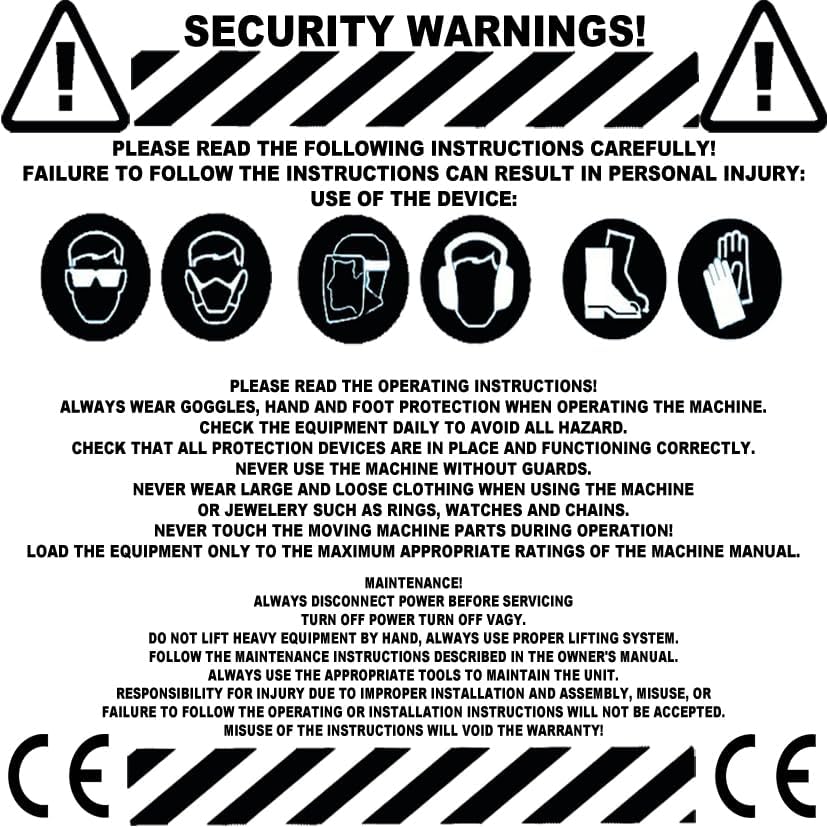
Image: General safety warnings and required personal protective equipment.
- Read Operating Instructions: Always read and understand the operating instructions before using the machine.
- Personal Protective Equipment (PPE): Always wear appropriate PPE, including safety goggles, gloves, and foot protection, when operating the machine.
- Equipment Inspection: Check the equipment daily to identify and address any potential hazards.
- Protection Devices: Ensure all protection devices are correctly in place and functioning before operation.
- No Guards Removal: Never use the machine without its guards.
- Clothing and Jewelry: Avoid wearing loose clothing or jewelry (rings, watches, chains) that could get caught in moving parts.
- Moving Parts: Never touch moving machine parts during operation.
- Load Limits: Load the equipment only to the maximum appropriate ratings specified in the machine manual.
3. Product Overview
The Yato YT-82250 is an 850W electric soldering iron designed for plastic repair and other soldering applications. It features adjustable temperature control and is compatible with various pipe diameters.

Image: The Yato YT-82250 Soldering Iron, highlighting its 850W power, 230V~50Hz input, 0-300°C temperature range, and compatible pipe diameters (16, 20, 25, 32, 40, 50, 63 mm).

Image: The Yato YT-82250 Soldering Iron kit, showing the main unit, various soldering dies for different pipe diameters, and accessories neatly organized in a case.
4. Setup
- Unpacking: Carefully remove all components from the packaging. Inspect for any damage.
- Mounting Dies: Select the appropriate soldering die (e.g., 16mm, 20mm, 25mm, 32mm, 40mm, 50mm, 63mm) for your application. Securely attach it to the heating plate of the soldering iron.
- Power Connection: Ensure the power switch is in the 'OFF' position. Connect the soldering iron to a standard AC 230V~50Hz power outlet.
- Placement: Place the soldering iron on a stable, heat-resistant surface, using its integrated stand.
5. Operating Instructions
- Power On: Turn the power switch to the 'ON' position. The digital display will illuminate.
- Temperature Setting: Use the temperature control buttons (up/down arrows) to set the desired temperature between 0-300°C. Allow the iron to heat up to the set temperature. The display will indicate when the target temperature is reached.
- Soldering Process: Once the iron reaches the desired temperature, carefully place the plastic pipe or material onto the heated die. Allow sufficient time for the material to melt and fuse.
- Joining: Remove the heated material from the die and immediately join the pieces together, holding them firmly until the plastic cools and sets.
- Power Off: After use, turn the power switch to the 'OFF' position and allow the iron to cool completely before storing.
6. Maintenance
- Disconnect Power: Always disconnect the power cord from the outlet before performing any maintenance or cleaning.
- Cleaning: Allow the soldering iron to cool completely. Use a soft, dry cloth to wipe down the exterior. For stubborn residue on the heating plate or dies, use a non-abrasive tool to gently scrape it off. Do not use harsh chemicals or abrasive cleaners.
- Inspection: Regularly inspect the power cord for any signs of damage (cuts, fraying). Check the soldering dies for wear or deformation. Replace damaged components immediately.
- Storage: Store the soldering iron and its accessories in a clean, dry place, preferably in its original case, away from direct sunlight and extreme temperatures.
- Tool Use: Always use appropriate tools for any maintenance tasks.
7. Troubleshooting
This section addresses common issues you might encounter with your Yato YT-82250 Soldering Iron.
- Iron not heating:
- Ensure the power cord is securely plugged into a working outlet.
- Check if the power switch is in the 'ON' position.
- Verify the circuit breaker or fuse for the outlet has not tripped.
- Inconsistent temperature:
- Ensure the temperature setting is correct for your application.
- Allow sufficient time for the iron to reach the set temperature.
- Ensure the dies are clean and properly attached.
- Poor solder joints:
- Verify the temperature is appropriate for the material being soldered.
- Ensure the surfaces to be joined are clean and free of contaminants.
- Allow adequate heating time for the material.
If you encounter issues not listed here or if troubleshooting steps do not resolve the problem, please contact customer support.
8. Specifications
Image: Icons summarizing key specifications: 850W, 230V~50Hz, 0-300°C, and pipe diameters (16, 20, 25, 32, 40, 50, 63 mm).
| Specification | Value |
|---|---|
| Brand | Yato |
| Model | YT-82250 |
| Specific Product Uses | Residential use, Plastic Repair |
| Power Source | AC |
| Power | 850 Watts |
| Voltage/Frequency | 230V~50Hz |
| Special Feature | Portable |
| Included Components | Soldering iron, various soldering dies (refer to packaging for full list) |
| Handle Material | Polyvinyl chloride (PVC) |
| Item Length | 45.21 Centimeters |
| Upper Rated Temperature | 300 Degrees Celsius |
| Compatible Pipe Diameters | 16, 20, 25, 32, 40, 50, 63 mm |
9. Warranty & Support
Warranty Information:
- Responsibility for injury due to improper installation, assembly, misuse, or failure to follow the operating or installation instructions will not be accepted.
- Misuse of the instructions will void the warranty.
For product support or warranty claims, please contact your retailer or the distributor.

Image: Contact information for EZ-Tools GmbH, a potential distributor or seller. Please verify with your purchase documentation for official support channels.
EZ-Tools GmbH Contact Information (Potential Distributor/Seller):
Deutschland
Gewerbepark 33.
85250 Altomünster
Mon - Fri: 8:00 - 17:00
Phone: +49 (0) 825 49 20 37 04
Website: www.ez-tools.de
Email: info@ez-tools.de