
1. Introduction
The Rii i8+ Mini Wireless Keyboard is a compact and versatile input device designed for a wide range of applications. This 3-in-1 peripheral combines the functionality of a full QWERTY keyboard, a multi-touch touchpad, and a remote control, making it ideal for use with PCs, laptops, smart TVs, gaming consoles, and other compatible devices. Its 2.4GHz wireless technology ensures a stable connection, while the integrated LED backlight enhances usability in low-light environments.

Figure 1.1: Front view of the Rii i8+ Mini Wireless Keyboard with its LED backlight illuminated, showcasing the QWERTY layout and integrated touchpad.
2. Features
- 3-in-1 Multifunction: Combines a 2.4GHz mini wireless QWERTY keyboard, touchpad, and LED backlight.
- Integrated Touchpad: Supports multi-finger functions, including single-finger click for left mouse, two-finger click for right mouse, and double-finger drag for scrolling.
- LED Backlight: Enhances visibility of keys in dark environments.
- Ergonomic Design: Shaped like a game controller for comfortable handling, with two rounded grips on the sides.
- Wireless Connectivity: Connects to devices via a mini USB receiver with an operational range of up to 25 meters.
- Rechargeable Battery: Features a built-in lithium-ion battery for convenience.
- Wide Compatibility: Ideal for PC, Laptop, Raspberry Pi 2-3, MacOS, Xbox 360, Xbox One, PS3, PS4, Google Android TV Box, HTPC, and IPTV.

Figure 2.1: Top-down view of the Rii i8+ Mini Wireless Keyboard, showing the full QWERTY layout and touchpad without the LED backlight active.
3. Package Contents
Please verify that all items are present in your package:
- 1x Rii i8+ Keyboard & Mouse Combo
- 1x USB wireless receiver
- 1x User Guide (This document)
- 1x Charging data cable

Figure 3.1: The Rii i8+ Mini Wireless Keyboard's internal components, including the rechargeable battery and the USB wireless receiver, which is typically stored within the keyboard's battery compartment.
4. Setup
- Locate the USB Receiver: The mini USB wireless receiver is typically stored in the battery compartment at the back of the keyboard. Open the battery cover and remove the receiver.
- Insert the Receiver: Plug the USB wireless receiver into an available USB port on your target device (PC, Smart TV, game console, etc.).
- Power On the Keyboard: Locate the ON/OFF switch on the side of the keyboard and slide it to the "ON" position.
- Initial Charging: For optimal performance, it is recommended to fully charge the keyboard before its first use. Connect the provided charging data cable to the keyboard's USB port and to a power source (e.g., computer USB port, USB wall adapter). The charging indicator light will illuminate during charging and turn off when fully charged.

Figure 4.1: Side view of the Rii i8+ Mini Wireless Keyboard, highlighting the ON/OFF power switch and the micro USB charging port.
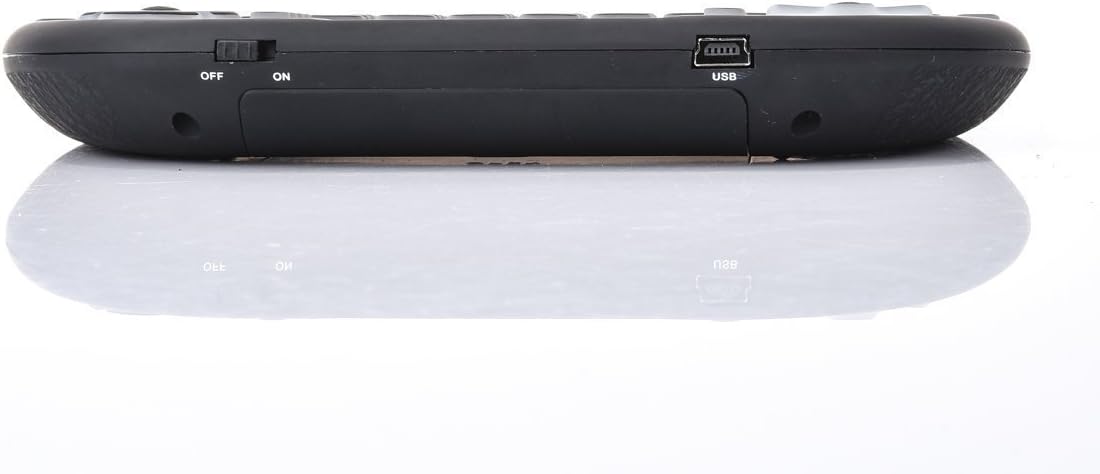
Figure 4.2: Rear view of the Rii i8+ Mini Wireless Keyboard, showing the battery compartment where the USB receiver is stored.
5. Operating Instructions
5.1 Basic Keyboard Use
The keyboard features a standard QWERTY layout. Simply type as you would on a regular keyboard. The function keys (F1-F12) and multimedia keys are accessible via the Fn key combination.
5.2 Touchpad Functions
- Single-finger Tap: Functions as a left mouse click.
- Two-finger Tap: Functions as a right mouse click.
- Two-finger Drag: Drag two fingers up or down on the touchpad to scroll the screen.
- Adjusting Touchpad Sensitivity: Press Fn + Space to cycle through different touchpad sensitivity levels.
- Enabling/Disabling Touchpad: Press Fn + F8 to toggle the touchpad on or off.
5.3 Backlight Control
Press the dedicated backlight button (often indicated by a light bulb icon) to turn the backlight on/off or cycle through different backlight colors/modes (if applicable to your model).
5.4 Sleep Mode
To conserve battery life, the keyboard will automatically enter sleep mode after approximately 3 minutes of inactivity. To wake the keyboard, simply press any key. Note: Moving your finger on the touchpad will not wake the device from sleep mode.
6. Maintenance
- Charging: Recharge the keyboard when the battery indicator light flashes or when performance degrades. Use only the provided charging cable or a compatible 5V USB charger.
- Cleaning: Use a soft, dry cloth to clean the keyboard and touchpad surfaces. Avoid using liquid cleaners or abrasive materials.
- Storage: When not in use for extended periods, turn off the keyboard using the ON/OFF switch and store it in a cool, dry place.
- Battery Care: Avoid exposing the battery to extreme temperatures. Do not attempt to disassemble or replace the built-in lithium-ion battery unless you are a qualified technician.
7. Troubleshooting
- Keyboard not responding:
- Ensure the keyboard is powered on.
- Check if the USB receiver is securely plugged into the device's USB port.
- Verify the keyboard's battery level. Recharge if necessary.
- Try plugging the USB receiver into a different USB port on your device.
- If the yellow pairing light is blinking, the keyboard may need to be re-paired. To re-pair, press and hold Fn + F1, then turn on the keyboard while still holding Fn + F1. The yellow light should blink rapidly. Insert the USB receiver into your device. The yellow light should turn off, indicating successful pairing.
- Touchpad is erratic or jumpy:
- Ensure the touchpad surface is clean and free of dirt or moisture.
- Use a light touch with the tip of your finger (avoid using your thumb or excessive pressure).
- Adjust the touchpad sensitivity using Fn + Space.
- Short battery life:
- Excessive use of the LED backlight will drain the battery faster. Consider turning it off when not needed.
- Ensure the keyboard is fully charged.
- The battery may degrade over time.
- Limited range or connection drops:
- Ensure there are no large metallic objects or other 2.4GHz wireless devices causing interference between the keyboard and the receiver.
- Reduce the distance between the keyboard and the USB receiver.
8. Specifications
| Feature | Specification |
|---|---|
| Model | i8+ Red |
| Connectivity Technology | 2.4GHz RF Wireless |
| Operating Range | Up to 15 meters (MAX), without signal disturbance |
| Frequency Range | 2.403GHZ ~ 2.480GHZ |
| Operational Voltage | 3.3V |
| Charge Voltage | 4.4V ~ 5.25V |
| Battery Type | Built-in Lithium-ion Battery |
| Power Consumption | 55mA (on), 1mA (sleep) |
| Number of Keys | 92 |
| Product Dimensions (L x W x H) | 7 x 4 x 1 inches (approx. 15 x 10 x 2 cm) |
| Item Weight | 6.4 ounces (approx. 107g) |
| Compatible Operating Systems | Android, Raspberry Pi OS, Windows, Mac |
9. Warranty & Support
The Rii i8+ Mini Wireless Keyboard comes with a manufacturer's warranty of up to 12 months from the date of purchase. This warranty covers defects in materials and workmanship under normal use.
For technical support, warranty claims, or any questions regarding your product, please refer to the contact information provided on the product packaging or the official Rii website. Please have your product model number (i8+ Red) and purchase details ready when contacting support.