
Olympus V205081WU000
OM SYSTEM OLYMPUS PEN E-PL8 User Manual
Model: V205081WU000
1. Introduction
The OM SYSTEM OLYMPUS PEN E-PL8 is a compact and stylish mirrorless camera designed for both beginners and enthusiasts. It features a 16.1 MP Live MOS sensor, 3-axis in-body image stabilization, and built-in Wi-Fi for seamless sharing. This manual provides essential information to help you get started and make the most of your camera's capabilities.
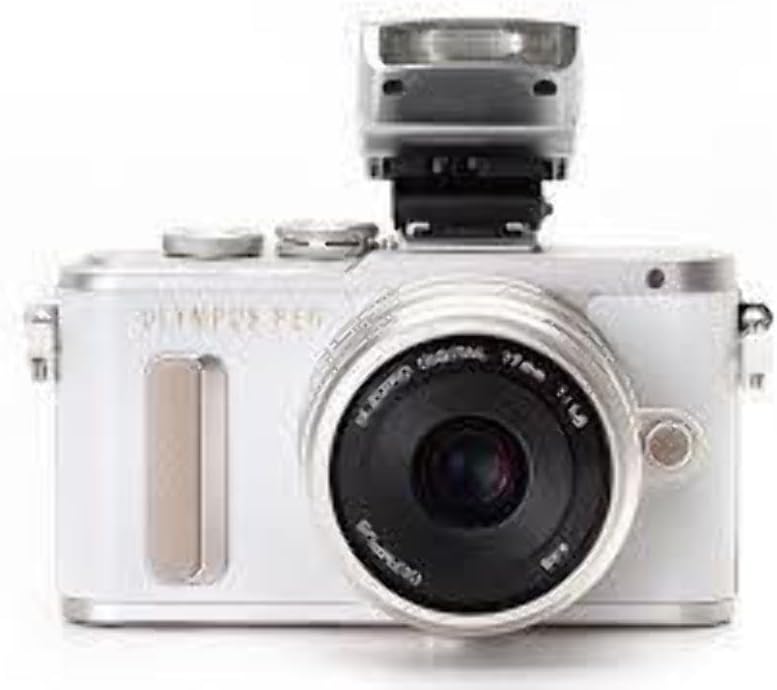
A front view of the OM SYSTEM OLYMPUS PEN E-PL8 camera in white, featuring the attached 14-42mm IIR silver lens. The camera has a compact, stylish design.
2. What's in the Box
Upon unboxing your OM SYSTEM OLYMPUS PEN E-PL8, you should find the following items:
- E-PL8 camera body
- 14-42mm IIR lens
- LC-37B lens cap
- LR-2 rear lens cap
- Lens manual
- Lens warranty
- FL-LM1 flash
- Shoulder strap
- CB-USB6 cable
- Olympus Viewer 3 software (CD-Rom)
- Manual
- Warranty card
- BLS-50 battery
- BCS-5 charger
Video: Getting Started with the Olympus PEN E-PL8. This video provides a comprehensive guide to setting up and operating your Olympus PEN E-PL8 camera, covering initial setup, image quality settings, and advanced features like Wi-Fi connectivity.
3. Setup
Before using your camera, follow these initial setup steps:
- Charge Battery and Install: Use the provided BCS-5 charger to fully charge the BLS-50 battery. Once charged, insert the battery into the camera body.
- Set Date and Time: Upon first power-on, the camera will prompt you to set the date and time. Follow the on-screen instructions to ensure accurate timestamps for your photos.
- Format Memory Card: Insert a compatible SDXC memory card (up to 128 GB supported). It is recommended to format the card in-camera before first use to ensure optimal performance and prevent data corruption. Navigate to the menu and select "Card Setup" to format.
- Attach Camera Strap: Securely attach the provided shoulder strap to the camera body for safe handling and portability.
4. Operating Your Camera
4.1 Image Quality Settings
The E-PL8 offers various settings to control your image quality and creative output.
- JPEG Art Filters: The camera produces excellent JPEG colors and includes 14 Art Filters to add a creative touch to your images and videos. These can be applied directly in-camera.
- RAW Mode: For maximum flexibility in post-processing, the E-PL8 can shoot in RAW format. This is ideal if you plan to edit your photos using external software or the in-camera RAW editor.
4.2 iAUTO Mode and Live Guide
For users unfamiliar with camera controls, the iAUTO mode combined with Olympus's Live Guide simplifies shooting. In iAUTO mode, you can access Live Guide to adjust image settings such as background blur, color saturation, and receive shooting tips based on your subject.
4.3 Touch AF and Touch Shutter Release
The E-PL8 features a responsive touchscreen for intuitive control:
- Touch AF: Tap on the screen to instantly set your autofocus point, providing precise control over your focus.
- Touch Shutter Release: Enable this feature to focus and capture photos simply by tapping the desired area on the touchscreen. This is particularly useful when using the camera in selfie mode by flipping the touchscreen 180 degrees downwards.
4.4 Built-in Wi-Fi
Connect your E-PL8 to your smartphone via its built-in Wi-Fi. This allows you to control the camera remotely using the Olympus Image Share app, as well as upload and share your images directly from the camera.
5. Maintenance
Proper maintenance ensures the longevity and optimal performance of your camera:
- Cleaning the Camera Body: Use a soft, dry cloth to wipe the camera body. For stubborn dirt, slightly dampen the cloth with water. Avoid using organic solvents.
- Cleaning the Lens: Use a lens brush or blower to remove dust from the lens surface. For smudges, use a specialized lens cleaning solution and a microfiber cloth.
- Sensor Cleaning: The E-PL8 features a Supersonic Wave Filter sensor dust reduction system, which automatically vibrates the sensor to dislodge dust. If dust spots persist, professional sensor cleaning may be required.
- Battery Care: Store batteries in a cool, dry place. Avoid fully discharging or overcharging the battery. If not using the camera for an extended period, remove the battery.
- Storage: When not in use, store the camera in a dry, well-ventilated area, away from direct sunlight, high temperatures, and humidity. Consider using a desiccant pack in humid environments.
6. Troubleshooting
Here are solutions to common issues you might encounter:
- Camera Not Turning On:
- Ensure the battery is fully charged and correctly inserted.
- Check if the battery contacts are clean.
- Images Are Blurry:
- Verify the lens is clean and free of smudges.
- Ensure the lens is unlocked and extended if it's a collapsible zoom lens.
- Check your focus settings (autofocus or manual focus).
- Confirm adequate lighting for your shot.
- Wi-Fi Connectivity Issues:
- Ensure the Olympus Image Share app is installed on your smartphone.
- Confirm that Wi-Fi is enabled on both the camera and your smartphone.
- Note that Wi-Fi transfer typically works best with JPEG files, not RAW files. Adjust your shooting mode if you are trying to transfer RAW images.
- Restart both the camera and your smartphone.
- Memory Card Error:
- Reformat the memory card in-camera (note: this will erase all data).
- Try a different, compatible memory card.
- Ensure the card is inserted correctly.
7. Specifications
| Feature | Detail |
|---|---|
| Brand | Olympus |
| Model Name | Olympus PEN E-PL8 |
| Model Number | V205081WU000 |
| Compatible Mountings | Micro Four Thirds |
| Photo Sensor Technology | CMOS |
| Effective Still Resolution | 16.1 MP |
| Image Stabilization | Dynamic (3-axis in-body) |
| Supported File Format | RAW, JPEG |
| Optical Zoom | 3x (with 14-42mm lens) |
| Maximum Aperture | 1.8 Millimeters |
| Expanded ISO Minimum | 100 |
| Expanded ISO Maximum | 25600 |
| Screen Size | 3 Inches |
| Display Type | LCD, Tilting, Touch Screen (Capacitive) |
| Flash Memory Type | SDXC |
| Connectivity Technology | USB, HDMI, Wi-Fi |
| Video Resolution | FHD 1080p |
| Item Weight | 1.1 Pounds |
| Color | White |
8. Warranty Information
The OM SYSTEM OLYMPUS PEN E-PL8 comes with a 1-year limited warranty from the date of purchase. This warranty covers defects in materials and workmanship under normal use. Please retain your proof of purchase for warranty claims. For full terms and conditions, refer to the warranty card included in your product packaging.
9. Support
For further assistance, product registration, or to explore additional accessories, please visit the official Olympus support website or the Olympus Store on Amazon:
- Olympus Store: Visit the Olympus Store on Amazon
- Online Resources: Consult the comprehensive online manual and FAQs available on the OM SYSTEM website for detailed information and advanced tips.
Related documentsV205081WU000


Ask a question about this manual
Ask about setup, troubleshooting, compatibility, parts, safety, or missing instructions. Manuals+ will review the question and use this page’s manual context to help answer it.