
1. Introduction
Thank you for choosing the Suunto Essential SS021215000 Digital Watch. This manual provides comprehensive instructions to help you understand and utilize all the features of your new timepiece. The Suunto Essential combines robust design with essential outdoor functions, making it an ideal companion for various activities.
Your watch features a durable stainless steel case, a comfortable black leather strap, and a mineral crystal display for enhanced durability. It is water-resistant to 30 meters (100 feet), suitable for splashes or brief immersion in water, but not for swimming or diving.
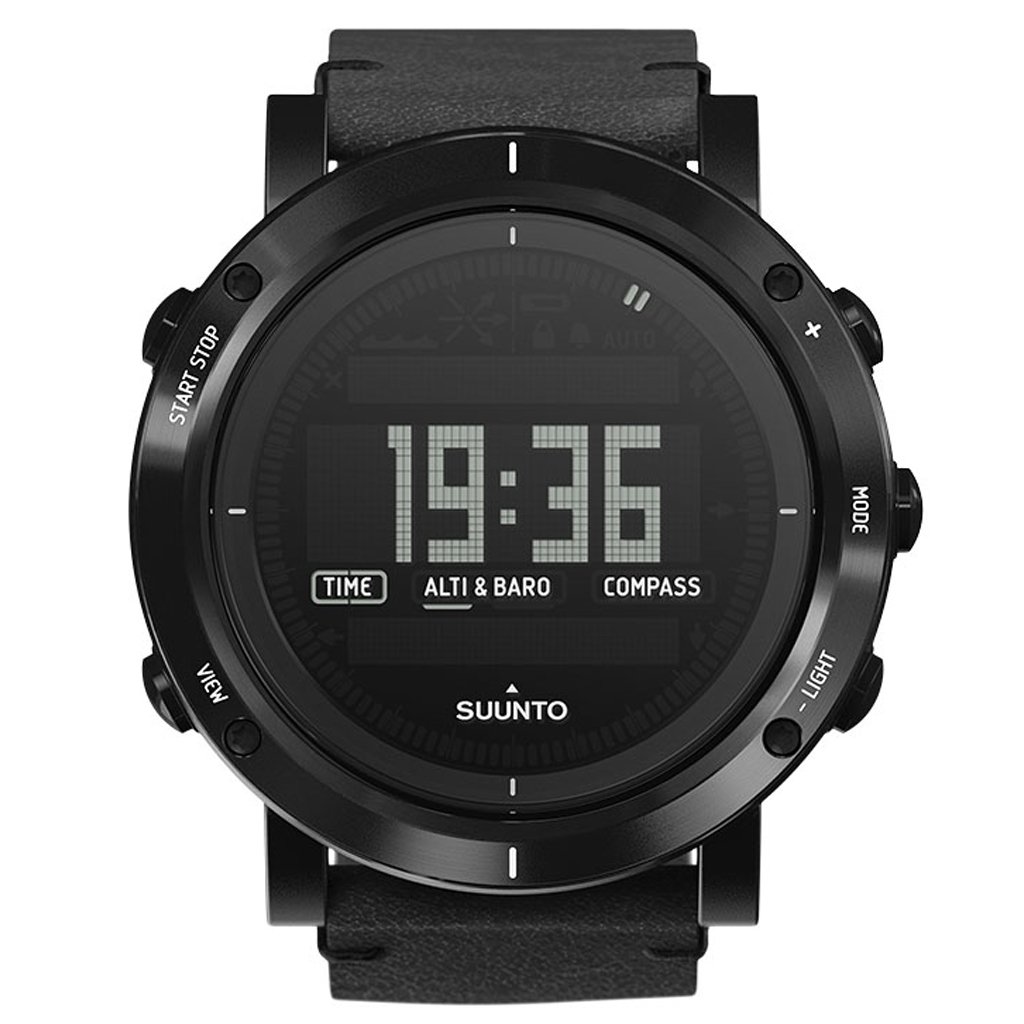
Figure 1: Front view of the Suunto Essential SS021215000 Digital Watch, displaying time, altimeter/barometer, and compass functions.
2. Initial Setup
2.1 Setting Time and Date
- Press and hold the MODE button (right-middle) until the watch enters the settings menu.
- Use the VIEW button (left-bottom) to scroll through the settings options until 'TIME' or 'DATE' is highlighted.
- Press the START STOP button (left-top) to select the desired setting.
- Use the VIEW and LIGHT (right-bottom) buttons to adjust the values (hours, minutes, day, month, year).
- Press START STOP to confirm each adjustment and move to the next field.
- Once all settings are complete, press and hold the MODE button to exit the settings menu.
2.2 Battery Activation
Your Suunto Essential watch is powered by a Japanese Quartz movement and typically comes with the battery pre-installed and activated. If the display is blank upon arrival, gently press any button to check if it activates. If it remains blank, the battery may need replacement by a qualified service center.
3. Operating Your Watch
3.1 Button Functions
The Suunto Essential watch features five buttons for navigation and function control:
- START STOP (Left-Top): Used to start/stop timers, confirm selections, and navigate upwards in menus.
- VIEW (Left-Bottom): Used to change display views within a mode, scroll downwards in menus, and adjust values.
- MODE (Right-Middle): Used to cycle through main modes (Time, Alti & Baro, Compass) and enter/exit settings.
- LIGHT (Right-Bottom): Activates the backlight for the display and adjusts values in settings.

Figure 2: Left side of the watch showing the START STOP and VIEW buttons.

Figure 3: Right side of the watch showing the MODE and LIGHT buttons.
3.2 Navigating Modes
From the time display, press the MODE button to cycle through the main modes:
- TIME: Displays current time, date, and day of the week.
- ALTI & BARO: Provides altitude and barometric pressure readings. Refer to the full Suunto user guide for calibration instructions.
- COMPASS: Displays directional information. Requires calibration for accurate readings.
Within each mode, press the VIEW button to cycle through different display views or sub-functions.
3.3 Water Resistance
The Suunto Essential SS021215000 is water-resistant to 30 meters (100 feet). This rating means the watch is suitable for everyday use and can withstand splashes, rain, or brief immersion in water. It is not designed for swimming, showering, or diving. Avoid pressing buttons while the watch is submerged in water to prevent water ingress.
4. Care and Maintenance
4.1 Cleaning Your Watch
- Wipe the watch case and crystal with a soft, damp cloth.
- For the leather strap, avoid excessive moisture. Clean with a dry or slightly damp cloth and allow it to air dry completely. Do not use harsh chemicals or abrasive materials.
- Rinse the watch with fresh water after exposure to saltwater to prevent corrosion.
4.2 Battery Replacement
The watch uses a standard watch battery. When the battery is low, the display may dim or certain functions may cease. Battery replacement should be performed by a certified Suunto service center or a professional watchmaker to ensure proper sealing and maintain water resistance.
4.3 Storage
When not in use for extended periods, store your watch in a cool, dry place away from direct sunlight and extreme temperatures. Avoid storing it near strong magnetic fields.
5. Troubleshooting
5.1 Display is Blank or Dim
- Possible Cause: Low battery.
- Solution: Replace the battery at an authorized service center.
- Possible Cause: Extreme temperature.
- Solution: Allow the watch to return to normal operating temperature.
5.2 Incorrect Time/Date
- Possible Cause: Time/date not set correctly or reset due to battery change.
- Solution: Follow the instructions in Section 2.1 to set the time and date.
5.3 Altimeter/Barometer/Compass Readings are Inaccurate
- Possible Cause: Sensors require calibration.
- Solution: Refer to the detailed Suunto user guide for specific calibration procedures for these sensors. Environmental changes can also affect readings.
5.4 Watch Not Responding to Buttons
- Possible Cause: Temporary software glitch.
- Solution: Try a soft reset by pressing and holding all five buttons simultaneously for 10-15 seconds. If the issue persists, contact Suunto support.
6. Specifications
| Feature | Detail |
|---|---|
| Model Number | SS021215000 |
| Movement Type | Japanese Quartz |
| Display Type | Digital |
| Case Material | Stainless Steel |
| Case Diameter | 49.1 mm |
| Case Thickness | 13.4 mm |
| Band Material | Leather |
| Band Width | 24 mm |
| Crystal Material | Mineral Crystal |
| Water Resistance Depth | 30 Meters (100 Feet) / 3 ATM |
| Item Weight | 120 g (0.12 Kilograms) |
| Special Features | Altimeter, Barometer, Compass, Water Resistant |
7. Warranty and Support
Your Suunto Essential SS021215000 Digital Watch is covered by a limited warranty. For detailed warranty terms and conditions, please refer to the warranty card included with your product or visit the official Suunto website. Keep your proof of purchase for warranty claims.
For technical support, service, or further inquiries, please contact Suunto customer service through their official website or authorized service centers. You can find contact information and frequently asked questions at www.suunto.com/support.


