Introduction
This manual provides comprehensive instructions for the LG Tone Pro HBS-770 Wireless Stereo Headset. Please read this guide thoroughly to ensure proper usage, optimal performance, and longevity of your device. Keep this manual for future reference.
Product Overview and Features
The LG Tone Pro HBS-770 is a wireless stereo headset designed for comfort and clear audio. Key features include:
- Ultra-Fine Wires: Low-profile wires made with quality Kevlar fiber, contributing to a slim design.
- Contoured for Comfort Design: A lightweight, around-the-neck wearing style for enhanced comfort during extended use.
- Quad-Layer Speaker Technology: Delivers balanced audio with reduced distortion.
- Dual MEMS Microphones: Ensures exceptionally clear voice calls.
- Tone & Talk 2.0: Features SMS reading, Voice Memo recording, and a Find Me function to locate your paired device.
- Wireless Connectivity: Utilizes Bluetooth technology for seamless connection.
What's in the Box
Upon opening the product packaging, verify that all items are present:
- LG Tone Pro HBS-770 Wireless Stereo Headset
- USB Charging Cable
- Multiple Sizes of Ear Gels
- User Manual (this document)

Figure 1: LG Tone Pro HBS-770 Wireless Stereo Headset (Pink)

Figure 2: Side view of the headset with controls visible
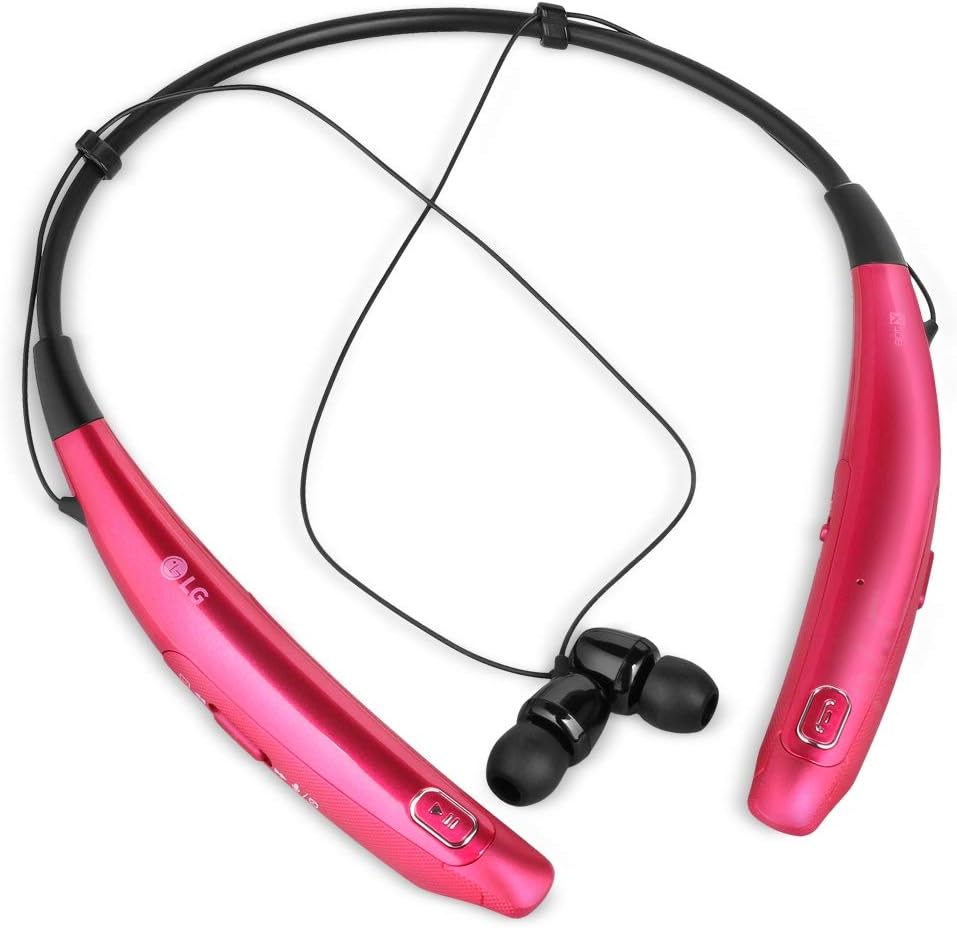
Figure 3: Close-up of the headset's earbuds
Setup
Charging the Headset
- Connect the USB charging cable to the charging port on the headset.
- Plug the other end of the USB cable into a compatible USB power source (e.g., computer USB port, USB wall adapter).
- The LED indicator will show the charging status. Refer to the LED indicator section for details.
- Once fully charged, disconnect the charging cable.
Bluetooth Pairing
- Ensure the headset is powered off.
- Press and hold the Power button until the LED indicator flashes blue and red, indicating pairing mode.
- On your mobile device, enable Bluetooth and search for available devices.
- Select "LG HBS-770" from the list of found devices.
- Once paired, the LED indicator will typically show a solid blue light or flash blue periodically.
Operating Instructions
Basic Controls
- Power On/Off: Press and hold the Power button.
- Volume Up/Down: Use the dedicated volume buttons.
- Play/Pause: Press the Multi-function button once.
- Next Track: Press and hold the Volume Up button.
- Previous Track: Press and hold the Volume Down button.
- Answer/End Call: Press the Multi-function button once.
- Reject Call: Press and hold the Multi-function button.
Tone & Talk 2.0 Features
Utilize the Tone & Talk 2.0 application on your paired smartphone for enhanced functionalities:
- SMS Reading: Have incoming text messages read aloud through your headset.
- Voice Memo: Record voice memos directly using the headset's microphone.
- Find Me: Use this feature to locate your paired smartphone if it's within Bluetooth range.
Maintenance
- Cleaning: Wipe the headset with a soft, dry cloth. Do not use harsh chemicals or abrasive materials.
- Ear Gels: Regularly clean the ear gels with a damp cloth and mild soap. Ensure they are completely dry before reattaching.
- Storage: Store the headset in a cool, dry place away from direct sunlight and extreme temperatures. Avoid tangling the wires.
- Water Resistance: The device is not water resistant. Avoid exposure to liquids.
Troubleshooting
| Problem | Possible Cause | Solution |
|---|---|---|
| Cannot power on | Low battery | Charge the headset fully. |
| Cannot pair with device | Headset not in pairing mode; Device Bluetooth off | Ensure headset is in pairing mode (flashing red/blue LED). Turn on Bluetooth on your device. |
| No sound | Volume too low; Not properly paired | Increase volume on headset and device. Re-pair the headset. |
| Poor call quality | Weak signal; Microphone obstructed | Move closer to your paired device. Ensure microphones are clear. |
Specifications
| Feature | Detail |
|---|---|
| Model Name | HBS-770 |
| Connectivity Technology | Wireless (Bluetooth 4.1) |
| Headphones Jack | No Jack |
| Material | Kevlar |
| Item Weight | 0.1 Ounces |
| Product Dimensions | 8.3 x 1.4 x 6.8 inches |
| Batteries | 1 Lithium Ion battery required (included) |
| Water Resistance Level | Not Water Resistant |
| Noise Control | Sound Isolation |
Warranty and Support
For warranty information, technical support, or service inquiries, please contact LG Electronics directly. Refer to the product packaging or the official LG website for the most up-to-date contact details and warranty terms.