1. Introduction
Thank you for choosing the Sportstech CX610 Crosstrainer Elliptical Ergometer. This manual provides essential information for the safe and effective assembly, operation, and maintenance of your new fitness equipment. Please read this manual thoroughly before use and keep it for future reference.
The Sportstech CX610 is designed for comprehensive full-body workouts, targeting major muscle groups while being gentle on joints. It features an 18 kg flywheel for smooth motion, 32 computer-controlled resistance levels, 12 pre-programmed workouts, and Bluetooth connectivity for app integration.

Figure 1: Sportstech CX610 Crosstrainer Elliptical Ergometer.
2. Important Safety Instructions
- Consult a physician before starting any exercise program.
- Keep children and pets away from the equipment during use.
- Place the crosstrainer on a flat, stable surface with adequate clearance around it.
- Ensure all bolts and nuts are securely tightened before each use.
- Wear appropriate exercise clothing and footwear.
- Do not exceed the maximum user weight of 120 kg.
- If you experience pain, dizziness, or shortness of breath, stop exercising immediately.
- Perform regular maintenance checks as described in this manual.
3. Package Contents
Before assembly, ensure all parts are present and undamaged. Refer to the assembly diagram (not provided in this manual, typically found in a separate leaflet) for a complete list of components.
- Main frame components
- Pedal arms and pedals
- Handlebars (fixed and moving)
- Console unit
- Power adapter
- Assembly hardware (bolts, washers, nuts, tools)
- Heart rate belt (included)
- Bottle holder and bottle
4. Setup and Assembly
Assembly typically takes 2-3 hours. It is recommended to have two people for assembly. Follow the detailed instructions provided in the separate assembly guide.
- Unpack Components: Carefully remove all parts from the packaging and lay them out on a clean, flat surface.
- Assemble Base Frame: Attach the front and rear stabilizers to the main frame using the provided bolts and washers.
- Install Pedal Arms: Connect the pedal arms to the main crank mechanism. Ensure proper alignment and secure tightening.
- Attach Handlebars: Mount both the fixed and moving handlebars. Connect any necessary sensor cables from the moving handlebars to the main frame.
- Mount Console: Secure the console unit to the console post. Connect all cables from the main frame to the back of the console.
- Attach Pedals: Secure the anti-slip pedals to the pedal arms. The pedals are adjustable in 3 levels.
- Final Checks: Double-check all connections and ensure all bolts are tightened. Plug in the power adapter.
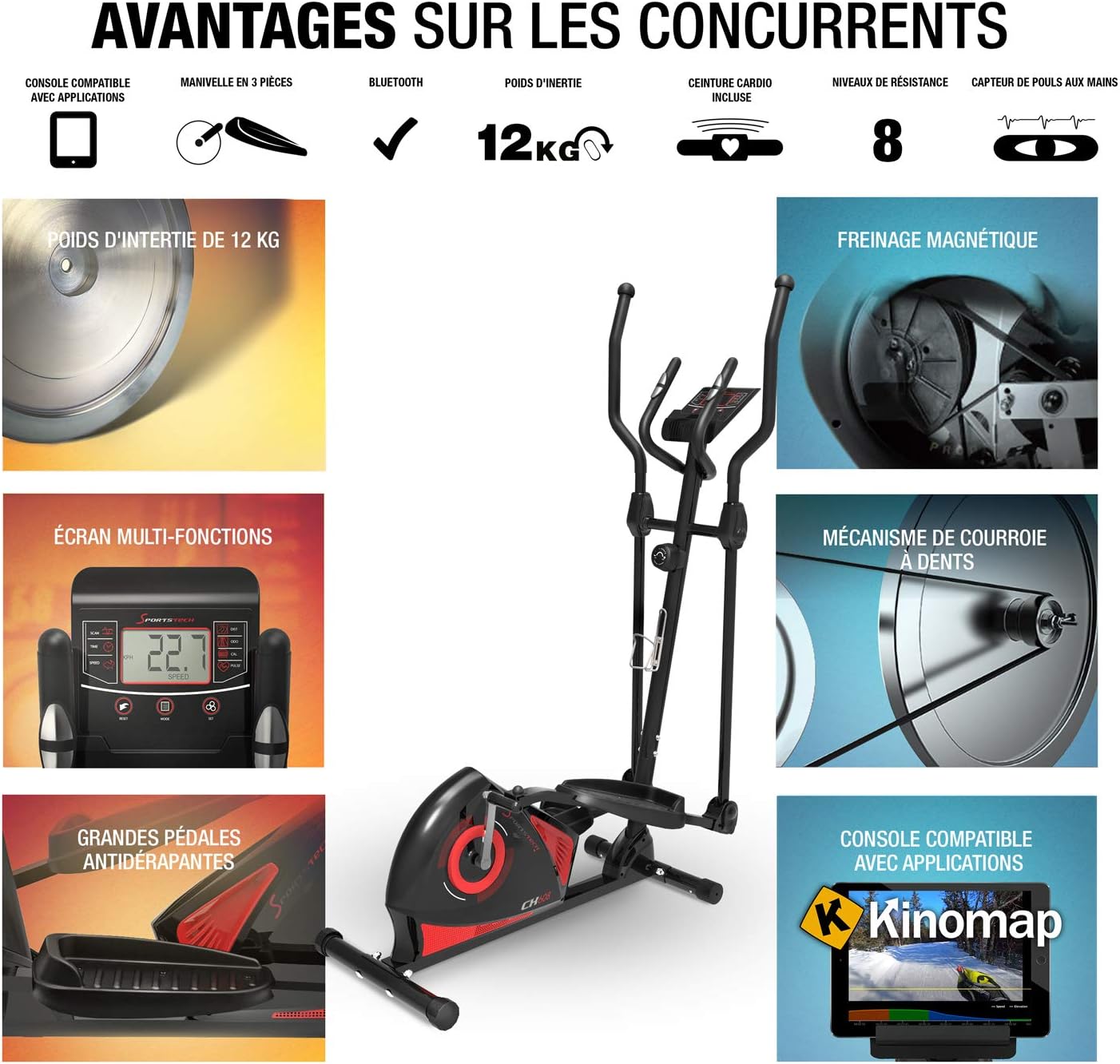
Figure 2: Key components and features for assembly reference.
5. Operating Instructions
5.1 Console Overview
The CX610 features a comprehensive console display.

Figure 3: Console display showing speed and other metrics.
- Display: Shows time, speed, distance, calories, pulse, and watts.
- Buttons: Typically include START/STOP, MODE, SET, RESET, and resistance adjustment buttons (+/-).
5.2 Starting a Workout
- Step onto the pedals, holding the fixed handlebars for stability.
- Press the START button to begin a manual workout.
- Adjust resistance using the +/- buttons. The CX610 offers 32 computer-controlled resistance levels.
- To select a pre-programmed workout, press the MODE button to cycle through options, then SET to confirm. There are 12 pre-programmed workouts, including watt, cardio, and HRC (Heart Rate Control) programs.
5.3 Bluetooth and App Connectivity
The CX610 console is Bluetooth-enabled and compatible with fitness applications.
- Download the recommended fitness app (e.g., Kinomap, if compatible) from your smartphone's app store.
- Ensure Bluetooth is enabled on your smartphone/tablet.
- Open the fitness app and follow the in-app instructions to connect to your CX610 crosstrainer.
- Once connected, you can use features like Google Maps with Street View for virtual training routes and track your workout history.

Figure 4: App connectivity via tablet for interactive training.
5.4 Heart Rate Monitoring
The CX610 supports heart rate monitoring via a compatible heart rate belt (included).
- Wear the heart rate belt according to its specific instructions, typically around your chest.
- The console will automatically detect the heart rate signal. Your pulse will be displayed on the screen.
- Utilize HRC programs for target heart rate zone training.

Figure 5: Heart rate monitoring with the included chest strap.
6. Maintenance
Regular maintenance ensures the longevity and optimal performance of your Sportstech CX610.
- Cleaning: Wipe down the crosstrainer with a damp cloth after each use to remove sweat and dust. Avoid abrasive cleaners.
- Lubrication: Periodically check moving parts, especially joints and pivot points. If squeaking occurs, apply a silicone-based lubricant to the affected areas. (Refer to the assembly guide for specific lubrication points).
- Bolt Tightness: Regularly check and tighten all bolts, nuts, and screws to ensure stability and safety.
- Storage: When not in use, store the crosstrainer in a dry, cool place. The integrated transport wheels allow for easy relocation.
7. Troubleshooting
| Problem | Possible Cause | Solution |
|---|---|---|
| Squeaking or grinding noise during operation | Loose bolts; lack of lubrication on moving parts. | Tighten all visible bolts and nuts. Apply silicone lubricant to joints, axles, and pivot points. |
| Console not powering on | Power adapter not connected; faulty power outlet; loose cable connection to console. | Ensure power adapter is securely plugged into the wall and the console. Test the outlet with another device. Check console cable connections. |
| Bluetooth app not connecting | Bluetooth off on device; app not updated; console not in pairing mode; interference. | Ensure Bluetooth is on. Restart app and console. Check app for updates. Move closer to the console. |
| Inaccurate heart rate reading | Heart rate belt not positioned correctly; low battery in belt; interference. | Adjust belt position. Check/replace belt battery. Ensure no strong electromagnetic interference nearby. |
8. Specifications
- Model Number: CX610 (Product ID: sp_cx608_fr)
- Flywheel Weight: 18 kg
- Resistance System: Magnetic, Computer-controlled
- Resistance Levels: 32
- Programs: 12 pre-programmed (including Watt, Cardio, HRC)
- Connectivity: Bluetooth, App compatible (e.g., Kinomap)
- Max User Weight: 120 kg
- Dimensions (L x W x H): 121 x 55 x 160 cm
- Pedal Length: 370 mm (adjustable 3 levels)
- Material: Acrylonitrile Butadiene Styrene (ABS)
- Features: Tablet holder, bottle holder, transport wheels, heart rate belt included.
9. Warranty and Support
For warranty information, please refer to the documentation included with your purchase or visit the official Sportstech website.
If you encounter any issues not covered in this manual or require further assistance, please contact Sportstech customer support.
- Brand: Sportstech
- Website: Visit the Sportstech Store on Amazon
- Contact: Refer to the official Sportstech website for contact details.


