
1. Introduction
The AudioControl LC8i is an 8-channel line output converter (LOC) designed to seamlessly integrate aftermarket amplifiers, speakers, and subwoofers with your vehicle's factory radio. This device allows for enhanced audio performance without compromising existing factory features such as climate controls or voice-activated functions. The LC8i accepts speaker-level signals, making it compatible with a wide range of factory audio systems, including high-powered amplified setups. It also features auxiliary RCA inputs for connecting external audio sources.

Figure 1: Top angled view of the AudioControl LC8i Line Output Converter.
2. Key Features
- 8-Channel Speaker-Level Inputs: Compatible with most factory stereo systems, handling up to 400 watts per channel.
- Channel Summing: Combines multiple input channels (4, 6, or 8) to produce a high-quality, full-range pre-amp signal without requiring additional hardware.
- AutoMode Inputs: Channel 3 input automatically feeds channel 3 and channel 4 outputs if no signal is detected at the channel 4 input.
- Auxiliary Input: RCA auxiliary input jacks with independent volume control for connecting secondary audio sources like portable media players.
- Output Level Adjustment: +/- 12 dB adjustment for each RCA output to match speaker level inputs, with separate control for the auxiliary input.
- Auto Turn-on: Signal sensing circuit (GTO™) automatically turns the unit on when speaker-level input is detected and off when the signal disappears.
- Remote Output: Provides a +12 volt DC remote output to trigger connected amplifiers, with a maximum current output of 1 amp.
3. Product Overview
The LC8i features a robust design with clearly labeled connections and controls for easy setup and adjustment.

Figure 2: Top view showing input/output level controls and AccuBASS™ settings.
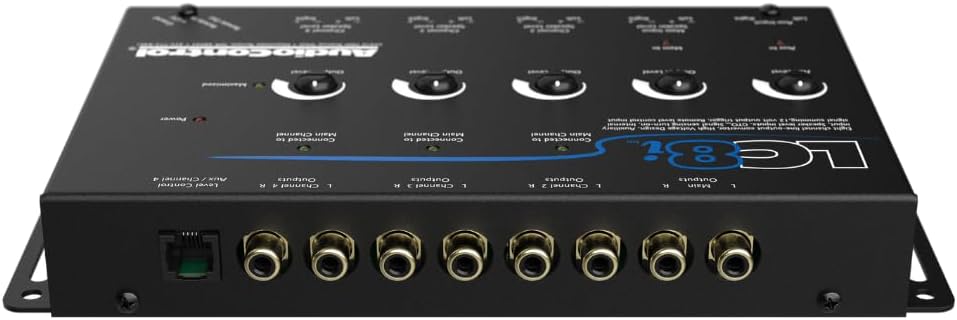
Figure 3: Rear view displaying speaker-level inputs, auxiliary inputs, and RCA outputs.
4. Setup and Installation
Proper installation is crucial for optimal performance. Ensure the LC8i is mounted in a location protected from excessive heat, moisture, and dirt, while allowing access to controls for adjustment.
4.1. Power and Ground Connections
- Connect the +12V terminal to a constant +12V power source.
- Connect the GND terminal to a solid chassis ground point.
- Use a 14 or 16 gauge wire for power and ground, protected by a 1-amp fuse.
4.2. Speaker-Level Inputs
Connect the speaker-level outputs from your factory head unit or amplifier to the corresponding inputs on the LC8i. The LC8i can handle up to 400 watts per channel input.
4.3. RCA Outputs
Connect the RCA outputs from the LC8i to the RCA inputs of your aftermarket amplifier(s). The LC8i provides dual outputs: a full-range output and a low-pass output (1000 Hz) for subwoofers.
4.4. Remote Turn-On
The LC8i features a GTO™ (Great Turn On) signal sensing circuit that automatically turns the unit on when it detects a signal from the factory system. It also provides a +12V remote output to turn on your aftermarket amplifiers. If your factory system does not provide a suitable GTO™ signal, the LC8i also offers an Audio Sense mode to detect musical signals for turn-on.
4.5. Auxiliary Input
Connect portable audio devices to the auxiliary RCA inputs. The volume for this input can be controlled independently via the wired remote.
Video 1: Overview of AudioControl LC2i-PRO features and setup, demonstrating principles applicable to the LC8i.
Video 2: Detailed explanation of the AudioControl LC2i Active Line Output Converter, illustrating wiring and configuration steps relevant to the LC8i.
5. Operating Instructions
5.1. Level Matching
AudioControl's level-matching system simplifies setup:
- Set your factory stereo to approximately 3/4 maximum volume.
- Adjust the output level control of the LC8i until the "Maximized" light begins to flicker.
- Then, adjust the gain controls on your aftermarket amplifiers.
This process ensures optimal performance and minimal noise from your system.
5.2. AccuBASS™ Adjustment
AccuBASS™ is a proprietary feature that restores bass frequencies often rolled off by factory audio systems at higher volumes. To adjust:
- Play a bass-heavy track at a moderate volume.
- Slowly increase the volume on your factory head unit until you notice the bass output diminishing.
- Adjust the AccuBASS™ Threshold control on the LC8i until the AccuBASS™ indicator light illuminates, indicating that bass restoration is active.
- Use the AccuBASS™ Level control to fine-tune the amount of restored bass.
5.3. Remote Bass Control
The included dash-mounted wired remote allows you to adjust the volume of the auxiliary channel and the bass output level of the subwoofer channel while driving.
6. Maintenance
The AudioControl LC8i is designed for reliable operation with minimal maintenance. Keep the unit clean and free from dust and debris. Ensure all connections remain secure. Avoid exposing the unit to extreme temperatures or direct moisture.
7. Troubleshooting
- No Power: Check +12V and ground connections. Verify the 1-amp fuse is intact. Ensure the GTO™ or Audio Sense feature is correctly configured and receiving a signal.
- No Audio Output: Confirm all speaker-level inputs and RCA outputs are securely connected. Check the source unit and amplifier settings.
- System Noise (Buzz/Whine): Ensure proper grounding. Experiment with the Ground Isolation switch settings (GND, ISO, 200Ω) to eliminate ground loops or alternator whine.
- Distorted Sound: Re-check level matching using the "Maximized" light. Ensure input signals are not clipping before reaching the LC8i.
- Lack of Bass: Verify AccuBASS™ settings and ensure the subwoofer output level is correctly adjusted. Check the factory system's bass roll-off characteristics.
8. Specifications
- Item Weight:
- 2 pounds
- Product Dimensions:
- 11.5 x 8.5 x 2.25 inches
- Item Model Number:
- LC8i
- ASIN:
- B01EE3Y6XK
- Date First Available:
- April 17, 2016
9. Warranty Information
The AudioControl LC8i comes with a 1 Year Manufacturer Warranty. Please refer to the official AudioControl website or your purchase documentation for detailed warranty terms and conditions.
10. Customer Support
For further assistance, technical support, or service inquiries, please visit the official AudioControl website or contact their customer service department. Always refer to the latest version of the product manual for the most up-to-date information.
Video 3: Features of the AudioControl LC Pro Series Line Output Converter, highlighting key functionalities.


