
1. Product Overview
The Braun MultiQuick MQ725 is a versatile 3-in-1 immersion hand blender designed for efficient food preparation. It features Smart Speed technology, allowing for variable speed control with a single hand squeeze. The PowerBell system ensures effective blending with minimal splashing. This model includes a hand blender motor unit, a blending shaft, a whisk attachment, a 1.5-cup mini chopper, and a 20 oz. beaker.
Key Features:
- PowerBell Technology: Durable stainless steel blades and a unique bell-shaped blending shaft for fast, fine results and reduced splashing.
- Smart Speed: The world's first Smart Speed technology allows for intuitive speed regulation by adjusting pressure on the control button.
- EasyClick System: Attachments can be removed and swapped with a simple click.
- Soft Grip Handle: Designed for comfortable and secure use.
- Included Attachments: 20 oz. beaker, whisk attachment, and 1.5-cup mini chopper attachment.
2. Components
Familiarize yourself with the various parts of your Braun MultiQuick MQ725 Immersion Hand Blender.
- Motor Unit: The main body containing the motor and speed control.
- Blending Shaft: Stainless steel shaft with PowerBell blades for immersion blending.
- Whisk Attachment: For whipping cream, beating eggs, and mixing light batters.
- Mini Chopper (1.5-cup): For chopping herbs, nuts, cheese, and small quantities of vegetables.
- Beaker (20 oz.): For blending, measuring, and mixing ingredients.

Image: The Braun MultiQuick MQ725 Immersion Hand Blender showing the motor unit, blending shaft, whisk, and chopper attachments.
3. Setup and Assembly
- Unpacking: Carefully remove all components from the packaging. Retain packaging for future storage or transport.
- Initial Cleaning: Before first use, wash all parts that will come into contact with food (blending shaft, whisk, chopper bowl, chopper blade, beaker) in warm soapy water. Rinse thoroughly and dry. The motor unit should only be wiped with a damp cloth.
- Attaching the Blending Shaft: Align the blending shaft with the motor unit and push them together until you hear a "click." To detach, press the EasyClick release buttons on the sides of the motor unit and pull the shaft off.
- Attaching the Whisk: Insert the whisk into the whisk gear box, then align the whisk gear box with the motor unit and push until it clicks into place.
- Attaching the Chopper: Place the chopper blade onto the center pin of the chopper bowl. Add ingredients to the bowl. Place the chopper lid onto the bowl, ensuring it is securely seated. Align the motor unit with the chopper lid and push until it clicks into place.
- Power Connection: Ensure the appliance is unplugged before attaching or detaching any accessories. Only plug the appliance into a suitable power outlet once assembly is complete and you are ready to use it.
4. Operating Instructions
General Operation (Immersion Blending)
- Preparation: Ensure the blending shaft is securely attached to the motor unit. Place ingredients in a tall container or pot.
- Immersion: Immerse the blending shaft into the ingredients before starting the appliance to prevent splashing.
- Power On: Plug the appliance into a power outlet.
- Safety Lock: Press and hold the safety lock button on top of the motor unit. Immediately after, press the Smart Speed button. The safety lock will deactivate, and the blender will start.
- Smart Speed Control: The blending speed is controlled by how much pressure you apply to the Smart Speed button. Press gently for lower speeds and harder for higher speeds.
- Blending Technique: Move the blender up and down in the ingredients to ensure even blending.
- Completion: Release the Smart Speed button to stop the blender. Unplug the appliance before detaching the blending shaft.

Image: A hand demonstrating the Smart Speed control by squeezing the button on the blender's handle.

Image: A woman blending soup directly in a pot using the Braun MultiQuick MQ725 immersion blender.

Image: A close-up view of the PowerBell blending shaft in action, blending ingredients in a bowl.

Image: The Braun MultiQuick MQ725 blender preparing a smoothie in the included beaker.
Using the Whisk Attachment
- Assembly: Attach the whisk to the whisk gear box, then attach the gear box to the motor unit.
- Application: Use the whisk for whipping cream, beating egg whites, or mixing light batters. Do not use for heavy doughs.
- Operation: Immerse the whisk into the ingredients. Follow the safety lock and Smart Speed instructions as for general blending.
- Optimal Use: For best results, use a deep bowl and move the whisk in a circular motion.

Image: A woman using the whisk attachment of the Braun MultiQuick MQ725 to mix ingredients in a bowl.
Using the Mini Chopper Attachment
- Assembly: Place the chopper blade in the chopper bowl. Add ingredients. Secure the chopper lid, then attach the motor unit.
- Ingredients: Suitable for chopping herbs, onions, garlic, nuts, cheese, and small amounts of meat. Do not overfill the bowl.
- Operation: Follow the safety lock and Smart Speed instructions. Use short pulses for coarse chopping, or longer presses for finer results.
- Caution: The chopper blade is very sharp. Handle with extreme care.
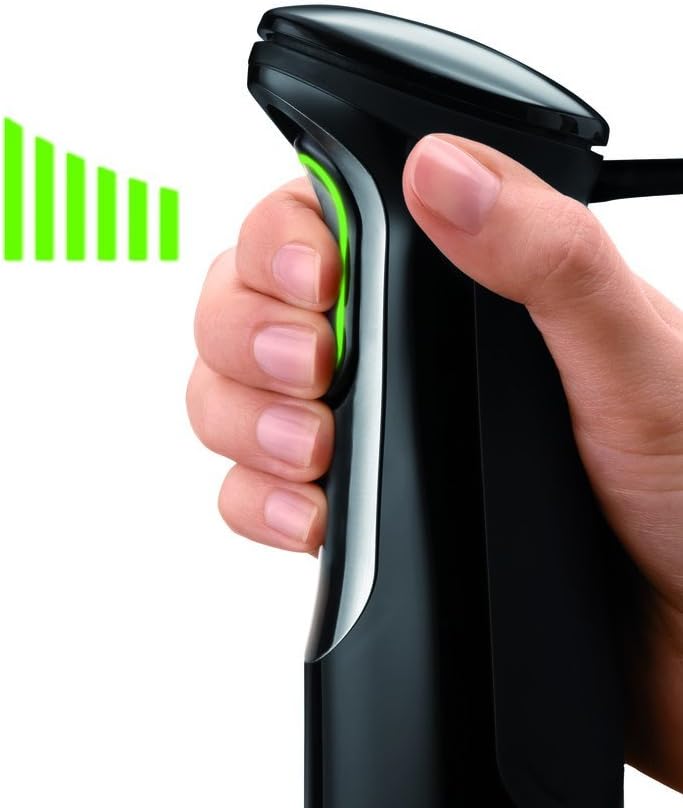
Image: The Braun MultiQuick MQ725 with the chopper attachment, demonstrating its use for chopping onions.

Image: The Braun MultiQuick MQ725 chopper attachment being used to prepare pesto.
Important Safety Information:
- Always unplug the appliance before cleaning or when not in use.
- Do not immerse the motor unit in water or other liquids.
- Keep hands and utensils out of the container while blending to prevent injury.
- Blades are sharp. Handle with care.
- The safety lock feature requires pressing the top button before activating the Smart Speed button. This is a safety measure and cannot be disabled.
5. Maintenance and Cleaning
Proper cleaning and maintenance will ensure the longevity and optimal performance of your hand blender.
- Unplug: Always unplug the appliance from the power outlet before cleaning.
- Motor Unit: Wipe the motor unit with a damp cloth. Do not immerse it in water or place it under running water.
- Blending Shaft, Whisk, Chopper Bowl, Chopper Blade, Beaker: These parts are dishwasher safe. Alternatively, they can be washed by hand in warm soapy water, rinsed, and dried thoroughly.
- Stubborn Residue: For stubborn food residue on the blending shaft, fill the beaker with warm water and a small amount of dish soap, then immerse the blending shaft and run the blender for a few seconds. Rinse afterward.
- Storage: Store the appliance and its attachments in a clean, dry place.
Note: Leaving highly pigmented foods (e.g., garlic, carrots) in plastic parts for extended periods may cause staining. This does not affect performance.
6. Troubleshooting
| Problem | Possible Cause | Solution |
|---|---|---|
| Appliance does not start. | Not plugged in, safety lock not disengaged, or attachment not properly secured. | Ensure the appliance is plugged in. Press and hold the safety lock button, then immediately press the Smart Speed button. Check that the attachment is clicked securely into the motor unit. |
| Poor blending results or splashing. | Insufficient liquid, too many ingredients, or not fully immersed. | Add more liquid if necessary. Reduce the quantity of ingredients. Ensure the blending shaft is fully immersed before starting. Use an up-and-down motion for even blending. |
| Blender creates suction at the bottom of the pot. | Common with immersion blenders, especially with thick mixtures. | The PowerBell design minimizes this, but if it occurs, gently tilt the blender or lift it slightly to break the suction. |
| Chopper attachment not chopping effectively. | Overfilled bowl, ingredients too large, or blade not properly seated. | Do not overfill the chopper bowl. Cut larger ingredients into smaller pieces. Ensure the chopper blade is correctly placed on the center pin. |
7. Product Specifications
- Model: MQ725
- Brand: Braun
- Power Source: Corded Electric
- Voltage: 120V
- Blade Material: Stainless Steel
- Included Components: Hand Blender with 20 oz. beaker, whisk attachment, and 1.5-cup mini chopper attachment
- Capacity (Beaker): 20 Fluid Ounces
- Product Dimensions: 2.24 x 2.24 x 15.59 inches
- Item Weight: 3.57 pounds
- Special Feature: Smart Speed Control
- Control Type: Manual Pressure-based
- Container Material: Plastic or Glass (for beaker/chopper bowl)
8. Warranty and Support
This Braun MultiQuick MQ725 Immersion Hand Blender comes with a manufacturer's warranty. Please refer to the warranty card included in your product packaging for specific terms and conditions, including warranty period and coverage details.
For technical support, service, or to order replacement parts, please visit the official Braun website or contact their customer service department. Contact information can typically be found in the product packaging or on the manufacturer's website.
9. Video Demonstration
Video: Official demonstration of the Braun MQ725 Multiquick Hand Blender, showcasing its features and various attachments in use.