
LowcostMobile ANT4GMIMO10MLCM
Contents
LowcostMobile PAN5G-MIMO-2021 4G/5G Directional MIMO Antenna User Manual
Model: ANT4GMIMO10MLCM
1. Introduction
This manual provides comprehensive instructions for the installation, operation, and maintenance of your LowcostMobile PAN5G-MIMO-2021 4G/5G Directional MIMO Antenna. Please read this manual carefully before installation and use to ensure optimal performance and safety.
The PAN5G-MIMO-2021 is designed to enhance 4G and 5G cellular signals, improving data rates and connection stability in areas with weak network coverage. It is suitable for both outdoor and indoor use, connecting to 4G LTE/LTE Advanced and 5G NR routers equipped with two SMA connectors.
2. Package Contents
Verify that all items are present in the package:
- 1 x LowcostMobile PAN5G-MIMO-2021 Antenna with 2 SMA outputs
- 2 x 10m ALSR200 Low-Loss Coaxial Cables (pre-attached)
- 1 x Mounting Kit for pole installation
- 1 x User Manual (this document)

Image: The LowcostMobile PAN5G-MIMO-2021 antenna, showing the main unit, coiled cables, and the mounting bracket kit.
3. Technical Specifications
| Feature | Specification |
|---|---|
| Model | PAN5G-MIMO-2021 (ANT4GMIMO10MLCM) |
| Frequency Range | 698-960 MHz, 1710-2700 MHz, 3300-3800 MHz |
| Supported Bands | 700, 800, 900, 1800, 2100, 2600, 3500 MHz (2G/3G/4G/5G NR) |
| Gain | 9-12 dBi |
| Impedance | 50 Ohms |
| VSWR | ≤ 1.5 |
| Max Power | 50 Watt |
| Beam Width (Horizontal) | 65° (698-960MHz), 30° (1710-2700MHz), 33° (3300-3800MHz) |
| Beam Width (Vertical) | 60° (all bands) |
| Cables | 2 x 10m ALSR200 Low-Loss Coaxial Cables |
| Connectors | 2 x SMA Male |
| Dimensions (L x W x H) | 30 x 20.5 x 6.5 cm |
| Weight (with cables) | ~1.9 kg |
| IP Rating | IP65 (Rain, Dust, Wind Protection) |
| Operating Temperature | -40°C to +65°C |
| Color | White |
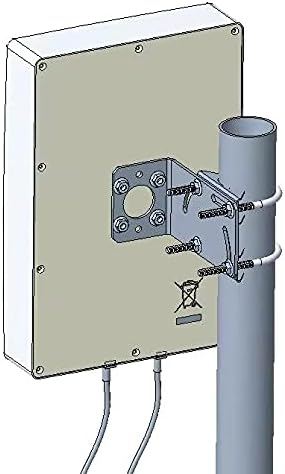
Image: A multilingual table detailing the technical specifications of the antenna, including frequency ranges, gain, cable type, and dimensions.
4. Setup and Installation
Proper installation is crucial for optimal performance. This antenna is designed for directional use, meaning it needs to be pointed towards the cellular tower for best results.
4.1. Site Selection
- Outdoor Installation (Recommended): For best signal reception, install the antenna outdoors, as high as possible, and with a clear line of sight towards the nearest cellular tower. Avoid obstructions like buildings, trees, or metal structures.
- Indoor Installation: While outdoor installation is recommended, the antenna can be used indoors if necessary. Position it near a window or in an area with the strongest signal.
- Orientation: The antenna is directional. You will need to carefully point it towards the cellular tower. Tools like signal strength apps on your smartphone can assist in finding the best direction.
4.2. Mounting the Antenna
The antenna comes with a mounting kit for pole installation.
- Attach the mounting bracket to the back of the antenna using the provided screws.
- Secure the antenna to a sturdy pole or mast using the U-bolts and nuts from the mounting kit. Ensure the antenna is firmly fixed and cannot be easily moved by wind.
- Adjust the antenna's orientation to face the cellular tower. Fine-tuning may be required after connecting to your router.

Image: The antenna mounted on a metal pole, illustrating a typical outdoor installation scenario.
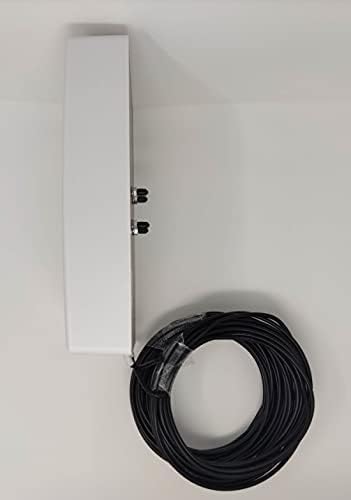
Image: The antenna installed on a mast on a tiled rooftop, demonstrating an elevated outdoor placement.
4.3. Connecting to Your Router
The antenna features two 10-meter ALSR200 low-loss coaxial cables, each terminated with an SMA male connector. These are designed for MIMO (Multiple-Input Multiple-Output) functionality, which requires two antenna inputs on your router.
- Locate the external antenna ports on your 4G/5G router. These are typically labeled "ANT1" and "ANT2" or similar, and are usually SMA female connectors.
- Carefully screw the SMA male connectors from the antenna cables onto the corresponding SMA female ports on your router. Ensure a snug, hand-tight connection. Do not overtighten.
- If your router uses different connector types (e.g., TS9, CRC9, MHF4), you will need appropriate adapters (not included with this antenna).
Compatible Routers (requiring SMA connectors or adapters):
- Huawei B715, E5186, B310, B315
- Freebox Delta (requires MHF4-SMA adapter)
- Asus 4G-AC55U (requires RP-SMA male - SMA female adapter)
- Box 4G B528, B818 (requires SMA female - TS9 male adapter)
- E5180 (requires CRC9-SMA adapter)
- Other routers/hotspots/modems from Netgear, TP-Link, D-Link, Teltonika, etc., with compatible SMA connectors or requiring specific adapters.
5. Operation
Once the antenna is physically installed and connected to your router, follow these steps:
- Power on your 4G/5G router.
- Access your router's administration interface (usually via a web browser) to monitor the signal strength. Look for metrics like RSSI, RSRP, RSRQ, and SINR.
- Antenna Orientation: Slowly adjust the antenna's direction (horizontal and vertical tilt) while monitoring the signal strength on your router's interface. Aim for the highest possible RSRP and SINR values, and the lowest RSSI. Small adjustments can make a significant difference.
- Once the optimal orientation is found, securely tighten all mounting hardware to prevent movement.
- Test your internet speed to confirm the improvement in performance.
The internet speed depends on various factors, including the number of simultaneous users on each frequency band and network congestion. Contact your service provider for network-specific information.
6. Maintenance
The LowcostMobile PAN5G-MIMO-2021 antenna is designed for durability and requires minimal maintenance.
- Regular Inspection: Periodically check the antenna and its mounting hardware for any signs of wear, corrosion, or loosening, especially after severe weather conditions.
- Cleaning: If the antenna becomes dirty, gently wipe it with a soft, damp cloth. Do not use harsh chemicals or abrasive cleaners.
- Cable Integrity: Ensure the coaxial cables are not kinked, pinched, or damaged. Damaged cables can significantly degrade performance.
- Environmental Protection: The antenna has an IP65 rating, providing protection against rain, dust, and wind. No additional weatherproofing is typically required for the antenna unit itself.
7. Troubleshooting
If you experience issues with your antenna, refer to the following troubleshooting tips:
- No Signal Improvement:
- Ensure the antenna is correctly oriented towards the nearest cellular tower. Fine-tune its direction.
- Verify that both SMA connectors are securely attached to your router.
- Check if your router's external antenna ports are enabled in its settings (some routers require this).
- Confirm that your router is compatible with external antennas and the correct adapters are used if necessary.
- Try a different mounting location, preferably higher and with fewer obstructions.
- Intermittent Connection:
- Check all cable connections for looseness or damage.
- Ensure the antenna is securely mounted and not swaying in the wind.
- Environmental factors (e.g., heavy rain, snow, new obstructions) can affect signal stability.
- Slow Speeds:
- Even with good signal, network congestion from your operator can cause slow speeds. This is beyond the antenna's control.
- Re-optimize antenna orientation for the best signal metrics (RSRP, SINR).
- Ensure your router is operating on the most efficient frequency bands available.
If problems persist, please contact LowcostMobile customer support for assistance.
8. Warranty and Support
Spare Parts Availability: Spare parts for this product are guaranteed for 5 years.
Customer Support: LowcostMobile provides after-sales service. For technical assistance or warranty inquiries, please contact our support team via email or telephone. Contact details can be found on our official website or your purchase documentation.
9. Product Disposal
This product should not be disposed of with household waste. Please dispose of it at an authorized recycling center for electronic waste. This helps protect the environment and human health.

Image: Rear view of the antenna, displaying the crossed-out wheeled bin symbol, indicating separate collection for electrical and electronic equipment.
Documents and downloads
Ask a question about this manual
Ask about setup, troubleshooting, compatibility, parts, safety, or missing instructions. Manuals+ will review the question and use this page’s manual context to help answer it.