Important Safety Information
The DR-HO’S Pain Therapy System is not intended to diagnose, treat, or cure any disease. If you suffer from any painful or health conditions, you should consult with your doctor for proper diagnosis and treatment.
The DR-HO’S Pain Therapy System is generally safe for use by diabetics, people on medication, and individuals who have undergone metal knee or hip replacement. However, it is always recommended to consult your doctor if you have further concerns.
This product is not meant for individuals with:
- Pacemakers, defibrillators, or extreme cardiac irregularities.
- Metal implants or electronic auxiliary devices.
- Abnormal high blood pressure.
- A tendency toward internal bleeding.
- Epilepsy.
- Pregnancy.
1. Product Overview
The DR-HO'S Pain Therapy System Essential Package is a multi-functional device designed to provide pain relief and muscle stimulation. It combines Transcutaneous Electrical Nerve Stimulation (TENS), Electrical Muscle Stimulation (EMS), Neuromuscular Electrical Stimulation (NMES), and Auto-Modulation technologies to target various types of pain and muscle discomfort.
Included Components:
- DR-HO'S Pain Therapy System Controller (Model PTS-II)
- 8 Small Electrode Pads
- 2 Large Electrode Pads (FlexTone Pads)
- 2 Foot Therapy Pads
- Electrode Wires
- Water Spray Bottle
- Travel Bag
- Instructional Manual

Product Overview Video
2. Key Features
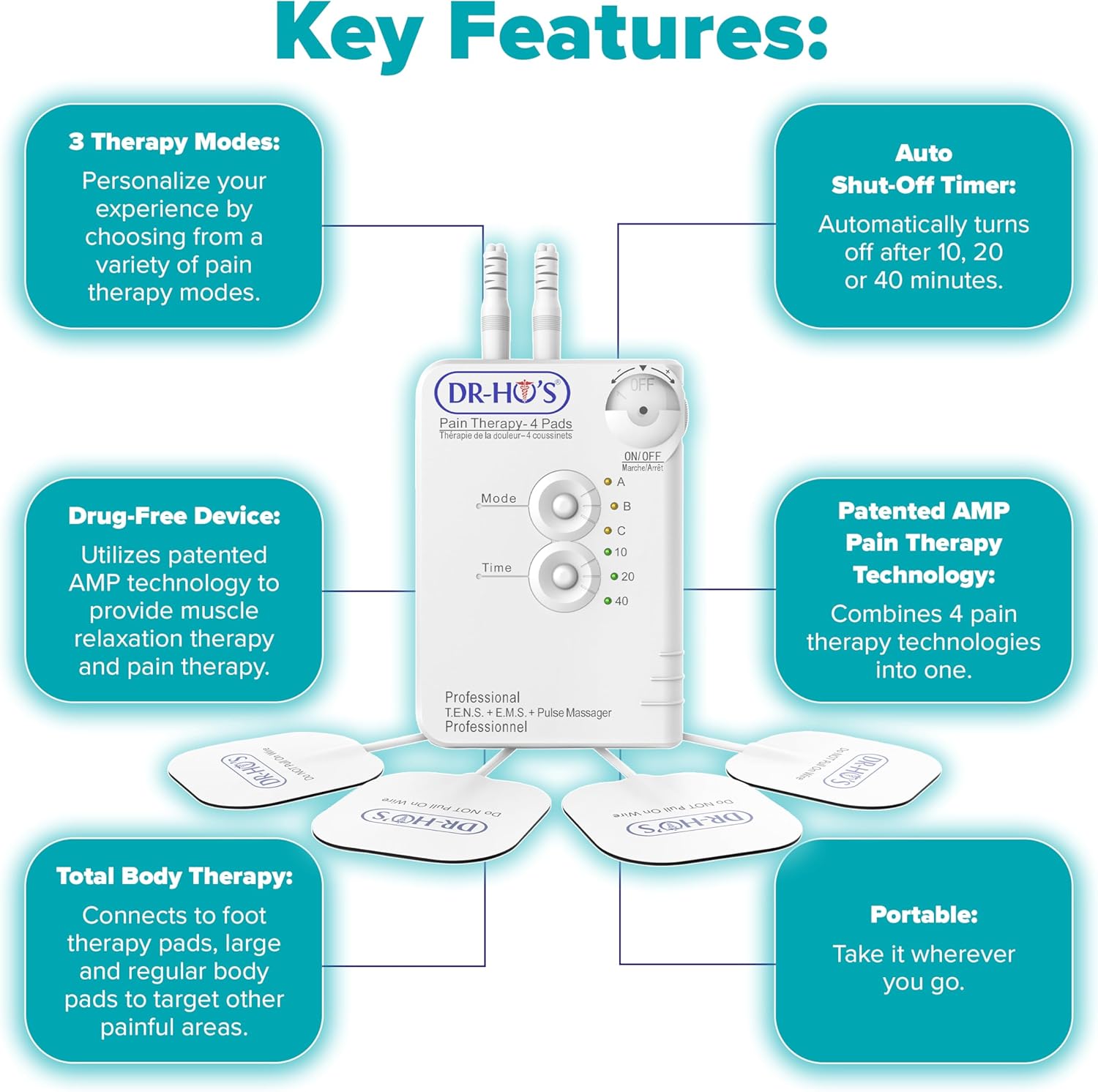
The DR-HO'S Pain Therapy System incorporates several features designed for effective and convenient use:
- 3 Therapy Modes: Customize your experience by choosing from a variety of pain therapy modes (A, B, C).
- Auto Shut-Off Timer: Automatically turns off after 10, 20, or 40 minutes to prevent overuse.
- Drug-Free Device: Utilizes patented AMP technology to provide muscle relaxation and pain therapy without medication.
- Patented AMP Pain Therapy Technology: Combines 4 pain therapy technologies into one for comprehensive relief.
- Total Body Therapy: Connects to foot therapy pads, large, and regular body pads to target various painful areas.
- Portable: Designed for easy transport and use anywhere.
3. Understanding the Technology
The system integrates multiple electrotherapy techniques:
3.1. TENS Therapy (Transcutaneous Electrical Nerve Stimulation)
TENS delivers gentle electrical impulses to the nerves to help interrupt pain signals, providing deep, penetrating pain relief.

3.2. EMS Therapy (Electrical Muscle Stimulation)
EMS provides muscle therapy to soothe sore and aching muscles, and improve muscle performance by causing muscles to contract and relax.

3.3. NMES Therapy (Neuromuscular Electrical Stimulation)
NMES sends impulses to the nerves, helping the relaxation of muscle spasms, increasing blood flow circulation, and improving range of motion.

3.4. AMP Technology (Auto-Modulation)
This patented technology delivers over 300+ TENS, EMS, and NMES waveforms to provide a dynamic pain relief treatment that feels like a soothing hands-on massage while relieving your pain.

4. Setup
4.1. Unpacking and Inspection
Carefully remove all components from the packaging. Inspect the device and accessories for any signs of damage. If any components are missing or damaged, please contact customer support.
4.2. Battery Installation
The DR-HO'S Pain Therapy System Controller requires two AAA batteries. Open the battery compartment on the back of the controller, insert the batteries according to the polarity indicators, and close the compartment securely.
4.3. Connecting the Pads
The system allows for simultaneous use of different pads. Each electrode wire connects to two pads. The controller has two ports for electrode wires, allowing up to four pads to be used at once.
- Connect the electrode wires to the small or large pads by snapping them onto the pad connectors.
- Plug the electrode wires into the ports on the top of the DR-HO'S controller.
- For foot therapy, connect the foot pads to the electrode wires and place your feet on them.
- Ensure all connections are secure before use.

5. Operating Instructions
5.1. Preparing the Skin
Before applying the pads, ensure the skin area is clean and dry. For optimal adhesion and conductivity, lightly spray the pads with water using the provided spray bottle if they feel less sticky.
5.2. Powering On/Off and Adjusting Intensity
To turn the device ON, rotate the ON/OFF/Intensity dial clockwise. To turn it OFF, rotate the dial counter-clockwise until it clicks. The intensity can be adjusted by continuing to rotate the dial clockwise to increase the intensity or counter-clockwise to decrease it. Start with the lowest intensity and gradually increase it to a comfortable level.
5.3. Selecting Mode
Press the 'Mode' button to cycle through the three available therapy modes: A, B, and C. Each mode offers a different pattern of electrical impulses. Experiment to find the mode that provides the most comfortable and effective sensation for your needs.
5.4. Setting Treatment Time
Press the 'Time' button to select the desired treatment duration: 10, 20, or 40 minutes. The device will automatically shut off once the selected time has elapsed.

5.5. Pad Placement Guidelines
Place the electrode pads directly on the skin over the area you wish to treat. Ensure the pads are not overlapping. For specific pain areas, refer to the detailed diagrams in the full instructional manual included with your package. Always ensure the pads are firmly adhered to the skin for effective treatment.
6. Maintenance and Care
6.1. Cleaning the Device and Pads
- Controller: Wipe the controller with a soft, dry cloth. Do not use abrasive cleaners or immerse it in water.
- Electrode Pads: After each use, gently wipe the adhesive side of the pads with a damp cloth or the provided water spray bottle to remove any skin oils or debris. Allow them to air dry completely before reattaching them to their protective film.
- Foot Pads: Wipe with a damp cloth and allow to air dry.
6.2. Storing the Device
Store the DR-HO'S Pain Therapy System and its accessories in the provided travel bag in a cool, dry place, away from direct sunlight and extreme temperatures. Ensure the pads are reattached to their protective film before storage to maintain their adhesive quality.
6.3. Replacing Pads
The electrode pads are reusable but will lose their adhesive quality over time. Replace pads when they no longer stick firmly to the skin or when you notice a decrease in sensation during treatment. Replacement pads can be purchased separately from authorized retailers.
7. Troubleshooting
If you encounter any issues with your DR-HO'S Pain Therapy System, please refer to the following common troubleshooting tips:
- No Sensation or Weak Sensation:
- Ensure the device is turned ON and the intensity dial is set to a comfortable level.
- Check that the electrode wires are securely plugged into both the controller and the pads.
- Verify that the pads are firmly adhered to clean, dry skin. Lightly spray the pads with water to improve conductivity if needed.
- Replace old or worn-out pads, as their conductivity may diminish over time.
- Device Not Turning On:
- Check if the batteries are correctly installed and not depleted. Replace with fresh AAA batteries if necessary.
- Ensure the ON/OFF/Intensity dial is rotated clockwise past the 'OFF' position.
- Irregular or Uncomfortable Sensation:
- Reduce the intensity level to a more comfortable setting.
- Ensure the pads are not overlapping and are placed on flat skin surfaces.
- Try a different therapy mode (A, B, or C) to see if it provides a more suitable sensation.
If the problem persists after trying these steps, please contact DR-HO'S customer support.
8. Specifications
- Model Number: PTS-II
- Product Dimensions: 8.5 x 3 x 10.5 inches
- Item Weight: 1.92 Pounds
- Manufacturer: DR-HO'S
- Power Source: 2 x AAA Batteries (not included)
9. Warranty Information
For detailed warranty information regarding your DR-HO'S Pain Therapy System Essential Package, please refer to the product packaging or visit the official DR-HO'S website. Warranty terms and conditions may vary.
10. Customer Support
If you require further assistance, have questions about your device, or need to report an issue, please contact DR-HO'S customer support directly. Contact information can typically be found on the product packaging, the official DR-HO'S website, or within the full instructional manual.


